| B3010002 - HMC or partition connection monitoring fault |
None |
Go to MAP7000 Section-3 Visual Checks. |
| B3030001 - The communication link between the service processor and the management
console (HMC) has failed |
- BEB10021 (black) - Network Surveillance LINK_FSP_HMC: Single HMC lost link to single FSP over
172.16-BLACK network
- BEB10022 (gray) Network Surveillance LINK_FSP_HMC: Single HMC lost link to single FSP over
172.17-GRAY network
- BEB10023 - Not sure which network lost link.
|
The B3030001 SRC does not specify which private network (black or gray) has
failed. - Go to MAP7000 Section-3 Visual Checks.
- If MAP7000 Section-3 Visual Checks does not list a visual symptom, you are instructed to use
the Network Topology Tool to determine which network fails.
- If the black network fails, substitute SRC BEB10021 in place of B3030001
- If the gray network fails, substitute SRC BEB10022 in place of B3030001
|
| B3030002 - A single partition HMC link has failed. |
- BEB10041 (black) Network Surveillance LINK_PART_HMC_REDUND: Single HMC lost link to single
partition on a system, the path through the 172.16-BLACK network is not available, the other network
is ok
- BEB10042 (gray) - Network Surveillance LINK_PART_HMC_REDUND: Single HMC lost link to single
partition on a system, the path through the 172.17-GRAY network is not available, the other network
is ok
- BEB10043 - Not sure which network lost link.
|
The B3030002 SRC does not specify which private network (black or gray) has failed.- Go to MAP7000 Section-3 Visual Checks.
- If MAP7000 Section-3 Visual Checks does not list a visual symptom, you are instructed to use
the Network Topology Tool to determine which network fails.
- If the black network fails, substitute SRC BEB10041 in place of B3030002.
- If the gray network fails, substitute SRC BEB10042 in place of B3030002.
|
| B3030003 - Multiple partition HMC links have failed. |
BEB10050 - Network Surveillance LINK_M_PART_HMC: Single HMC lost links to
multiple partitions on single system; both paths are not available; FSP to HMC link is still
working |
Go to MAP7000 Section-3 Visual Checks and substitute SRC BEB10050 in place of
B3030003. |
| B3030004 - All partition links for a single system to HMC have failed. |
BEB10060 - Network Surveillance LINK_A_PART_HMC: Single HMC lost links to all
partitions on single system; both paths are not available; FSP to HMC link is still working |
Go to MAP7000 Section-3 Visual Checks and substitute SRC BEB10060 in place of
B3030004. |
| B3030005 - All system links from one system to a single HMC have
failed. |
BEB10070 - Network Surveillance LINK_ALL_HMC: Single HMC lost links to single
system (partition and FSP); both paths are not available |
Go to MAP7000 Section-3 Visual Checks and substitute SRC BEB10070 in place of
B3030005. |
| B3030006 - The links between a single HMC and a single managed system have
failed. |
BEB10080 - Network Surveillance LINK_HMC_SYS: Single HMC lost links to all
systems (FSP and partition); both paths are not available |
Go to MAP7000 Section-3 Visual Checks and substitute SRC BEB10080 in place of
B3030006. |
| B3030007 - A single HMC link to more than one managed system occurred. |
BEB10090 - Network Surveillance LINK_HMC_M_SYS: Single HMC lost links to
multiple systems (FSP and partition); both paths are not available |
Go to MAP7000 Section-3 Visual Checks and substitute SRC BEB10090 in place of
B3030007. |
| B3030008 - One HMC link to more than one HMC occurred. |
BEB10100 - Network Surveillance LINK_HMC_HMC: Lost HMC to HMC links; both
paths are not available |
Go to MAP7000 Section-3 Visual Checks and substitute SRC BEB10100 in place of
B3030008. |
| B3030009 - One HMC link to more than one HMC occurred. |
BEB10120 - Network Surveillance LINK_HMC_M_HMC: Lost single HMC to HMC link;
only one path is not available |
Go to MAP7000 Section-3 Visual Checks and substitute SRC BEB10120 in place of
SRC B3030009. |
| B303000A - The HMC host links to all managed systems. |
BEB10130 - Network Surveillance LINK_HMC_ALL: Lost HMC link to multiple HMCs;
both paths are not available. This does not apply to the storage facility
management
console (HMC). |
Go to MAP7000 Section-3 Visual Checks and substitute SRC BEB10130 in place of
B303000A. |
| B303000B - Multiple HMCs lost links to a single managed system. |
None |
N/A |
| B303000C - Multiple HMCs lost links to multiple managed systems. |
BEB10150 - Network Surveillance M_LINK_HMC_M_SYS: Multiple HMCs lost all links
to multiple systems (FSP and partition) |
Go to MAP7000 Section-3 Visual Checks substituting SRC BEB10150 in place of
B303000C. |
| B303000D - Multiple HMCs lost links to multiple managed systems. |
BEB10160 - Network Surveillance M_LINK_HMC_ALL: Multiple HMCs lost all links
to all systems (FSP and partition) |
Go to MAP7000 Section-3 Visual Checks substituting SRC BEB10060 in place of
B303000D. |
| B303000E - The network interface card (NIC) has failed. |
- BEB10011 (black) Network Surveillance NIC_FAILURE: Single HMC physical link unavailable on
ethernet port - eth0 (172.16-BLACK network)
- BEB10012 (gray) Network Surveillance NIC_FAILURE: Single HMC physical link unavailable on
ethernet port - eth3 (172.17-GRAY network)
- BEB10013 - Network Surveillance: Ethernet cables missing or swapped
|
The B303000E SRC does not specify which private network (black or gray) has failed.- Go to MAP7000 Section-3 Visual Checks.
- If MAP7000 Section-3 Visual Checks does not list a visual symptom, you are instructed to use
the Network Topology Tool to determine which network fails.
- If the black network fails, substitute SRC BEB10011 in place of B303000E
- If the gray network fails, substitute SRC BEB10012 in place of B303000E
|
| B303000F - A single partition HMC link failure has occurred on a redundant
path. |
- BEB10041 (black) Network Surveillance LINK_PART_HMC_REDUND: Single HMC lost link to single
partition on a system, the path through the 172.16-BLACK network is not available, the other network
is ok
- BEB10042 (gray) Network Surveillance LINK_PART_HMC_REDUND: Single HMC lost link to single
partition on a system, the path through the 172.17-GRAY network is not available, the other network
is ok
- BEB10043 Not sure which network has lost link.
|
The B303000F SRC does not specify which private network (black or gray) failed.- Go to MAP7000 Section-3 Visual Checks.
- If MAP7000 Section-3 Visual Checks does not list a visual symptom, you are instructed to use
the Network Topology Tool to determine which network fails.
- If the black network fails, substitute SRC BEB10041 in place of B303000F
- If the gray network fails, substitute SRC BEB10042 in place of B303000F
|
| B3030010 - A single HMC link to one HMC failure has occurred on a redundant
path. |
BEB10110 - Network Surveillance LINK_HMC_HMC_REDUND |
Go to MAP7000 Section-3 Visual Checks and substitute the BEB10110 SRC in
place of the B3030010 SRC. |
| B3030011 - The server firmware connection monitoring to the flexible service
processor has failed. |
None |
Go to MAP7000 Section-3 Visual Checks. |
| B3030012 - The flexible service processor connection monitoring of server
firmware has failed. |
None |
Go to MAP7000 Section-3 Visual Checks. |
| B3030013 - The communication path (mailbox) between the server firmware and
the flexible service processor has failed. |
None |
Go to MAP7000 Section-3 Visual Checks. |
| B3100500 - Device Driver Message: mmm dd hh:mm:ss DR-RC02-OPENSYS kernel:
e1000: ethN: e1000_watchdog_task: NIC Link is Down |
- BEB10011 (black) Network Surveillance NIC_FAILURE: Single HMC physical link unavailable on
ethernet port - eth0 (172.16-BLACK network)
- BEB10012 (gray) Network Surveillance NIC_FAILURE: Single HMC physical link unavailable on
ethernet port - eth3 (172.17-GRAY network)
|
The B3100500 SRC does not specify which private network (black or gray) has failed.- Go to MAP7000 Section-3 Visual Checks
- If MAP7000 Section-3 Visual Checks does not list a visual symptom, you are instructed to use the
Network Topology Tool to determine which network fails.
- If the black network fails, substitute SRC BEB10011 in place of B3100500
- If the gray network fails, substitute SRC BEB10012 in place of B3100500
|
| B3100501 - Device Driver Message: mmm dd hh:mm:ss DR-RC02-OPENSYS kernel:
e1000: ethN: unregister 'asix' usb-0000:00:xx.x-x, ASIX AX88772 USB 2.0 Ethernet |
- BEB10014 (black) Network Surveillance NIC_FAILURE: Single HMC physical link unavailable on
ethernet port - eth0 on the USB adapter (172.16-BLACK network)
- BEB10015 (gray) Network Surveillance NIC_FAILURE: Single HMC physical link unavailable on
ethernet port - eth3 on the USB adapter (172.17-GRAY network)
|
The B3100501 SRC does not specify which private network (black or gray) has
failed. - Go to MAP7000 Section-3 Visual Checks
- If MAP7000 Section-3 Visual Checks does not list a visual symptom, you are instructed to use the
Network Topology Tool to determine which network fails.
- If the black network fails, substitute SRC BEB10014 in place of B3100501
- If the gray network fails, substitute SRC BEB10015 in place of B3100501
|
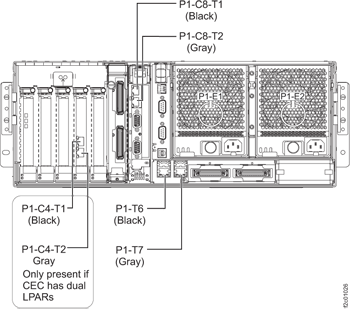
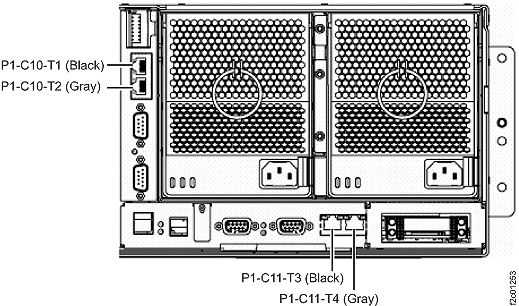
 CEC enclosure Ethernet adapter (LPAR), black cable to P1-C2-T1, and gray cable to
P1-C2-T2.
CEC enclosure Ethernet adapter (LPAR), black cable to P1-C2-T1, and gray cable to
P1-C2-T2.
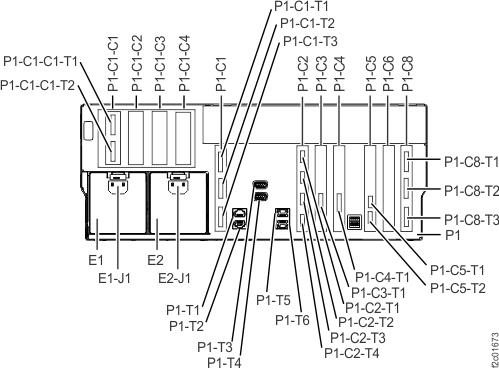
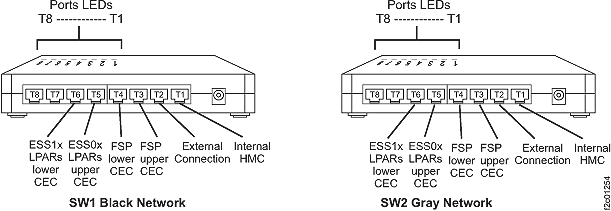
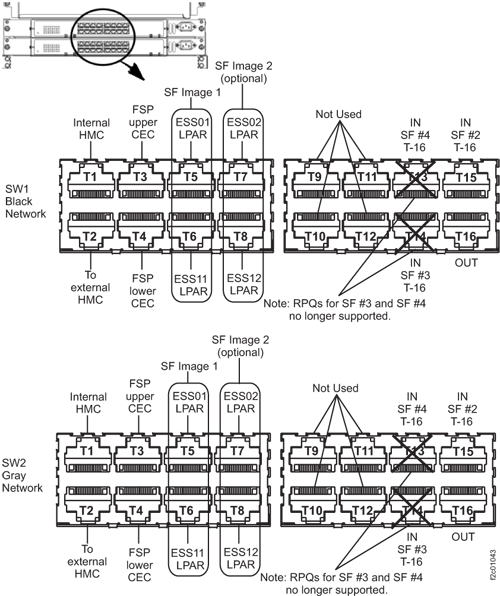 Figure 5. 8-port Ethernet switch port designations (SW1, SW2-Tx) Models 921/931, 922/932, 9A2/9B2
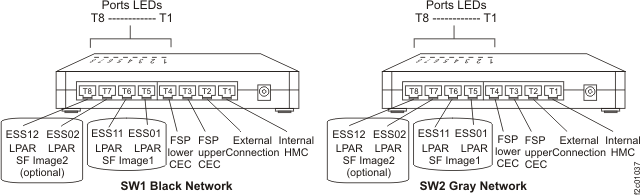 Figure 6. 8-port Ethernet switch port designations (SW1, SW2-Tx) Model 941, Model 951, and Model 961