DS8000 Service Documentation Version 7.5

MAP2350 Ethernet switch power problem

The Ethernet switch power LED is off. The Ethernet switch power input connector receives power from both primary power supplies (PPSs) through a "Y" cable that is connected to both PPSs.

About this task

This same power cable also provides power to the other Ethernet switch and the management console server and keyboard display.
Select the applicable model:

MAP2350 Section-1 (Model 961)

Procedure

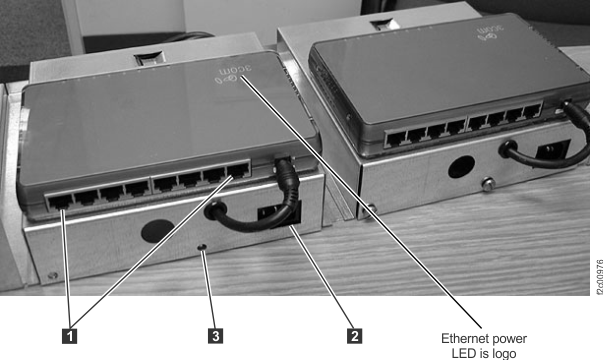
  1. Locate the Ethernet switch that is failing. See Figure 1 and Figure 2. Ensure the Ethernet switch power LED is still off before you go to the next step; note that the Ethernet power LED indicator is the white logo on the top of the switch.
    Figure 1. Ethernet switch tray locations (Model 961, rack version 1)
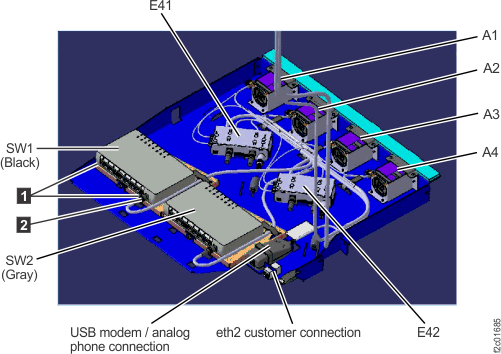
    Ethernet tray (switches, laptop fans, power distribution assembly) locations
    Figure 2. Ethernet switch tray locations (Model 961 rack version 2 rear)
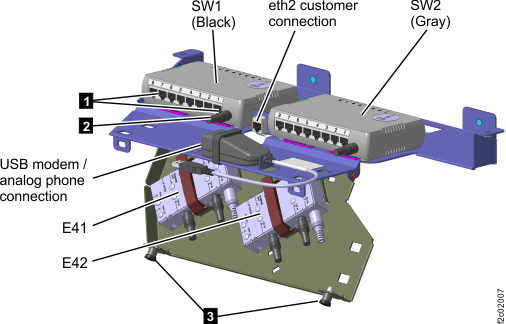
    Ethernet switch tray locations (Model 961 rack version 2 rear)
  2. Check whether the power input cable is properly plugged into the failing Ethernet switch. Is it properly plugged?
    • Yes, go to the next step.
    • No, plug the power input cable. Ensure the power LED is now lit, then exit this MAP.
  3. At the other Ethernet switch, observe the power LED. Is it lit?
    • Yes, go to the next step.
    • No, both Ethernet switches are not receiving power. Both Ethernet switches, the management console and it's cooling fans receive redundant power from two PJA units directly behind the Ethernet switches. Display and repair any related serviceable events for the power system and if there are none, observe the PJA LED indicators and use MAP2360 PJA visual symptoms to continue the problem isolation.
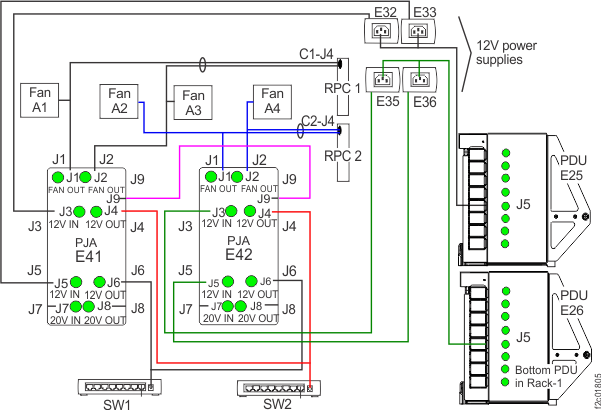
  4. The Ethernet switch power input cable is a Y-cable with three connectors. See Figure 3.
    • The left Ethernet switch (SW1) connects to the switch input Callout label 1, the left PJA (E41) output J6, and the right PJA (E42) output J6.
    • The right Ethernet switch (SW2) connects to the switch input Callout label 1, the left PJA (E41) output J4, and the right PJA (E42) output J4.
    Is the Y-cable properly connected and not visually damaged?
    • Yes. go to the next step.
    • No, connect the Y-cable, ensure the switch power LED is lit and then exit this MAP.
    Figure 3. 12V power distribution
    12V power distribution
  5. Ensure the Y-cable is receiving power from at least one PJA before replacing the Ethernet switch.
    • The left Ethernet switch (SW1) receives power from the J6 connector on both PJAs.
    • The right Ethernet switch (SW2) receives power from the J4 connector on both PJAs.

    Observe the J4 or J6 green LED indicators as appropriate. The indicator is lit if the Y-cable has power present. See Figure 3.

    Is the switch receiving power from at least one PJA?

MAP2350 Section-2

Procedure

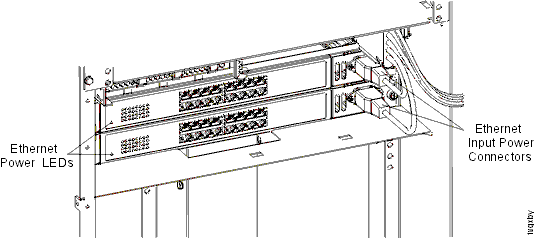
  1. Locate the Ethernet switch that is failing. Ensure the Ethernet switch power LED is still off before you go to the next step.
    Figure 4. 16-port Ethernet switch power LEDs and input power connectors
    16-port Ethernet switch power LEDs and input power connectors
    Note: In Figure 5, the Model 941 is shown; the Model 951 is similar.
    Figure 5. 8-port Ethernet switches
    8-port Ethernet switch with cables
  2. Check whether the power input cable is properly plugged into the failing Ethernet switch. Is it properly plugged?
    • Yes, go to the next step.
    • No, plug the power input cable. Ensure the power LED is now lit, then exit this MAP.
  3. At the other Ethernet switch, observe the power LED. Is it lit?
    • Yes, go to the next step.
    • No, both Ethernet switches are not receiving power. Both Ethernet switches, and the management console server, and keyboard and display receive power from a common multi-drop power cable that is connected to both PPSs. Display and repair any related serviceable events for the power system or contact your next level of support.
  4. At the failing Ethernet switch, unplug the power input cable. Then remove the Ethernet switch assembly from the rack by removing the two screws at each end of the sheet metal brackets. With the Ethernet switch assembly removed, observe the short power cable that goes from the sheet metal bracket to the power connector on the rear of the Ethernet switch. Is it properly plugged?
    • Yes, replace the Ethernet switch FRU.
    • No, securely plug the short power cable into the power connector on the rear of the Ethernet switch. Reinstall the Ethernet switch. Replug the power input cable, and ensure the power LED is lit. Then, exit this MAP.