MAP610B Section-1
About this task
Procedure
- Ensure that you were sent here from MAP6100 Reloading the management console licensed internal code (LIC).
- Table 1 lists
the three CDs/DVDs that you need to reload the HMC code. The CDs/DVDs
are in the HMC Recovery Kit. Note: A kit number is on each CD/DVD (below the IBM logo; for example, KIT: 23R0133). Ensure that all of the CDs/DVDs have the same kit number.
Table 1. HMC Recovery Kit: CDs/DVDs required to reload the HMC code (LIC bundle VRMF 6.2.xxx.xxx or 63.xxx.xxx.xxx) Media disk CD or DVD label Description Installation time (approximate) 1 2107 HMC Recovery DVD
HMC Base 1
Version: xxxxxxxxx
DVD: #1Base operating system and base HMC code 30 minutes 2 HMC Extensions
Version: xxxxxxxxx
CD: #2Unique code support for 2107 2 minutes 3 HMC_ICAT_GUI
Version: xxxxxxxxx
CD: #3DS Storage Manager code (also known as ICAT), the IBM graphical user interface 7 minutes - Do you have a copy of the most recent version of the customer
configuration worksheet? Note: The customer configuration worksheet should be stored in the Rack-1 document enclosure.
- Yes, go to step 5.
- No, go to the next step.
- Can you successfully log on to the HMC that you are repairing?
- Yes, perform the procedure in MAP6105 Display and record the HMC customer configuration and network settings information, record the needed information, return here, and then go to the next step.
- No, you must contact the customer to get a new copy of the information before continuing to the next step.
- Determine the level of code for the LIC bundle that is
currently installed on this HMC by logging in to the HMC that you
are repairing. Can you log in successfully?
- Yes, go to the next step.
- No, go to step 7.
- Display the level of HMC code.
- In the HMC Navigation area, under the Management Environment, expand the HMC (identified by hostname).
- Open Licensed Internal Code Maintenance > HMC Code Update.
- In the right content area, the Status section displays the level of HMC code.
- Go to step 8.
- Consider the following information when
trying to determine the level of HMC code and then go to the next
step:
- If this HMC has VPN network access to download LIC bundles, a set of Update CDs might not be stored in Rack-1. Even if a set of Update CDs is stored in Rack-1, the code level of those CDs might not match the code level that is installed.
- If this HMC does not have VPN network access, one or more sets of Update CDs might be stored in Rack-1.
- Refer to customer account records that track the installed level of LIC bundles.
- Contact your next level of support to see if they can determine the code level by referring to call home MRPD reports, PE packages, or other means.
- Shut down and power off the management console. See MAP6640 Shutting down, restarting, and logging off the management console.
- At the rear of the management
console server,
disconnect the following three Ethernet cables. See Figure 1 (X335 server)
or Figure 2 (X336
server) or Figure 3 (X3550 server).
- DS8000® network cable, black (eth0)
- DS8000 network cable, gray (eth3)
- Customer network cable (eth2)
Later, after you have reloaded the HMC code and all of the network settings have been restored, you will reconnect the cables.
Figure 1. Ethernet connectors on the rear of the X335 management console server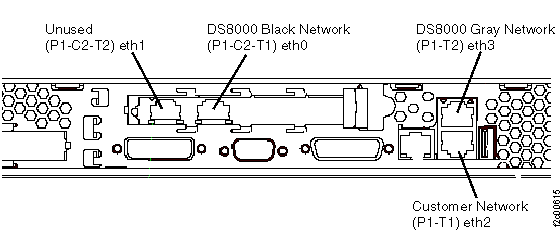 Figure 2. Ethernet connectors on the rear of the X336 management console server
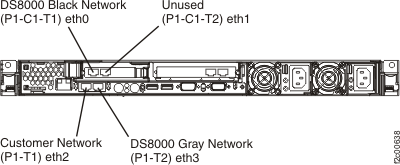 Figure 3. Ethernet connectors X3550 management console server (rear view)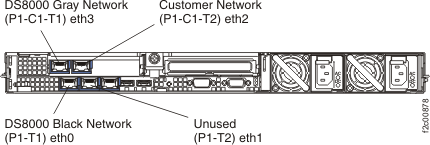
- Power on the management
console and immediately
insert the HMC Base Recovery DVD #1. The management
console powers
on, boots from the DVD, and then displays the Hardware
Management Console - Hard Disk Install / Upgrade screen.
This takes about two minutes. Note: If the HMC does not boot from the DVD, use the X335/X336 Hardware Maintenance Manual and Troubleshooting Guide or the IBM® System x3550 Type 7978 and 1913 Problem Determination and Service Guide to isolate the problem. The guide is on the DS8000 service documentation CD (the CD is part of the ship group).
- Select Install from the list of options presented and click Next.
- Select Install from Media and click Next. On the next screen, ensure the operation is "install" and the source is "media", then click Finish.
- In about 30 minutes, the DVD is ejected and the following
screen is displayed.
Please select one of the following options:
1 -- Install additional software from CD media
2 -- Finish the installation at a later time
Please enter your selection:
Type 1 and press Enter. When prompted, insert the HMC Extensions CD #2 and then press Enter.
- In about 2 minutes, the CD is ejected and the following
screen is displayed.
Please select one of the following options:
1 -- Install additional software from CD media
2 -- Finish the installation at a later time
Please enter your selection:
Type 1 and press Enter. When prompted, insert the HMC_ICAT_GUI CD #3 and then press Enter.
- In about 7 minutes, the following screen is displayed.
Please select one of the following options:
1 -- Restore critical console data from DVD-RAM media (Install Only)
2 -- Restore upgrade data from DVD-RAM media (upgrade from older Version/Release)
3 -- Finish the installation
Please enter your selection:
Note: Some bundle levels will not eject the CD. To manually open the media tray and remove the CD, insert a paper clip through the pinhole in the DVD-RAM drive.Type 3 to finish the installation and then press Enter.
- The management
console reboots
and the following screen is displayed:
WELCOME TO THE HMC ROLE SELECTION MENU ENTER A MENU OPTION FROM LIST 1) ASSIGN HMC AS PRIMARY 2) ASSIGN HMC AS SECONDARY 99) EXIT- Ensure MC 1 is on the label on the front of the keyboard/display tray.
- Type 1 and then press Enter.
- When prompted, type Yes to confirm and then press Enter.
- When prompted, type the appropriate keyboard selection menu number
and then press Enter.Note: If you do not make a selection within one minute, it will default to menu option 1 and then continue to the management console logon screen.
- Log on to the management
console with user
ID CE and password serv1cece.
Was the logon successful?
- Yes, go to the next step.
- No, begin problem isolation at Start here.
- At the rear of the management console server, reconnect ONLY the customer network cable (eth2). See Figure 1 (X335 server) or Figure 2 (X336 server) or Figure 3 (X3550 server).
- Use MAP6106 Restoring the HMC customer communication and network settings to restore the HMC communication and customer resources settings, return here, and then go to the next step.
- Reboot the HMC to activate the settings. See MAP6640 Shutting down, restarting, and logging off the management console.
- Earlier in this MAP, you determined the level of code (LIC bundle) that needs
to be reinstalled on this HMC. Note: If you are not sure whether the code level of the managed storage facilities matches the code level of the update CDs, contact your next level of support. Most HMC bundle levels are downward compatible if one or more managed storage facilities are still at an older bundle level.Does the bundle level of the recovery CD set that you used to rebuild the HMC boot match the bundle level of the HMC before it was rebuilt?
- Yes, go to step 23.
- No, go to the next step.
- Use the CDA process to update the HMC LIC code now. The
HMC will be rebooted as part of the CDA process. Note: Do not use the CDA pre-verify process. It will fail because the private network Ethernet cables are still disconnected from the HMC.
- At the rear of the management console server, reconnect the black DS8000 network cable (eth0) and the gray DS8000 network cable (eth3). See Figure 1 (X335 server) or Figure 2 (X336 server) or Figure 3 (X3550 server).
- Contact your next level of support so they can remotely connect and perform a procedure to rediscover storage facilities on this HMC.
- Ensure both of the DS8000 private
network connections (Interface eth0 and Interface eth3) are working
properly. Use the Network Topology Tool to ensure that the LPAR nodes
are displayed. It could take up to 20 minutes after
the private network cables were connected before CEC and LPAR nodes
display on the HMC panels.
See MAP7000 Entry point for storage facility private network problems.