DS8000 Service Documentation Version 6.3.3
MAP7000 Entry point for storage facility private network problems
This MAP provides guidance on repairing all network problems with the storage facility private network.
MAP7000 Section-1
Procedure
MAP7000 Section-2 Using an SRC
Procedure
- At the rear of each CEC enclosure managed by this
HMC, ensure that the private network Ethernet cables are connected.
- For models 921/931, 922/932, and 9A2/9B2 see Figure 1.
- CEC enclosure service processor (FSP), black cable to P1-C8-T1 and gray cable to P1-C8-T2.
- CEC enclosure integrated Ethernet ports on the I/O planar for base LPAR, black cable to P1-T6, and gray cable to P1-T7.
- CEC enclosure Ethernet ports on PCI Ethernet card (only on models 9A2/9B2, with two LPARs per CEC), black cable to P1-C4-T1 and gray cable to P1-C4-T2.
Figure 1. CEC Ethernet ports (Models 921/931, 922/932, 9A2/9B2)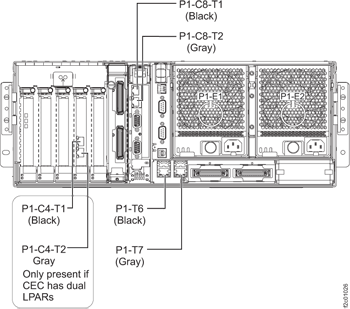
- For Model 941and Model 951 see Figure 2.
- CEC enclosure service processor (FSP), black cable to P1-C11-T3 and gray cable to P1-C11-T4.
- CEC enclosure integrated Ethernet ports on the CEC enclosure VPD pass-through card, black cable to P1-C10-T1, and gray cable to P1-C10-T2.
Figure 2. CEC Ethernet ports (right rear of CEC - Model 941)- Models 941 and 951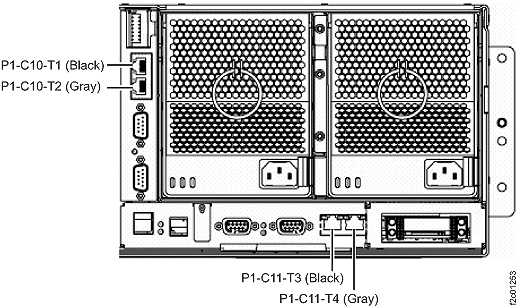
- For models 921/931, 922/932, and 9A2/9B2 see Figure 1.
- At the rear of each Rack-1 managed by this HMC, ensure that the private network Ethernet cables
are connected to the Ethernet switches. See Figure 3, Figure 4, or Figure 5.
Figure 3. 16-port Ethernet switch port designations (SW1, SW2 - Tx) - Models 921/931, 922/932, 9A2/9B2
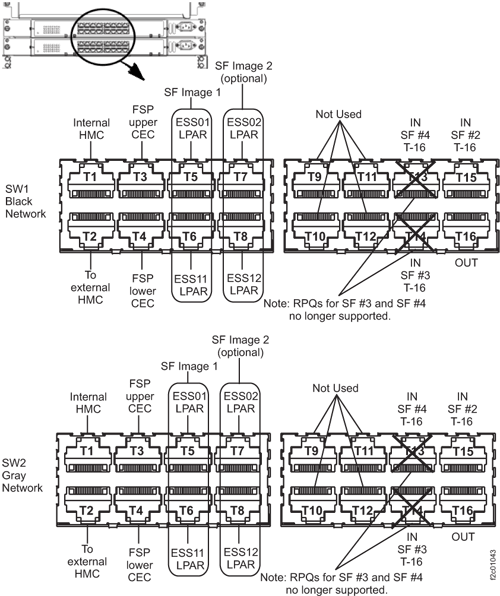 Figure 4. 8-port Ethernet switch port designations (SW1, SW2-Tx) Models 921/931, 922/932, 9A2/9B2
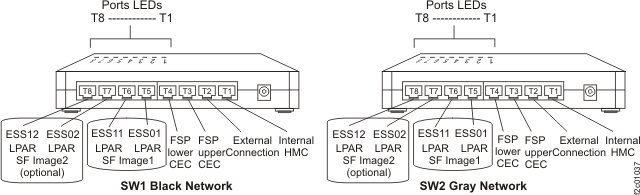 Figure 5. 8-port Ethernet switch port designations (SW1, SW2-Tx) Model 941 and 951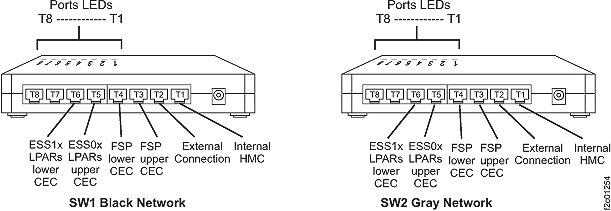
MAP7000 Section-3 Visual Checks
About this task
Procedure
Use Table 2 to check each
storage facility that is managed by this HMC.
| Visual Check | Action |
|---|---|
| If one or both internal Ethernet switches at the rear of Rack-1 in this storage complex are not powered on, see the Action column. | Go to MAP2350 Ethernet switch power problem. |
| If the CEC enclosure power supplies at the rear of each CEC enclosure do not have the green 'Input power' LEDs lit, see the Action column. | If a single CEC enclosure is
failing:
|
| At the front of the rack, observe each CEC enclosure control panel. The normal indication
is: 01 N V=F |
If the service processor panel is
blank, go to MAP4100 Repairing a service processor (FSP) problem. If an SRC is displayed, go to System reference codes overview. |
| At the front of the rack, observe the CEC enclosure processor regulator cards which are to the left of the boot drives. If the green LEDs are not lit, see the Action column. | Use the management console to power on the storage facility. See MAP1211 Controlling the storage facility power from the management console. |
| Check the Ethernet switch ports that have cables connected that exit the rack and go to an external HMC or another storage facility. If the port LEDs are not lit properly, see the Action column. | Go to MAP7000 Section-4 Problem with an external connection. |
| Check the Ethernet switch ports that have cables that are connected from the switch to the internal HMC. For both the 16-Port Ethernet switch and 8-Port Ethernet switch, check the T1 ports. If the port LEDs are not lit properly, see the Action column. |
|
| None of the visual checks that are listed in this table apply. | Go to MAP7001 Using the network topology tool. |
Figure 6. Connectivity
between storage facilities for HMCs using both 16-port Ethernet switches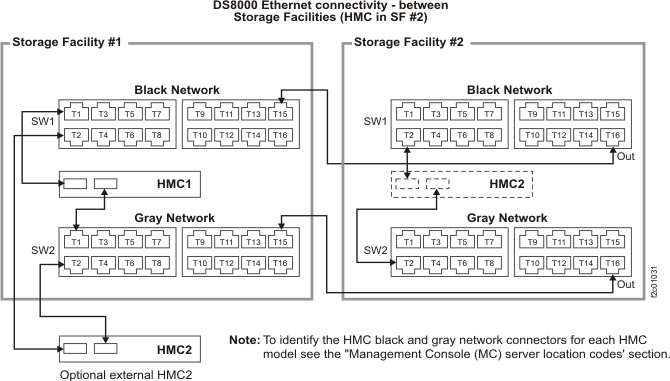
Figure 7. 8-port
Ethernet switch ports used for cables exiting the storage facility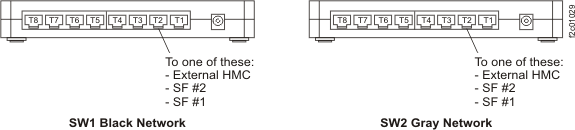
Figure 8. Connectivity
between storage facilities for HMC and both 8-port Ethernet switches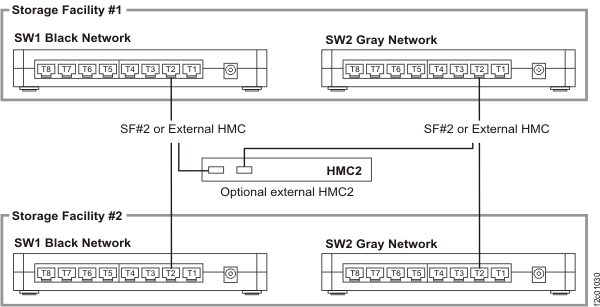
MAP7000 Section-4 Problem with an external connection
Procedure
MAP7000 Section-5 SRC=B3xxxxxx
Procedure
Most storage facility private network problems
are reported with SRCs of BEB1xxxx. There are a few exceptions where the problems are reported with
SRCs of B3xxxxxx which are from the eServer™ products. When this occurs, use Table 4 to determine the equivalent storage facility BEB1xxxx SRC and/or the appropriate
action.
| SRC in serviceable event and definition | Equivalent storage facility SRC and definition | Action |
|---|---|---|
| B3010002 - HMC or partition connection monitoring fault | None | Go to MAP7000 Section-3 Visual Checks. |
| B3030001 - The communication link between the service processor and the management console (HMC) has failed |
|
The B3030001 SRC does not specify which private network (black or gray) has
failed.
|
| B3030002 - A single partition HMC link has failed. |
|
The B3030002 SRC does not specify which private network (black or gray) has failed.
|
| B3030003 - Multiple partition HMC links have failed. | BEB10050 - Network Surveillance LINK_M_PART_HMC: Single HMC lost links to multiple partitions on single system; both paths are not available; FSP to HMC link is still working | Go to MAP7000 Section-3 Visual Checks and substitute SRC BEB10050 in place of B3030003. |
| B3030004 - All partition links for a single system to HMC have failed. | BEB10060 - Network Surveillance LINK_A_PART_HMC: Single HMC lost links to all partitions on single system; both paths are not available; FSP to HMC link is still working | Go to MAP7000 Section-3 Visual Checks and substitute SRC BEB10060 in place of B3030004. |
| B3030005 - All system links from one system to a single HMC have failed. | BEB10070 - Network Surveillance LINK_ALL_HMC: Single HMC lost links to single system (partition and FSP); both paths are not available | Go to MAP7000 Section-3 Visual Checks and substitute SRC BEB10070 in place of B3030005. |
| B3030006 - The links between a single HMC and a single managed system have failed. | BEB10080 - Network Surveillance LINK_HMC_SYS: Single HMC lost links to all systems (FSP and partition); both paths are not available | Go to MAP7000 Section-3 Visual Checks and substitute SRC BEB10080 in place of B3030006. |
| B3030007 - A single HMC link to more than one managed system occurred. | BEB10090 - Network Surveillance LINK_HMC_M_SYS: Single HMC lost links to multiple systems (FSP and partition); both paths are not available | Go to MAP7000 Section-3 Visual Checks and substitute SRC BEB10090 in place of B3030007. |
| B3030008 - One HMC link to more than one HMC occurred. | BEB10100 - Network Surveillance LINK_HMC_HMC: Lost HMC to HMC links; both paths are not available | Go to MAP7000 Section-3 Visual Checks and substitute SRC BEB10100 in place of B3030008. |
| B3030009 - One HMC link to more than one HMC occurred. | BEB10120 - Network Surveillance LINK_HMC_M_HMC: Lost single HMC to HMC link; only one path is not available | Go to MAP7000 Section-3 Visual Checks and substitute SRC BEB10120 in place of SRC B3030009. |
| B303000A - The HMC host links to all managed systems. | BEB10130 - Network Surveillance LINK_HMC_ALL: Lost HMC link to multiple HMCs; both paths are not available. This does not apply to the storage facility management console (HMC). | Go to MAP7000 Section-3 Visual Checks and substitute SRC BEB10130 in place of B303000A. |
| B303000B - Multiple HMCs lost links to a single managed system. | None | N/A |
| B303000C - Multiple HMCs lost links to multiple managed systems. | BEB10150 - Network Surveillance M_LINK_HMC_M_SYS: Multiple HMCs lost all links to multiple systems (FSP and partition) | Go to MAP7000 Section-3 Visual Checks substituting SRC BEB10150 in place of B303000C. |
| B303000D - Multiple HMCs lost links to multiple managed systems. | BEB10160 - Network Surveillance M_LINK_HMC_ALL: Multiple HMCs lost all links to all systems (FSP and partition) | Go to MAP7000 Section-3 Visual Checks substituting SRC BEB10060 in place of B303000D. |
| B303000E - The network interface card (NIC) has failed. |
|
The B303000E SRC does not specify which private network (black or gray) has failed.
|
| B303000F - A single partition HMC link failure has occurred on a redundant path. |
|
The B303000F SRC does not specify which private network (black or gray) failed.
|
| B3030010 - A single HMC link to one HMC failure has occurred on a redundant path. | BEB10110 - Network Surveillance LINK_HMC_HMC_REDUND | Go to MAP7000 Section-3 Visual Checks and substitute the BEB10110 SRC in place of the B3030010 SRC. |
| B3030011 - The server firmware connection monitoring to the flexible service processor has failed. | None | Go to MAP7000 Section-3 Visual Checks. |
| B3030012 - The flexible service processor connection monitoring of server firmware has failed. | None | Go to MAP7000 Section-3 Visual Checks. |
| B3030013 - The communication path (mailbox) between the server firmware and the flexible service processor has failed. | None | Go to MAP7000 Section-3 Visual Checks. |
| B3100500 - Device Driver Message: mmm dd hh:mm:ss DR-RC02-OPENSYS kernel: e1000: ethN: e1000_watchdog_task: NIC Link is Down |
|
The B3100500 SRC does not specify which private network (black or gray) has failed.
|
| B3100501 - Device Driver Message: mmm dd hh:mm:ss DR-RC02-OPENSYS kernel: e1000: ethN: unregister 'asix' usb-0000:00:xx.x-x, ASIX AX88772 USB 2.0 Ethernet |
|
The B3100501 SRC does not specify which private network (black or gray) has
failed.
|