MAP7012 Private network isolation procedure 12
The Network Topology tool has been used to determine that one management console has lost connectivity to all nodes through the Gray network (eth3).
MAP7012 Section-1
Procedure
- Locate the Ethernet switch SW2 (Gray network) at the rear of the storage facility that contains the failing management console. See Figure 1 for 16-port switches and Figure 2 and Figure 3 for 8-port switches. Is the Ethernet switch powered on?Note: If this is an external management console, then go to the storage facility to which the management console is cabled.
- Yes, continue with the next step.
- No, go to step MAP2350 Ethernet switch power problem.
Figure 1. 16-port Ethernet switch port designations (SW1, SW2 - Tx) - Models 921/931, 922/932, 9A2/9B2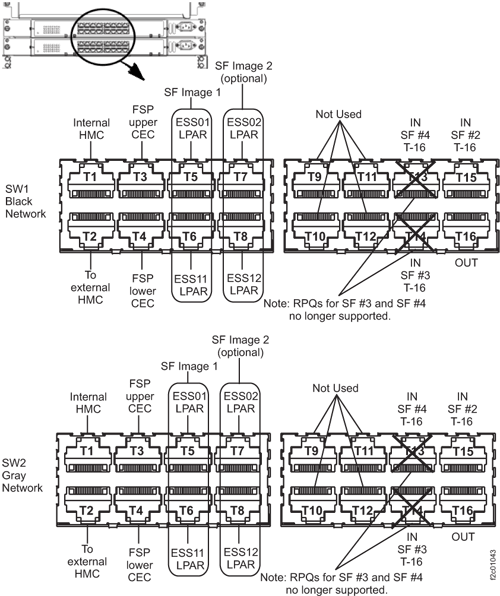 Figure 2. 8-port Ethernet switch port designations (SW1, SW2-Tx) Models 921/931, 922/932, 9A2/9B2
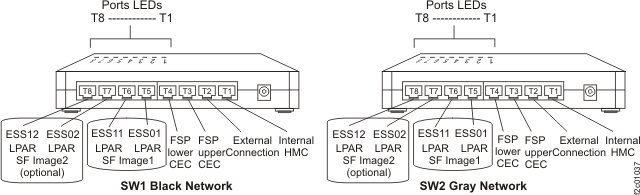 Figure 3. 8-port Ethernet switch port designations (SW1, SW2-Tx) Model 941 and 951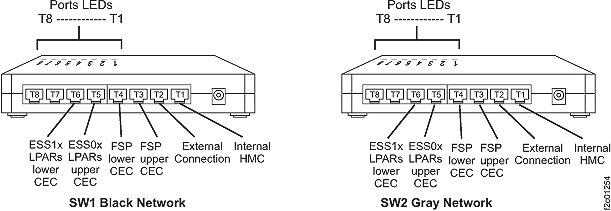
- Observe the eth3 link status LED on the rear of the failing management console. See Figure 4
(X335 server) or Figure 5 (X336 server) or Figure 6 (X3550
server).
Is the eth3 Link Status LED lit?
- Yes, continue with MAP7012 Section-2.
- No, continue with the next step.
Figure 4. LEDs on the rear of the X335 management console server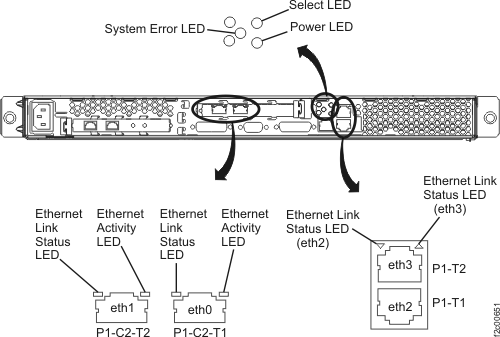 Figure 5. LEDs on the rear of the X336 management console server
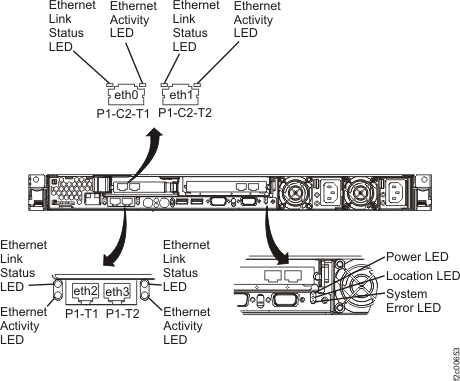 Figure 6. LEDs on the rear of the X3550 management console server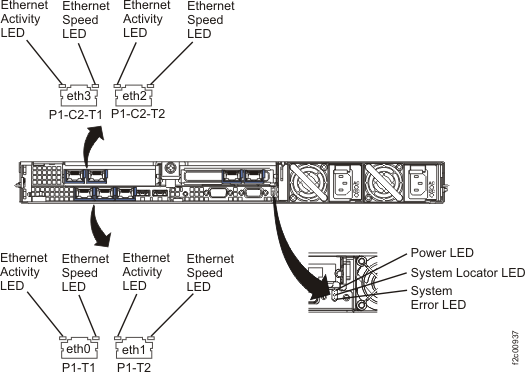
- Move the Ethernet cable from eth3 to eth1. See Figure 7 (X335 server)
or Figure 10 (X336
server) or Figure 11 (X3550 server).
Is the eth1 Link Status LED lit?
- Yes, it appears that the management console Ethernet port is failing. Restore the Ethernet cables to their original positions and continue with MAP7012 Section-3.
- No, it appears that the Ethernet cable between the management console and the Ethernet switch is failing. Go to MAP 7012 Section-6 to replace the cable.
Figure 7. Ethernet connectors on the rear of the X335 management console server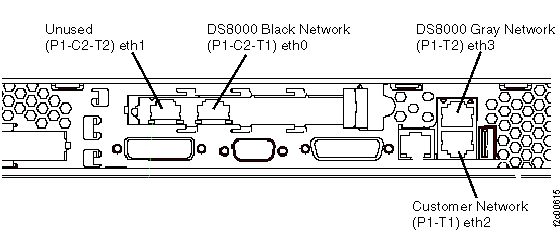 Figure 8. Ethernet connectors on the rear of the X336 management console server
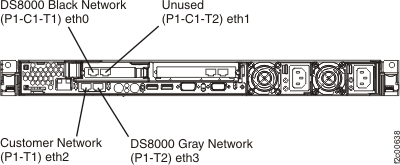 Figure 9. Ethernet connectors on the rear of the X336 management console serverFigure 10. Ethernet connectors on the rear of the X336 management console serverFigure 11. Ethernet connectors X3550 management console server (rear view)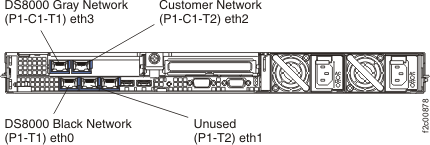
- Observe the
eth3 USB Ethernet 100/ACT LED indicator. See Figure 14.
- The eth3 USB Ethernet adapter USB cable connects to the ThinkPad W500 as shown in Figure 13.
- The USB and Ethernet cables that connect to the eth3 adapter are gray. See Figure 12.
Figure 12. eth0 (black network) and eth3 (gray network) USB Ethernet adapters for Thinkpad W500 (similar for Thinkpad T510, T520)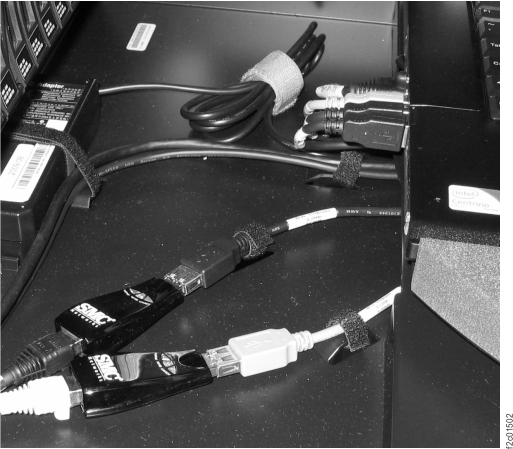 Figure 13. Ethernet connectors eth3 for laptop management console server (rear view)
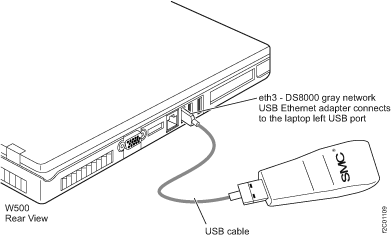 Figure 14. USB Ethernet adapter LED indicators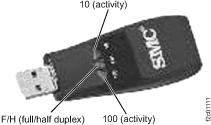
Is the indicator lit or blinking?
- Yes, the Ethernet connection appears to be working. Exit this MAP and determine if the failure is still occurring.
- No, go to 13.
- Observe
the eth3 USB Ethernet 100/ACT LED indicator. See Figure 14.
- The eth3 USB Ethernet adapter USB cable
 connects to the Thinkpad as
shown in Figure 15.
connects to the Thinkpad as
shown in Figure 15. - The USB and ethernet cables that connect to the eth3 adapter are gray. See Figure 12.
Figure 15. ThinkPad T510, T520 USB and RJ45 network connection ports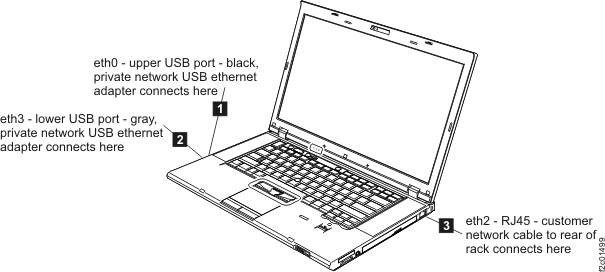
Is the indicator lit or blinking?
- Yes, the Ethernet connection appears to be working. Exit this MAP and determine if the failure is still occurring.
- No, go to step 13.
- The eth3 USB Ethernet adapter USB cable
MAP7012 Section-2
In this section, you will attempt to resolve the problem by performing a network reset on the failing management console network port.
Procedure
Is the network problem resolved?
- Yes, return to the serviceable event and close it by reviewing the steps in MAP1500 Ending a service action.
- No, replace the FRUs in the order listed in Table 3 until the problem is resolved.
| FRU | Go to: |
|---|---|
| Management console Ethernet adapter | MAP7012 Section-4 |
| Ethernet switch | MAP7012 Section-5 |
| Cable, management console to Ethernet switch | MAP7012 Section-6 |
MAP7012 Section-3
In this section, you will attempt to resolve the problem by performing a network reset on the failing management console network port.
Procedure
Is the network problem resolved?
- Yes, return to the serviceable event and close it by reviewing the steps in MAP1500 Ending a service action.
- No, if you have an x335, x336, or x3550 HMC go to MAP7012 Section-4 to replace the Ethernet adapter in the management console server.
- No, if you have a ThinkPad laptop, go
to MAP7012 Section-7 to replace one of the following FRUs:
- eth3 Ethernet adapter
- USB cable
- ThinkPad laptop (the laptop system board is not a FRU, it takes too long to replace)
MAP7012 Section-4
In this section, you will replace the xSeries HMC Ethernet adapter eth3 to correct problems on the Gray network.
Procedure
MAP7012 Section-5
In this section, you will replace the SW2 Ethernet switch to correct problems with the Gray network.
Procedure
MAP7012 Section-6
In this section, you will replace the Ethernet cable between the management console and the Ethernet switch.
Procedure
MAP7012 Section-7
In this section, you will replace network FRUs on the laptop HMC.