Procedure
- This step shows an overview of the Rack-2 to Rack-1 PCIe
and SPCN cable routing. Do not route or connect the cables until directed
in later steps.
- The PCIe cables 1 are thick. The SPCN cables 2 are thin. See Figure 1 and Figure 2.
- On a raised floor, the cables are routed down through the tile cutouts and underneath the floor.
- On a non-raised floor, the cables are routed beneath the racks.
Figure 1. Rack-1 Mechanical routing of the PCIe and SPCN cables (rack-to-rack)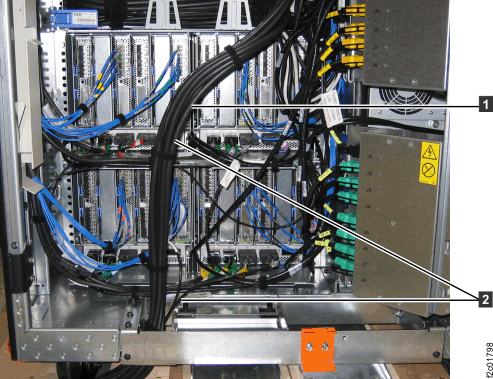 Figure 2. Rack-2 Mechanical routing of the PCIe and SPCN cables (rack-to-rack)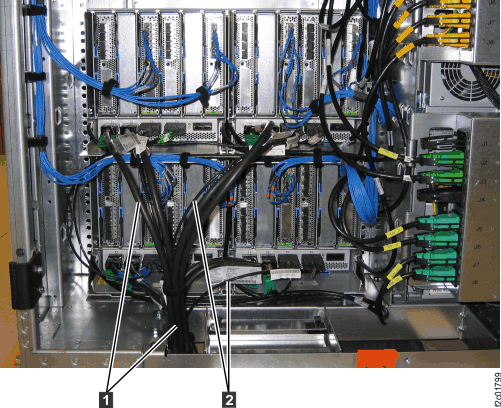
- At the rear of Rack-1 and Rack-2 remove the tailgate
frame bracket.
- Remove the two screws
 as shown in Figure 3.
 - Loosen but do not remove the two top screws
 .
. - Slide the bracket out. This allows you access to the tailgate cable retention hardware when you install cables later in this installation.
Figure 3. Tailgate frame bracket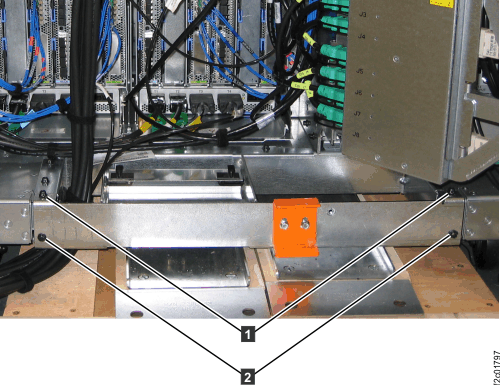
- Remove the two screws
- Observe the rear of Rack-2 and Rack-1 to determine
the location of the Rack-1 to Rack-2 PCIe cable and SPCN cable bundle.
- Use the third column to continue the installation.
Table 1. Location of PCIe and SPCN cable bundle If the PCIe and SPCN cable bundle is: You will be directed to route and connect the loose end of the cable bundle: Go to: Coiled and pre-installed in Rack-1 (see Figure 4) To Rack-2 PCIe and SPCN cable bundle is preinstalled in Rack-1 Coiled and pre-installed in Rack-2 (similar to Figure 4 To Rack-1 PCIe and SPCN cable bundle is preinstalled in Rack-2 Coiled and not pre-installed in Rack-1 or Rack-2 To both Rack-1 and Rack-2 PCIe cable bundle is not preinstalled in Rack-1 or Rack-2 Figure 4. PCIe and SPCN cable bundle pre-installed in Rack-1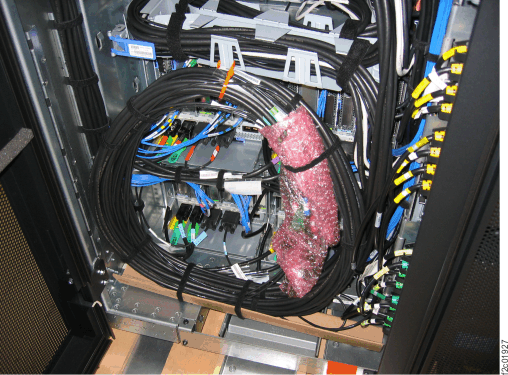 Note: PCIe and SPCN cable bundle may be shipped coiled or secured around the inside walls of the rack.
- Use the third column to continue the installation.