DS8000 Service Documentation Version 7.5
PCIe cable bundle is not preinstalled in Rack-1 or Rack-2
Procedure
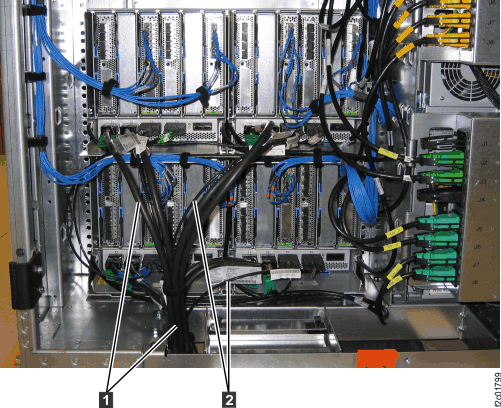
- This step shows an overview of the Rack-1 to Rack-2 routing
of the PCIe 1 and SPCN 2 cables
in Rack-1 (Figure 1)
and Rack-2 (Figure 2).
Do not route or connect the cables until directed in later steps.
Figure 1. Rack-1 Mechanical routing
of the PCIe and SPCN cables (rack-to-rack)
Figure 2. Rack-2 Mechanical routing
of the PCIe and SPCN cables (rack-to-rack)
- Both new Rack-2 and existing Rack-1 do not have the PCIe
and SPCN cable bundle preinstalled.
Note: Normally the
PCIe and SPCN cable bundle is preinstalled in Rack-2 (if shipped from IBM® in 2012) or in Rack-1 (if shipped
from IBM in 2013 and later).
- Locate the Rack-2 to Rack-1 PCIe and SPCN cable bundle.
The bundle should be coiled and in a box that may have shipped separately
as an MES.
- Uncoil the bundle.
- The PCIe and SPCN cable bundle is routed beneath Rack-2
and Rack-1. On a raised floor, the bundle is routed under the floor.
On a non-raised floor, the bundle is routed on the floor.
- Route and connect the bundle to Rack-2. Follow the steps
in PCIe and SPCN cable bundle is preinstalled in Rack-1. When
that is complete, return here and go to sub-step 2e.
- Route and connect the bundle to Rack-1. Follow the steps
in PCIe and SPCN cable bundle is preinstalled in Rack-2. When
that is complete, return here and go to the next step.
- Go to Completing the logical installation of the I/O enclosures.
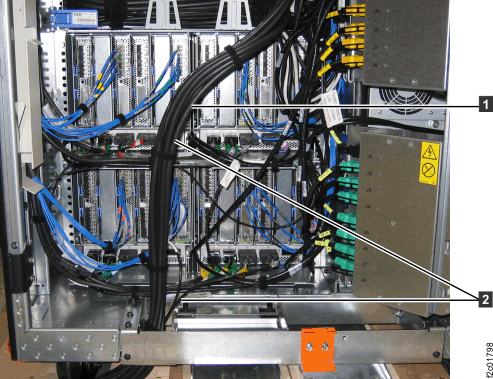 Figure 2. Rack-2 Mechanical routing of the PCIe and SPCN cables (rack-to-rack)