You are here to install one or more pairs of storage enclosures in Rack-2.
Procedure
- Storage enclosures on multiple DA
pairs can be installed at the same time. Complete the following steps:
- Use Figure 1 to
determine their Rack-2 storage enclosure location codes (ex: R2-G11). Figure 1. Rack 1-4 storage enclosure and I/O location codes (rear view)
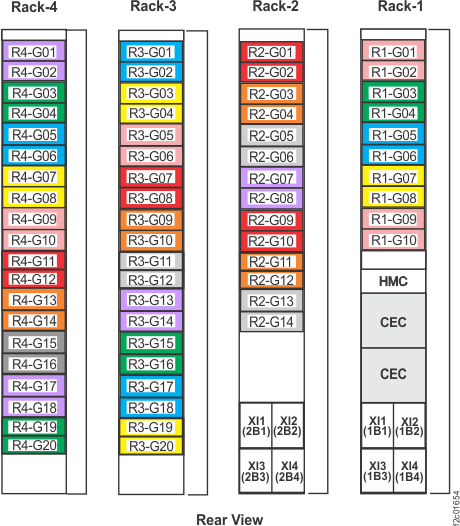
- Use Figure 1 to
determine their Rack-2 storage enclosure location codes (ex: R2-G11).
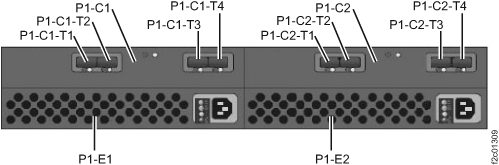
- For each Rack-2 storage enclosure physical
location code that is displayed by the HMC, ensure that the four FC-AL
cables are still connected to the T1 & T2 connectors (labeled
J1 & J2 on the sheet metal) on both FCIC cards in the Rack-2 storage
enclosure that is being installed. See Figure 2. Attention: Ensure each FC-AL cable is connected to the correct enclosure and port. Incorrect connections during this installation could result in a loss of access when additional storage is added to the affected DA pair.Note: Do not disconnect these cable ends as part of this installation procedure.Figure 2. Storage enclosure connections (T1 and T2)
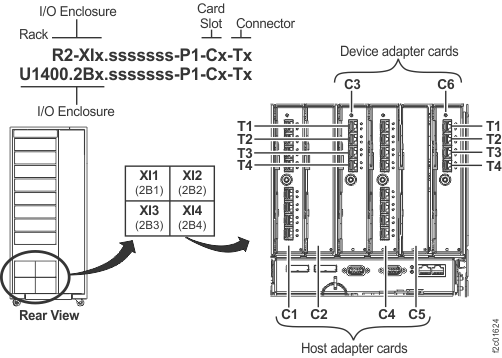
- Connect each of the four FC-AL cables
to the Rack-2 I/O enclosure connectors that are determined in columns
two and three in Table 2.
See Figure 3, then
go to step 7. Attention: Ensure each FC-AL cable is connected to the correct adapter and port. Incorrect connections during this installation could result in a loss of access when additional storage is added to the affected DA pair.Figure 3. I/O enclosure locations and device adapter card slot locations
- This step routes and connects
the short FC-AL cables that go between two Rack-2 storage enclosures.
- Go to the next step. Figure 4. Storage enclosure FCIC connector locations
- Go to the next step.
When the
HMC is finished, it displays a message:
Service action is ending...
The window closes. Go to the next step.
- View the storage facility
state, refer to MAP1100 View storage facility state (end of call).
- All status fields should display as PASSED
except for the following.
- If the Resources State result is "Failed", select it and then click Details. If the Drive state is "5 (Certifying)", this is normal and you should go to the next step.
- If other checks are failed, select it and then click Details. They should be fixed before going to the next step. If needed, call the next level of support.
Note: If the Large File Transfer (the tenth System Check Type status from the top) displays as FAILED, the remaining System Check Types below it cannot be displayed. Contact the next level of support.Figure 5. Window: View Storage Facility State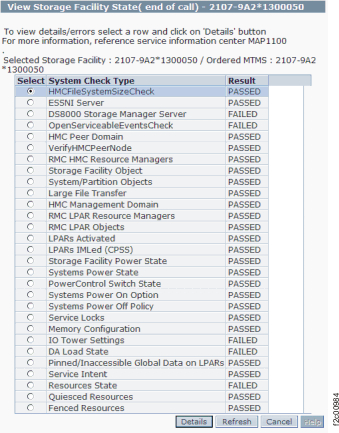
- All status fields should display as PASSED
except for the following.