Procedure
- This step shows
an overview of the Rack-1 to Rack-2 routing of the PCIe 1 and
SPCN 2 cables in Rack-1 (Figure 1) and Rack-2 (Figure 2). Do not route
or connect the cables until directed in later steps. Figure 1. Rack-1 Mechanical routing of the PCIe and SPCN cables (rack-to-rack)
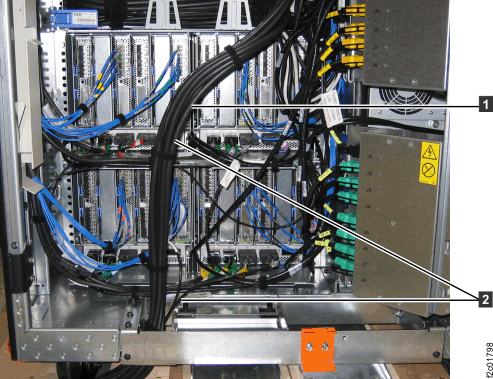 Figure 2. Rack-2 Mechanical routing of the PCIe and SPCN cables (rack-to-rack)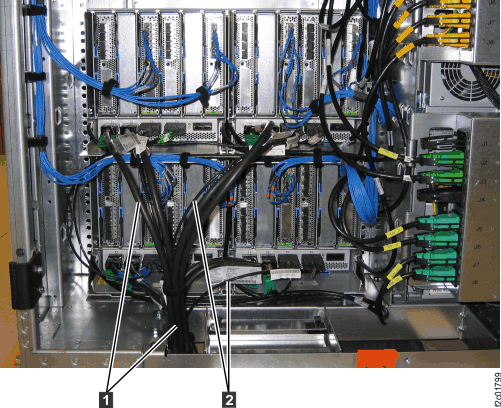
- At the rear of Rack-1 and Rack-2, remove the tailgate
frame bracket.
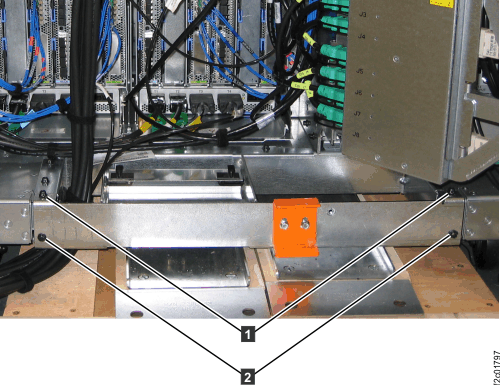
- Remove two screws
 as shown in Figure 3.
 - Loosen but do not remove the two top screws
 .
. - Slide the bracket out. This allows you access to the
tailgate cable retention hardware when you install cables later in
this installation. Figure 3. Tailgate frame bracket
- Remove two screws
- At the rear of
Rack-1, route the PCIe and SPCN cables down and out the tailgate.
See Figure 4.
- Route the PCIe cables into a central bundle that exits the left side of
the tailgate as shown.
- Pull the cable bundle up into Rack-1 to allow an "S"
curve . The curve allows the bundle to be
moved left or right for better access when replacing FRUs.
- Use cable ties to tie the cable bundles to the tie points (Figure 5)
on the left side of the tailgate.
Figure 4. Rack-1 Mechanical routing of the PCIe and SPCN cables (rack-to-rack)Figure 5. Tailgate cable bundle tie points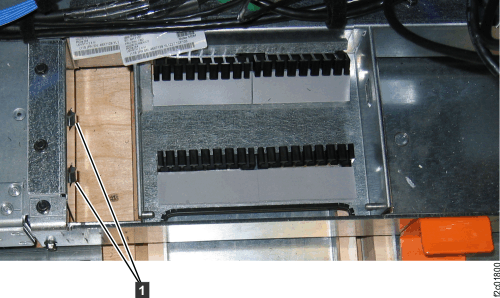
- Route the PCIe cables into a central bundle
- At the rear of
Rack-1, observe the T4 connectors on the bottom two I/O enclosures.
See Figure 6 and Figure 7.
- R1-XI3-P1-C7-T4
- R1-XI4-P1-C7-T4
Find the condition that applies:- SPCN cables are connected to both T4 connectors and the cables go to the tailgate. Go to the next step.
- SPCN cables are connected to both T4 connectors and the cables
go to the Rack-1 CEC enclosure cable management arms.
- Disconnect the two cables from the T4 connectors and use cables ties to fasten them out of the way.
- Find the two SPCN cable ends in the cable bundle that exits the
tailgate. See Figure 6.
- Remove the cable connector protector covers and install them on the two cables you just disconnected.
- Remove cable ties from the cable bundle down to the tailgate.
- Use the cable location labels to route the two SPCN cables to the proper T4 connector. See Figure 7.
- Reinstall the cable ties on the cable bundle.
- Go to the next step.
- SPCN cables are not connected to both T4 connectors. The cables are tied into the cable bundle. See Figure 6.
- Remove cable ties from the cable bundle down to the tailgate.
- Use the cable location labels to route the two SPCN cables to the proper T4 connector. See Figure 7.
- Reinstall the cable ties on the cable bundle.
- Go to the next step.
Figure 6. Rack-2 SPCN cables in Rack-1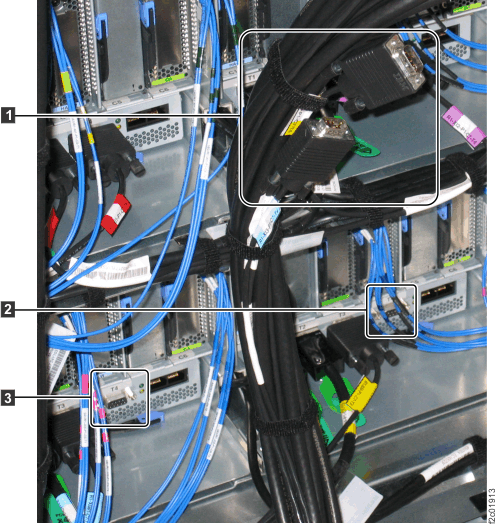 Figure 7. I/O enclosure locations on cable labels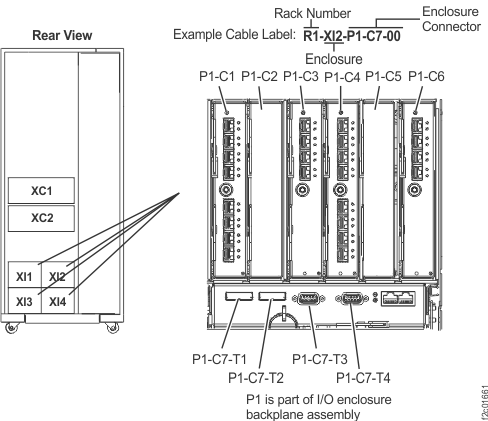
- At the rear of
Rack-2, route and connect the PCIe and SPCN cables coming up through
the tailgate to the proper I/O enclosure connectors. See Figure 2.
- Use the location code label on each cable to determine the correct connector. See Figure 7.
- Pull the cable bundle up into the rack to allow an "S" curve in the PCIe and SPCN cables. The curve allows the cables to be moved left or right for better access when replacing FRUs.
- Use cable ties to
tie the cable bundles to the tie points (Figure 5)
on the left side of the tailgate.