DS8000 Service Documentation Version 7.5

Installing the interrack decorative covers kit

About this task

Perform the following steps for each expansion rack that you have completely cabled.

Procedure

  1. Locate the interrack decorative covers kit. It contains two side interrack covers.
  2. Assemble each of the side interrack covers as follows:
    1. Open the hinged side interrack cover  1  so that it is straight. See the following figure.
    2. Loosen the two nuts  2  on the threaded studs next to the hinge points.
    3. Slide the plate  3  so that it engages both studs.
    4. Tighten both nuts.
      Figure 1. Assembling the later version of the interrack decorative side covers
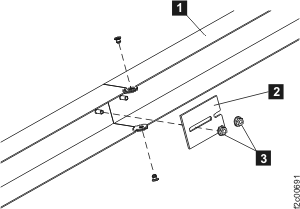
      Side interrack covers
  3. Install each of the two interrack side covers  1  by pushing the cover into place over the interrack spacing studs. Take care not to interfere with any interrack cables. See Figure 2.
    Figure 2. Installing the interrack decorative cover
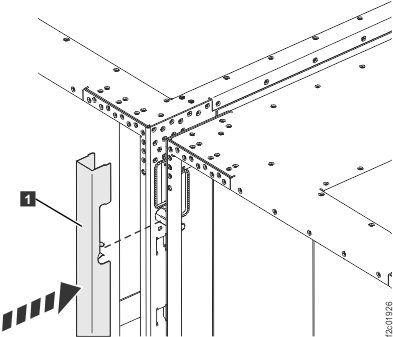
    Installing the interrack decorative covers
  4. Continue with the next section.