This is not a stand-alone procedure. Customer disruption and damage
to the hardware might occur if microcode and power boundaries are
not in the proper conditions for this service action.
If you were sent here by a serviceable event FRU repair, the microcode
and power boundaries have already been set.
If there is no FRU identify indicator or location code, you
were sent here by an isolation MAP or symbolic FRU procedure. Use the information in that procedure
and the figures in this procedure to locate the proper part to exchange.
Most, but not all, FRUs have identify indicators. Use the flashing amber or solid blue FRU identify indicators to ensure that you are working
on the correct enclosure or FRU.
The "light path" identify LEDs are a hierarchy of LEDs that can
identify the rack, enclosure, FRU, and even the FRU connector to which a cable is
connected.
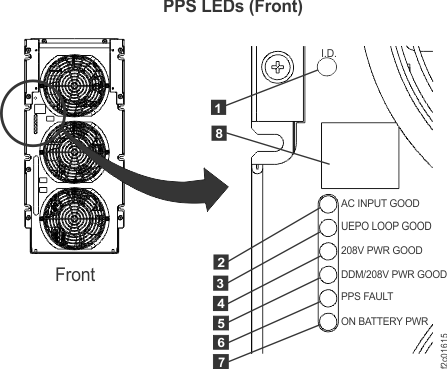
Do not use the PPS FAULT
LED indicator to identify the PPS being
repaired.
When the failing PPS is being
repaired, the PPS FAULT
LED indicator on the working PPS in the
same rack might be on solid. The working PPS is indicating
that the PPS being
repaired is not available for use.
Use the FRU Identify LED indicator to identify the PPS being
repaired.
Figure 1. LEDs on the PPS (front)
Have the customer remove power to the PPS containing the
module being replaced.
Instruct the customer to switch off the circuit breaker
that supplies mainline ac power to the power receptacle for the PPS
that contains the module being replaced.
Attention: Use lockout and tagout procedures
as defined in the Electrical Safety for IBM® Customer
Engineers.
Observe the front of the PPS. Is the
AC INPUT GOOD LED indicator off?
Yes, the customer has removed power from the correct PPS. Continue
with the next step.
No, stop. The customer has not removed power from the correct PPS.
Determine which PPS the customer
has removed power from.
Have the customer restore power to the PPS. The PPS may not
power back on fully.
Observe
the LED indicators on the front of both PPSs with
a PPS that
is fully powered on. If the PPS did not
power on fully, you will need to do a pseudo repair of the PPS to power
it on. A pseudo repair of the PPS means
that you use the normal FRU replacement procedures, but you do not
replace or even disconnect the PPS cables.
Refer to MAP1230 Replace a FRU without using a serviceable event.
After the PPS is
powered back on, return to this step and have the customer switch
off the circuit breaker to the proper PPS.
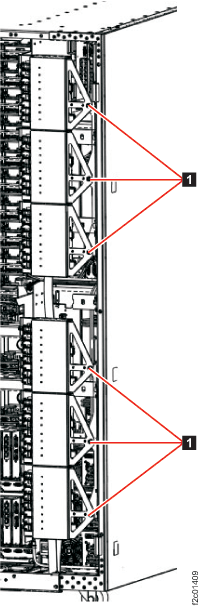
To gain full access to the rear of the PPS, unfasten and then rotate the power distribution
units (PDUs) away from the rear of the PPS.
Figure 2. Power distribution units in normal position (rack rear view)
Remove power and mainline power cord from the PPS.
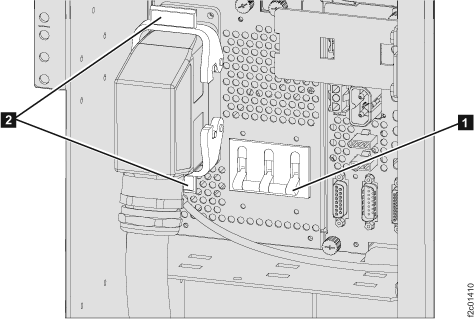
On the PPS, at the ac input power module, set the CB00
switch to Off (down).
Push the two release levers .
Disconnect the mainline power cord from the ac input
power module.
Figure 3. Remove the ac mainline power cord
At the rear of the PPS that
does not contain the module that is being replaced, disconnect
the PPS-to-PPS communication
cable at the bottom right of the PPS sequencer
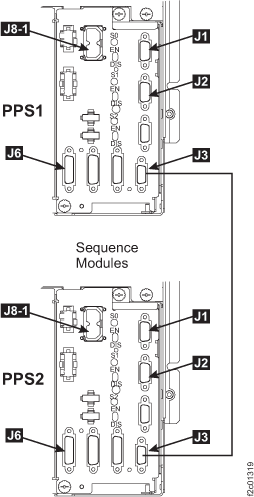
module (see Figure 4).
Notes:
Disconnecting the cable from the PPS that
does not contain the module that is being replaced will protect that PPS. Then,
when the other end of the cable is disconnected from the PPS containing
the module that is being replaced, no pins inside that connector will
be able to touch ground and shut down the PPS that
does not contain the module that is being replaced.
This removes the remaining logic power from the PPS containing
the module that is being replaced; all PPS LEDs
should now be off.
At the rear of the PPS containing the module that is being
replaced, disconnect the J3 PPS-to-PPS communication cable at the
bottom right of the PPS sequencer module.
Disconnect the PDU power cable from the PPS 208V DDM power
module.
Remove the PPS 208V DDM power module.
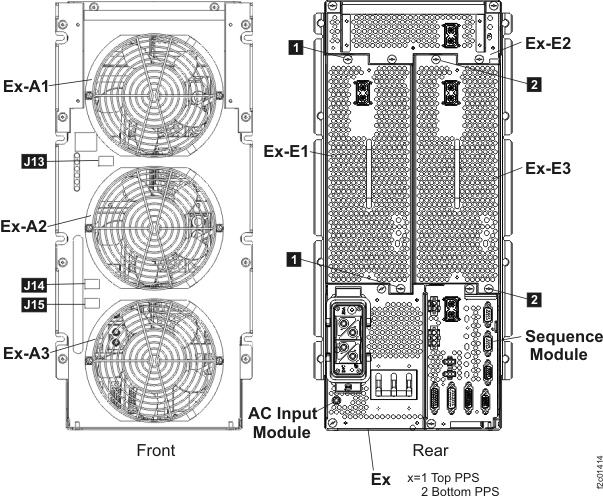
Use the location code to determine which module location
(E1 or E3). See Figure 6.
Remove the screws or (as applicable) from the PPS 208V
DDM power module.
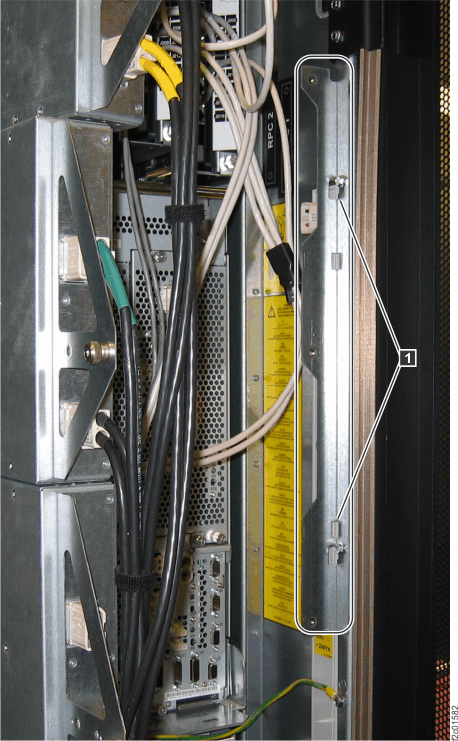
If the cable routing bracket blocks the module,
remove it. Each bracket is held by two screws that only need to be
loosened, not removed. See Figure 5, .
Figure 5. Cable routing brackets
Remove the PPS 208V DDM power module.
Figure 6. PPS module location codes
Install the PPS 208V power module
About this task
Note: Do
not connect the PDU power cable to the PPS 208V DDM power module.
It will be connected in a separate procedure after the PPS has been
powered on and the module has been verified.
Procedure
Install the PPS 208V DDM power module.
Install the new PPS 208V DDM power module. Secure the
two silver thumbscrews.
Ensure the enable switch on the PPS 208V power module
is set to enabled (up).
Reinstall any cable routing brackets that
were removed.
At the rear of the PPS containing the replacement module, connect
the PPS-to-PPS communication
cable at the bottom right of the PPS sequencer
module.
At the rear of the PPS that
does not contain the replacement module, connect the PPS-to-PPS communication
cable at the bottom right of the PPS sequencer
module.
Note: One or more of the PPS LEDs
may now be lit on the PPS containing
the replacement module.
Do not connect the PDU power cable to the PPS 208V DDM
power module at this time. It will be connected in a separate procedure
after the PPS has been powered on and the module has been verified.
Connect power.
At the PPS, connect
the mainline power cord to the ac input power module. Secure it with
both release levers .
At the ac input power module, set the CB00 switch to
on (up) .
Figure 7. Connect the
ac mainline power cord
Instruct the customer to switch on the mainline circuit
breaker that supplies mainline ac power to the power receptacle for
the PPS containing the module being replaced. The "Do Not Operate"
tag and padlock can be removed.
Remove
the lockout tag and/or device that was applied to each customer mainline
AC voltage circuit breaker, then switch on the customer circuit breaker.
Exit this service information center parts
exchange procedure and return to the procedure that sent you here.