Before you begin
Attention: Power supplies are hot-pluggable FRUs.
Only remove one power supply at a time.
Procedure
- To locate this FRU, do one of the following
and then return here and continue to replace the FRU:
- Most, but not all, FRUs have identify indicators. Use the flashing amber or solid blue FRU identify indicators to ensure that you are working
on the correct enclosure or FRU.
- The "light path" identify LEDs are a hierarchy of LEDs that can
identify the rack, enclosure, FRU, and even the FRU connector to which a cable is
connected.
- For more information, refer to MAP1240 Locating FRUs using identify indicators.
- At the rear of the rack, observe the partner power supply,
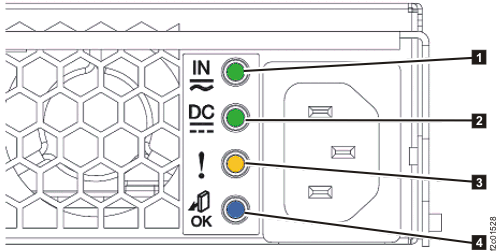
which is not being replaced, in this storage enclosure. See Figure 1.
Figure 1. Storage enclosure power supply
LEDs
- Observe the storage enclosure power supply that is being
replaced.
- The input power LED
 and the output power LED
  will still be lit even though the
HMC screen indicates the FRU was powered off. This is normal.
will still be lit even though the
HMC screen indicates the FRU was powered off. This is normal.
- The power LEDs will be off after the input power cord is disconnected
in the next step.
- At the power supply being replaced, release the
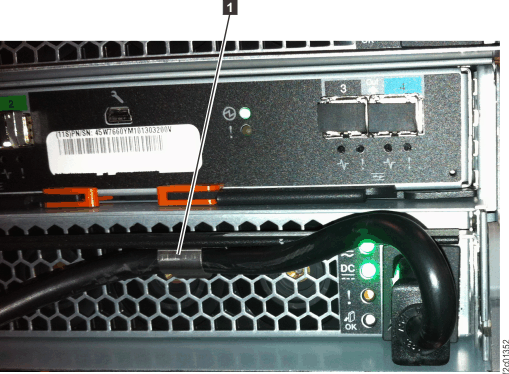
power input cable from the retention bracket and disconnect it. See Figure 2.
Note: After
the power input cable is disconnected, storage enclosure fans in the
other power supply will shift from low to high speed.
Figure 2. Storage enclosure power supply
power input cable and retaining bracket
- To remove components from
the rear of the storage enclosure, you might need to:
- Loosen cable ties
- Remove the cable tray from the enclosure being serviced or
the enclosure above it
- Loosen or release the cable ties holding the FC-AL and
power cables as needed.
- If you need to remove the cable tray, release the cable
ties. Then, lift up on the spring-loaded latches at the left and
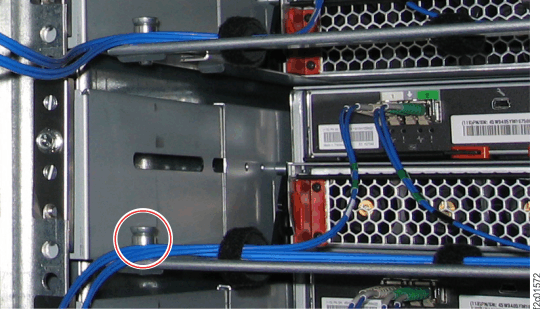
right end of the tray and then slide the tray to the rear. See Figure 3.
Figure 3. Cable tray spring-loaded latch
- To maintain proper cooling airflow through the storage
enclosure, both power supplies must be physically installed, even
if one of them is not functional. When a power supply is removed,
it disrupts the airflow. Ensure you are ready to install the new power
supply immediately after removing the old power supply.
- Are you replacing a power supply in the bottom
storage enclosure of Rack-1 in a Model
951?
- No, go to the next step.
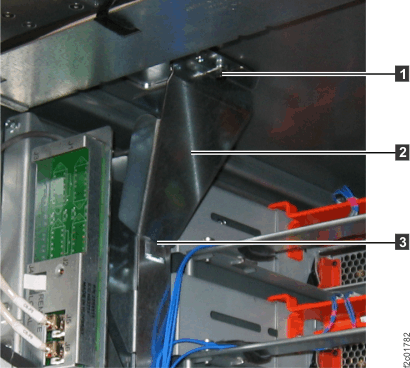
- Yes. The power supply will hit the Ethernet switch tray air
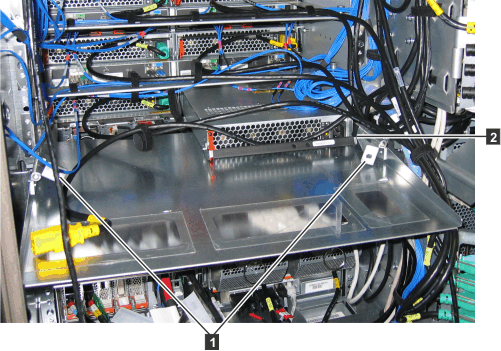
baffle hinge . Remove the two screws , pivot the hinges inward and down,
and slide the air baffle to the rear until the power supply can be
removed, as shown in Figure 4.
Then continue at the next step.
Figure 4. Ethernet switch tray air baffle
hinges (Model 951)
- Are you replacing the left power supply in the
top storage enclosure in a rack with overhead cable management (top
exit) for host and data cables?
- No, go to the next step.
- Yes, you must remove the upper cable channel assembly . See Figure 5.
- Loosen the retaining screw .
- Pivot the upper cable channel assembly to the right and lift it out of the
tab slot
 .
.
Figure 5. Top tailgate upper cable
channel assembly
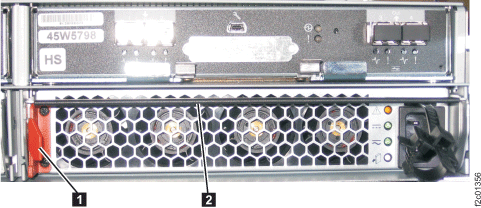
- Push the orange retaining clip to the right, and pull the power supply
latch handle out and down. See Figure 6.
Figure 6. Storage enclosure
power supply latch handle and retaining clip
- Pull the power supply straight out from the storage enclosure.
 Use approved ESD procedures to prevent damage.
 Not used