DS8000 Service Documentation Version 6.3.3
Connecting the power control cables to power on the rack
About this task
Attention: After the RPC cables from this rack have
been connected, DO NOT switch off or remove power to this expansion
rack for any reason.
Procedure
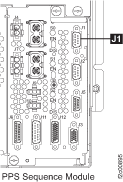
- At the rear of the expansion rack being installed, find
the power control cable that is already connected to the sequencer
module connector J1 in the upper PPS.
The loose end of this cable is coiled in the rear upper right corner
of the rack. Note: On later racks, this cable will have a gray label on the end that connects to the RPC card.Figure 1. PPS J1 connector
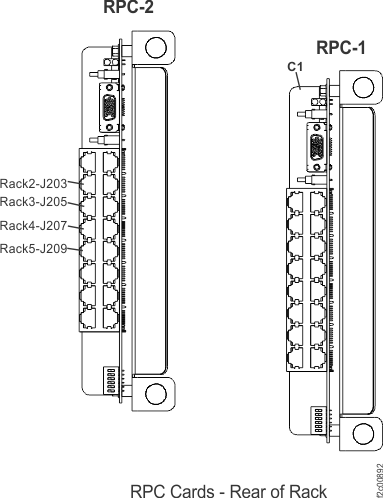
- Use Table 1 and Figure 2 in this step to
determine which RPC1 card connector the cable will be plugged.
- Plug the cable in.
Note: The expansion rack will power on immediately and the top fan in both PPSs will now spin.Table 1. Rack number and RPC1 connector locations From upper PPS J1 connector in rack number To RPC 1 card (right card) 2 J203 3 J205 4 J207 Figure 2. RPC1 cards, connector locations (rear of rack)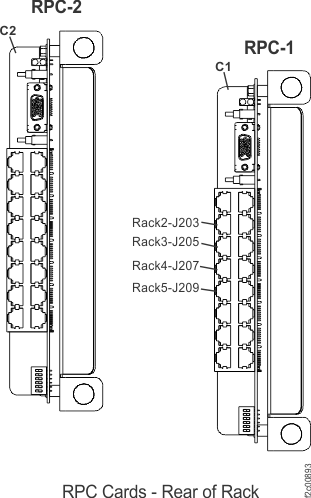
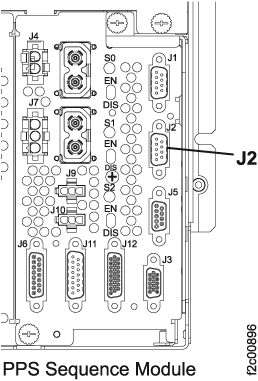
- At the rear of the expansion rack being installed, find
the power control cable that is already connected to the sequencer
module connector J2 in the upper PPS.
The loose end of this cable is coiled in the rear upper right corner
of the rack. Note: On later racks, this cable will have a yellow label on the end that connects to the RPC card.Figure 3. PPS J2 connector
- Use the Table 2 and Figure 4 in this step
to determine which RPC2 card connector the cable will be plugged.
Plug the cable in.
Table 2. Rack number and RPC2 connector locations From upper PPS J2 connector in rack number To RPC 2 card (left card) 2 J203 3 J205 4 J207 Figure 4. RPC2 cards, connector locations (rear of rack)