Before you begin
DANGER
An
electrical outlet that is not correctly wired could place hazardous
voltage on the metal parts of the system or the devices that attach
to the system. It is the responsibility of the customer to ensure
that the outlet is correctly wired and grounded to prevent an electrical
shock. (D004)
Repeat steps 1 through 3 for each rack that you install.
Procedure
- If the rack has a top exit
line cord feature, pull the line cords up to remove excess slack,
and tighten the adjustable clamp bracket
 into the clamp housing
  to secure the line cords. Do not
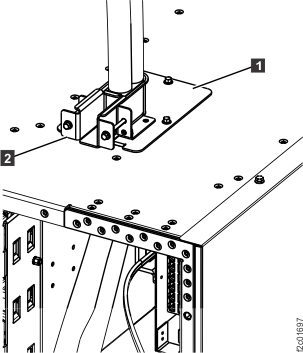
excessively tighten the clamp bracket. See Figure 1. Figure 1. Top exit line cord clamp
to secure the line cords. Do not
excessively tighten the clamp bracket. See Figure 1. Figure 1. Top exit line cord clamp