DS8000 Service Documentation Version 7.5

Routing FC-AL cables, business class

About this task

Note: If an FC-AL cable is damaged, you can use the point-to-point cabling diagrams to determine the other end of the cable. See Point-to-point cabling diagrams - FC-AL cables. Several FC-AL cables are tightly bundled together so it is extremely difficult to physically trace an individual FC-AL cable from end to end.

Procedure

  1. Find and uncoil the FC-AL cables that are coiled at the rear of the expansion rack you are installing. Do not remove the black protective cable connector covers.
  2. Determine the destination rack and storage enclosure for each FC-AL cable.
    1. Find the location code label at the free end of each FC-AL cable.
    2. If the labels include the physical location code (example: R2-G01-P1-C1-T2) refer to Figure 1 and Figure 2 and Figure 3 to translate to the destination storage enclosure. Then go to step 3.
    3. If the labels include only the three-character connection designators (example: 4A1), refer to Figure 2 and Figure 3 to translate to the destination storage enclosure. Then go to step 3.
    Figure 1. Cable labels, storage and I/O enclosure locations for physical location codes
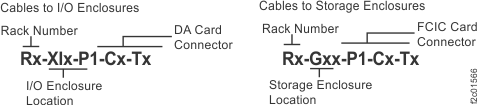
    Cable labels, storage and I/O enclosure locations for physical location codes
    Figure 2. Point-to-point cabling diagram for the FC-AL cables (Models 961, 96E) (business class) (rear view, racks 1 and 2)
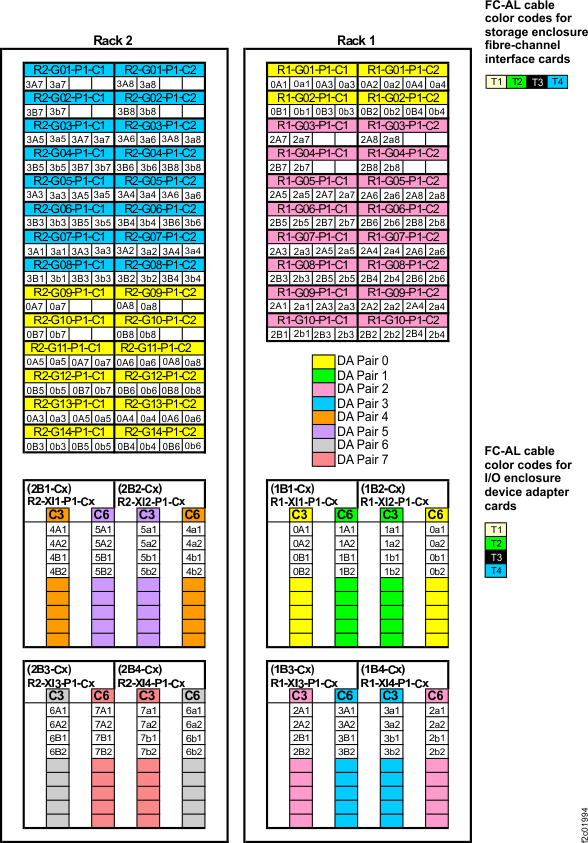
    Point-to-point cabling diagram for the FC-AL cables (Models 961, 96E) (business class) (rear view, racks 1 and 2)
    Figure 3. Point-to-point cabling diagram for the FC-AL cables (Models 961, 96E) (business class) (rear view, racks 3 and 4)
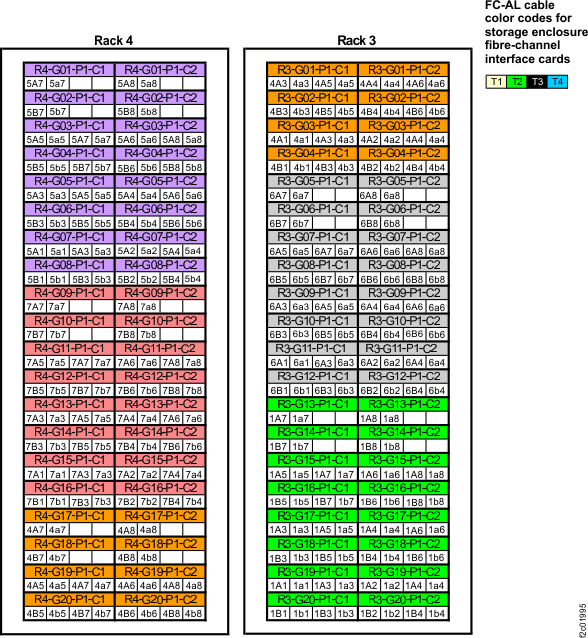
    Point-to-point cabling diagram for the FC-AL cables (Models 961, 96E) (business class) (rear view, racks 3 and 4)
  3. Route the FC-AL cables to the destination rack.
    1. Do not connect the FC-AL cables to the storage enclosure Fibre Channel interface cards until directed later in this procedure.
    2. Route each cable bundle to the destination rack through the rack to rack holes near the rack cover upper hinges at the rear of each rack.
  4. Route the FC-AL cables to the destination storage enclosure.
    1. Do not connect the FC-AL cables to the storage enclosure Fibre Channel interface cards until directed later in this procedure.
    2. FC-AL cables that will connect to the Fibre Channel interface card in the left side of a storage enclosure are routed down the left side of the rack.
      • Left-side cables have "C1" in the location code (e.g. Rx-XIx-P1-C1-Tx), or the last character in the connection designator will be odd (e.g. 2A5).
    3. FC-AL cables that will connect to the to the right Fibre Channel interface card in a storage enclosure are routed down the right side of the rack.
      • Right-side cables have "C2" in the location code (e.g. Rx-XIx-P1-C1-Tx), or the last character in the connection designator will be even (e.g. 2A6).
  5. Do not remove the black rubber protective connector covers at the end of each cable. Do not connect the cables until directed later in the install.
  6. Go to Installing and testing the expansion rack storage enclosures, business class.