Use this MAP to reinstall the licensed internal code (LIC bundle VRMF 64.2.xxx.xxx or later) for the management console.
| Media disk | CD or DVD label | Description | Installation time (approximate) |
|---|---|---|---|
| 1 | 2107 HMC Recovery DVD HMC Base 1 Version: xxxxxxxxx DVD: #1 |
Base operating system and base HMC code | 45 minutes |
| 2 | HMC Extensions Version: xxxxxxxxx CD: #2 |
Unique code support for 2107 | 4 minutes |
| 3 | HMC_ICAT_GUI Version: xxxxxxxxx CD: #3 |
DS Storage Manager code (also known as ICAT), the IBM graphical user interface | 8 minutes |


Please remove the disk media from the DVD/CD drive...
The machine will now reboot to complete the installation
==> Press any key to reboot the machine
Remove the media and press Enter. The HMC will reboot. When the reboot is complete, the following screen is displayed:
Please select one of the following options:
1 -- Install additional software from CD media
2 -- Finish the installation at a later time
Please enter your selection:
Type 1 and press Enter. When prompted, insert the HMC Extensions CD #2 and then press Enter.
Please select one of the following options:
1 -- Install additional software from CD media
2 -- Finish the installation at a later time
Please enter your selection:
Type 1 and press Enter. When prompted, insert the HMC Extensions CD #2 and then press Enter.
Please select one of the following options:
1 -- Install additional software from CD media
2 -- Finish the installation at a later time
Please enter your selection:
Type 1 and press Enter. When prompted, insert the HMC_ICAT_GUI CD #3 and then press Enter.
Please select one of the following options:
1 -- Restore critical console data from DVD-RAM media (Install Only)
2 -- Restore upgrade data from DVD-RAM media (upgrade from older Version/Release)
3 -- Finish the installation
Please enter your selection:
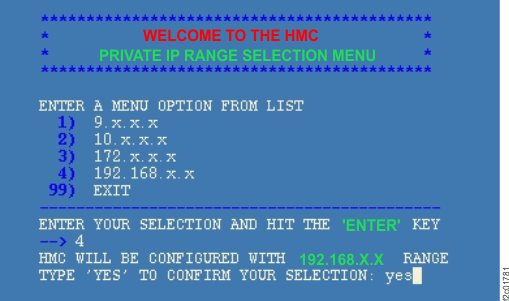
After you confirm your selection, the HMC boot continues.
Was the logon successful?
RMC communication could not be established to the LPARs; unable to determine the status of Preloaded code.
This
is normal because critical console data has not yet been restored.
Click OK to close the message window.| Is a private address range in use? | LIC bundle level | Action |
|---|---|---|
| Do not know | Any | Contact your next level of support. |
| Yes | Below 76.xx.xx.xx | Contact your next level of support. |
| Yes, 9.xx.xx.xx on a secondary HMC (model 941) | Below 76.10.xx.xx | Contact your next level of support. |
| Yes, 9.xx.xx.xx on a secondary HMC (model 951) | Below 86.10.xx.xx | Contact your next level of support. |
| Yes | 76.xx.xx.xx or above | Go to step 8 |
| No, the default 172.xx.xx.xx is in use | Any | Go to step 9 |
Example of SRC EA880936 text:
HSCE2358 Managed system 9117-MMA*10FE733 PRIMARY T-side code level 01FM340 not
compatible. Recommended HMC level: Version: 7 Release: 340 Service Pack: 3 HMC Build level:
20090709.1.

The HMC must be updated to the exact bundle level it was running, or restore of HMC critical data will fail. The HMC will be rebooted as part of the CDA process.
RMC communication could not be established to the LPARs; unable to determine the status of Preloaded code.
This
is normal because critical console data has not yet been restored.
Click OK to close the message window.| Address range in use | Enter for beginning IP address | Enter for ending IP address |
|---|---|---|
| 9.xx.xx.xx | 9.16.0.5 | 9.16.0.100 |
| 10.xx.xx.xx | 10.236.0.5 | 10.236.0.100 |
| 172.xx.xx.xx (default) | 172.17.0.5 | 172.17.0.100 |
| 192.168.xx.xx | 192.168.240.5 | 192.168.240.100 |
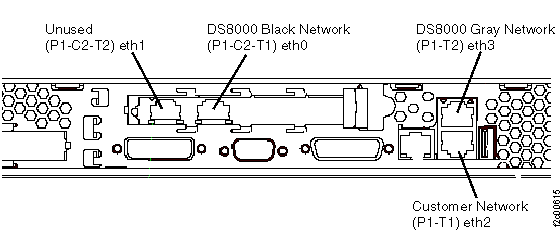
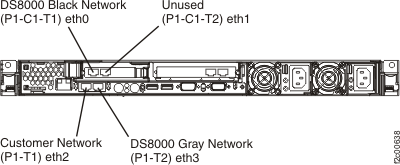
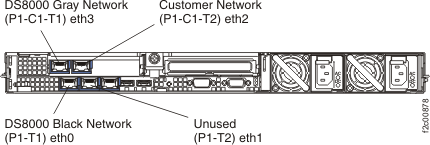
Interface eth0: Full duplex link
Partition SF75ABCD0ESS01: Active
Partition SF75ABCD0ESS11: Active
Interface eth3: Full duplex link
Partition SF75ABCD0ESS01: Active
Partition SF75ABCD0ESS11: Active
See MAP7001 Using the network topology tool.