MAP6120 Section-1
Procedure
- Perform the following steps to verify or set the customer network configuration:
 Enter the Console Name and Domain Name from the customization worksheets. Do not click
OK now, otherwise the console will be rebooted.
Enter the Console Name and Domain Name from the customization worksheets. Do not click
OK now, otherwise the console will be rebooted.
- Click the Routing tab. Perform a New, Change, or Delete task to the
customer's Gateway settings based on the customization worksheets. Set the Gateway Device to
eth2. If the Enable 'routed' check box is present,
ensure that it is not selected. Click OK. After you click OK, the console is automatically rebooted. A
message displays that informs you that the network configuration has changed. You can only
acknowledge this message. There might be a message that prompts you to create a new certificate.
Click Yes to create the new certificate. The network changes will be in
effect after console reboot.Attention: If the customer has installed their own certificate, this procedure will replace their certificate with a self-signed certificate. Inform the customer and ask them to recreate their certificate and reinstall.
- Route and connect the customer Ethernet cable to the eth2 port.
- Route the Ethernet cable through the tailgate and up to the rear of the management console
server.
Models configured for overhead cable management (top exit): route the Ethernet cable through
the top tailgate and cable trough at the left rear of the rack. See Figure 1. Figure 1. Overhead cable management (top exit) for Fibre Channel, communication, and power cables
through
the top tailgate and cable trough at the left rear of the rack. See Figure 1. Figure 1. Overhead cable management (top exit) for Fibre Channel, communication, and power cables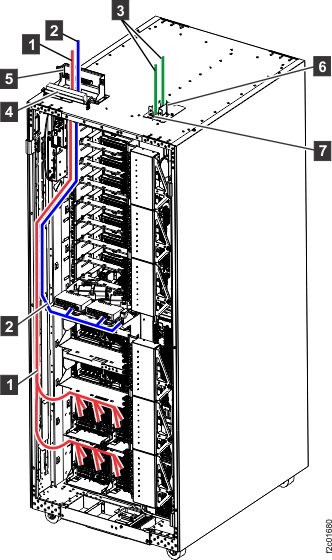 Figure 2. Routing customer host, customer network, and power cables, top or bottomNote: Figure shows top or bottom exit routing of host cables 1 , network cables 2 , and power cables 3 .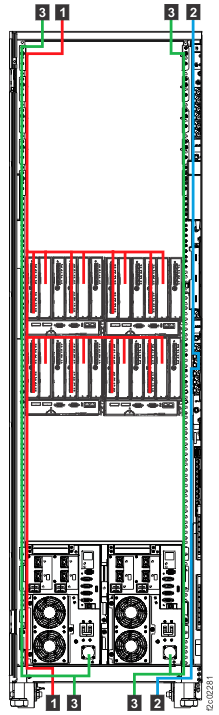
- Connect the cable to the customer network (Ethernet) connector (eth2) on the management console
server. See Figure 3 (X335 server) or Figure 4 (X336 server),
or Figure 5 (X3550 server), or Figure 6 (laptop management console) or Figure 7 (small form factor management console, Models
98x). Figure 3. Ethernet connectors on the rear of the X335 management console server
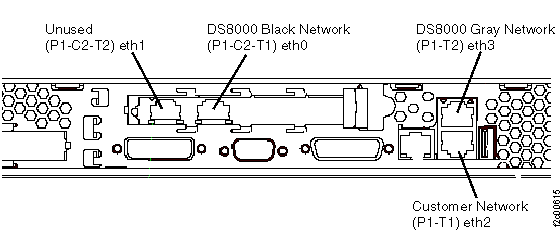 Figure 4. Ethernet connectors on the rear of the X336 management console server
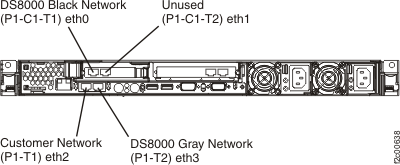 Figure 5. Ethernet connectors X3550 management console server (rear view)
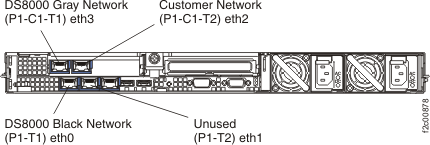 Figure 6. ThinkPad laptop customer modem and Ethernet connectors, rear of rack
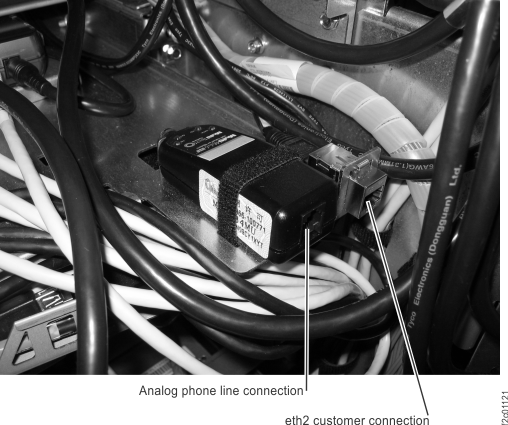 Note: Ethernet connector and modem connector may be reversed on some racks. Both connectors are located at the rear of the rack, to the right of the Ethernet switches, below the bottom storage enclosure air baffle.Figure 7. Model 98x management console customer modem (where applicable) and Ethernet connectors, rear of rack
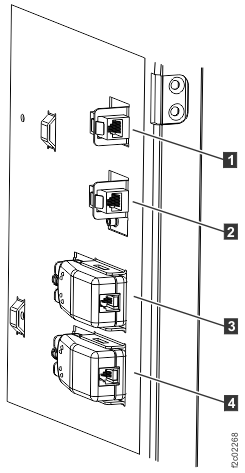 Note: Ethernet connection 1 is for management console 1 (MC 1). Ethernet connection 2 is for management console 2 (MC 2).
- Route the Ethernet cable through the tailgate and up to the rear of the management console
server.