DS8000 Service Documentation Version 7.5
Disconnecting Ethernet cables if new HMC will
be secondary role (MC2)
Procedure
- Will the Rack-1 you are installing be connected
to an existing Rack-1 (already installed) by private network cables
(gray and black)?
- Yes. The two Rack-1s will share their internal management
consoles (primary and secondary roles). Go to the next step.
- No. Stop. You should not be in this section. Go back to Checking cables on all racks and ensure you answered
the questions correctly.
- At the rear of the Rack-1 being installed do the following.
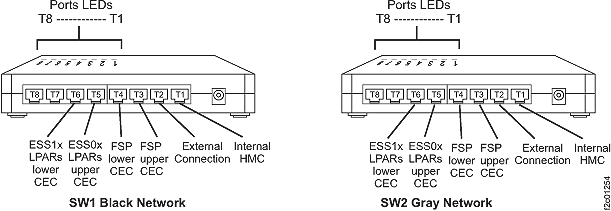
See Figure 1.
- Disconnect the T1 cable from the SW1 Black Network Ethernet
switch.
- Disconnect the T1 cable from the SW2 Gray Network Ethernet
switch.
Note: These cables will be reconnected in a later step.
Figure 1. 8-port Ethernet switch port
designations (SW1, SW2-Tx) Model 941, Model 951, and Model 961
- Does the storage facility to be installed have one or more
storage expansion racks?