DS8000 Service Documentation Version 7.5

Checking customer power type and DC-UPS input phase selection settings

About this task

Attention: The DC-UPS input phase selection settings must be correct for the type of power provided by the customer. If the setting is not correct, the DC-UPS will not power on.

Procedure

  1. Determine the customer power type:
    Table 1. Power label colors according to power type
    Customer power type Mainline power cable label and DC-UPS label
    Single-phase (200 - 240 V) 200 - 240 V 1-phase (green)
    Three-phase low voltage (200 - 240 V) 200 - 240 V 3-phase (blue)
    Three-phase high voltage (380 - 415 V) 380 - 415 V 3-phase (yellow)
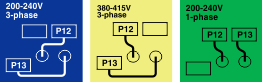
  2. At the rear of the rack, set the DC-UPS input phase selection cables (P12/P13) for your customer power type. Ensure both DC-UPSs are set the same.
    1. Use Figure 1 to determine the setting for your customer power type determined in step 2.
    2. Figure 3 shows the phase selection cables that are below the CB1 main line switch.
    3. If the cable setting must be changed:
      1. Loosen the screw  1  (upper left) and open the DC-UPS phase selection cover.
      2. Reconnect P12 and P13 to match the customer power type.
      3. Close the DC-UPS phase selection settings cover and tighten the thumbscrew.
      Figure 1. DC-UPS input phase selection label
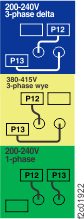
      Image of DC-UPS input phase selection label
    Figure 2. DC-UPS input phase selection label location
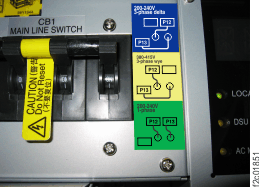
    DC-UPS input phase selection label location
    Figure 3. DC-UPS input phase selection
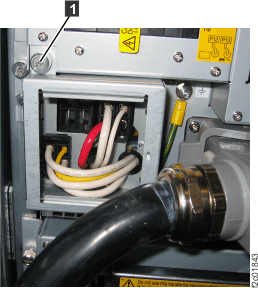
    DC-UPS input phase selection
  3. Uncoil the mainline power cables from the ship group.
    CAUTION:
    Do not connect the storage facility power cables to customer power until you are instructed in a later installation section.
  4. Locate the DC-UPS connector on the mainline power cables. Observe the label on the rear surface of the connector. Note the label color and the power type. See Figure 4 and Figure 5.
    Figure 4. Mainline power cable connector power type label location
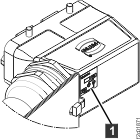
    Mainline power cable connector power type label location
    Figure 5. Mainline power cable connector, power type labels
    Mainline power cable connector power type labels
  5. The customer power type, the mainline power cable label and the DC-UPS input phase setting must all match.
    1. See Table 1.
    2. Do you have the correct mainline power cables?
      • Yes, continue at the next step.
      • No, the DC-UPS will not power on. Stop and resolve the problem.
  6. Continue with the installation according to the type of customer power: