DS8000 Service Documentation Version 6.3.3
MAP1240 Locating FRUs using identify indicators
About this task
The primary method to locate a FRU to be exchanged is by using the hierarchy of identify indicators for that FRU. When the FRU to be exchanged has been selected in a serviceable event, or selected using the FRU replace options, the management console will cause the hierarchy of identify indicators to be lit.
For example, if
you select to exchange a storage enclosure DDM FRU from a serviceable
event, the following identify indicators will be lit:
- Rack identify indicator (on the rack operator panel) for the rack that contains the FRU
- Storage enclosure identify indicator for the enclosure that contains the FRU
- DDM identify indicator for the specific DDM that is to be replaced
For those FRUs that do not have an identify indicator (see Table 1, Table 2), the rack and enclosure identify indicators will still be lit. To determine the actual FRU within the enclosure, you need to use the last part of the location code for that FRU. See MAP1245 Finding FRUs by using location codes
For more information about LEDs, see LED indicators.
MAP1240 Section-1
Procedure
- Observe the operator panel identify LED
 on each rack in the storage facility.
Figure 1. Model 941 "Identify" indicator (LED) on a rack operator panel
on each rack in the storage facility.
Figure 1. Model 941 "Identify" indicator (LED) on a rack operator panel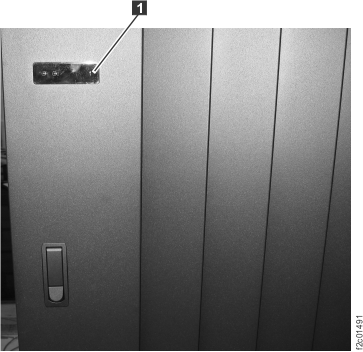 Figure 2. Model 951 "Identify" indicator (LED) on the upper right of the front cover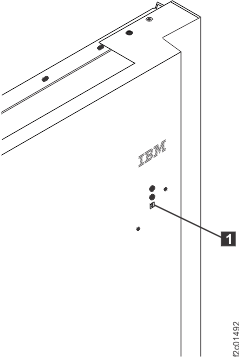
MAP1240 Section-2 (battery enclosure)
Procedure
At the rear of the rack, find the battery enclosure with
the blinking identify LED .
. Figure 3. All models
battery module enclosure locations (rear)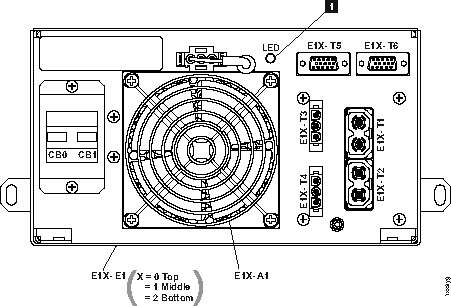
Figure 4. All models battery module set locations (front)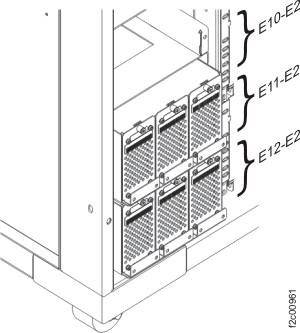
MAP1240 Section-3 (DASD fan tray)
Procedure
1. At the front of the rack, find the DASD fan tray with
the blinking identify LED [A1] [A2] [A3].
Figure 5. Models
92x, 93x, 92E, 9A2, 9B2, 9AE, 941 "Identify" indicator (LED) for a
DASD fan tray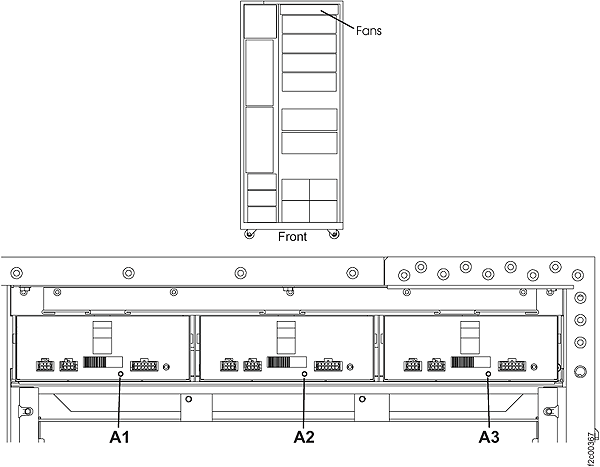
MAP1240 Section-4 (fan sense card)
Procedure
1. At the front and rear of the rack, find the fan sense
card with the blinking identify LED .
. - C3 location is at the front of the rack
- C4 location is at the rear of the rack
Figure 6. Models 92x, 93x, 9A2, 9B2, 941 LEDs on the fan sense
cards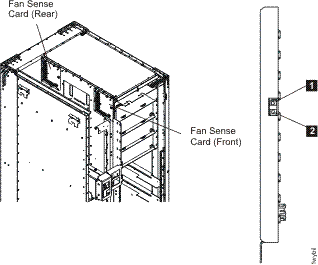
MAP1240 Section-5 (local remote or zSeries local remote switch card)
Procedure
At the rear of the rack,
find the local remote switch card or zSeries local
remote switch with the blinking identify LED (Figure 7) or LED  (Figure 8).
(Figure 7) or LED (Figure 8). Figure 7. Model 941 "Identify"
indicators (LEDs) for local remote and zSeries local remote switch
cards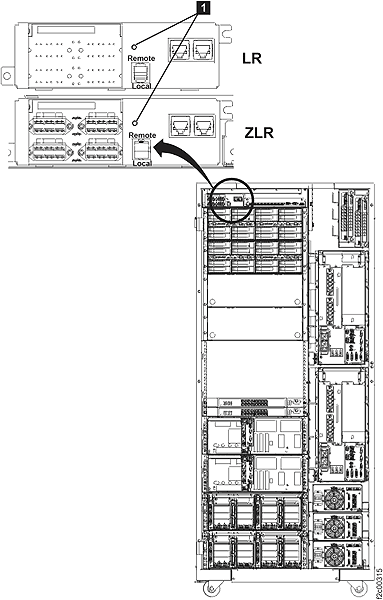
Figure 8. Model 951 "Identify"
indicators (LEDs) for local remote and zSeries local remote switch
cards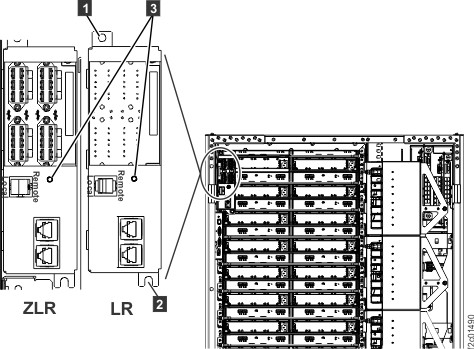
MAP1240 Section-6 (primary power supply, PPS)
Procedure
- 1. At the front of the rack, find the primary power supply
with the blinking identify LED .
- E1 location is upper PPS
- E2 location is lower PPS
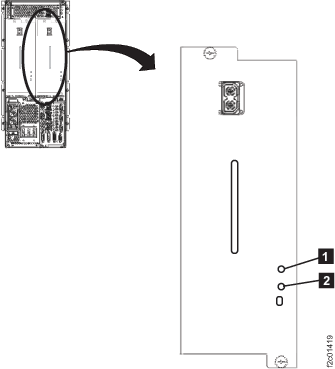
Figure 9. All models "Identify" indicator (LED) for a PPS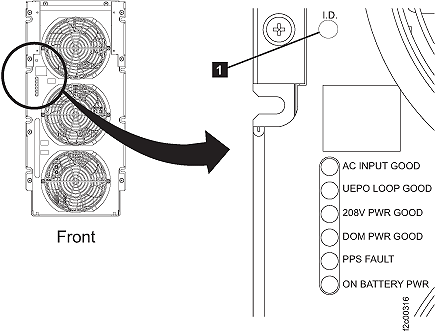
- The Models 941, 94E 5/12V DDM
power module identify LED is at the rear of the rack. Figure 10. "Identify" indicator (LED) for a 5/12V DDM power module
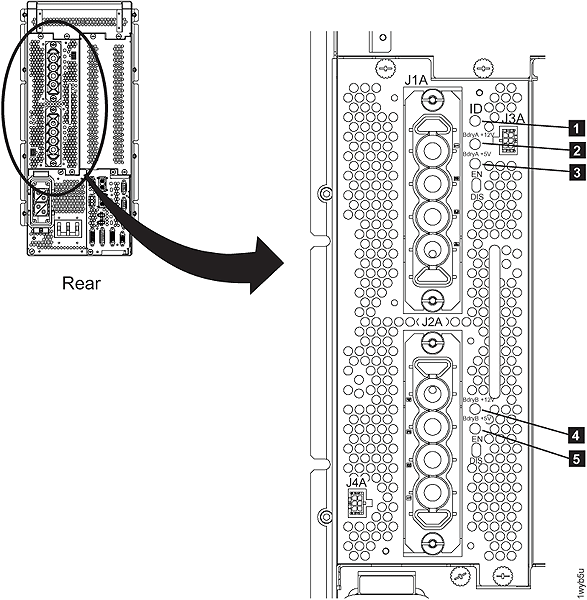
- The booster power module identify
LED is at the rear of the rack. Figure 11. All models "Identify" indicator (LED) for a booster power module
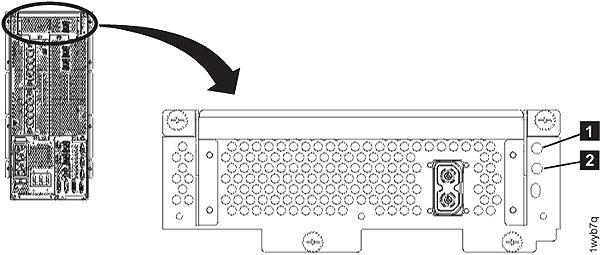
- The Models 951, 95E 208V DDM power module
identify LED is at the rear of the rack. Figure 12. "Identify" indicator (LED) for a 208V DDM power module
MAP1240 Section-7 (rack identity card)
Procedure
1. At the rear of the rack, observe the identify LED .
. Figure 13. Model 941 "Identify"
indicator (LED) on the rack identity card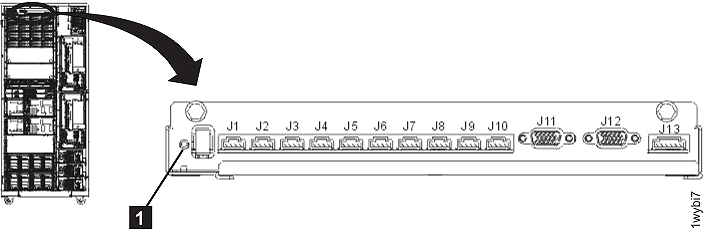
Figure 14. Models 951, 95E "Identify"
indicator (LED) on the rack identity card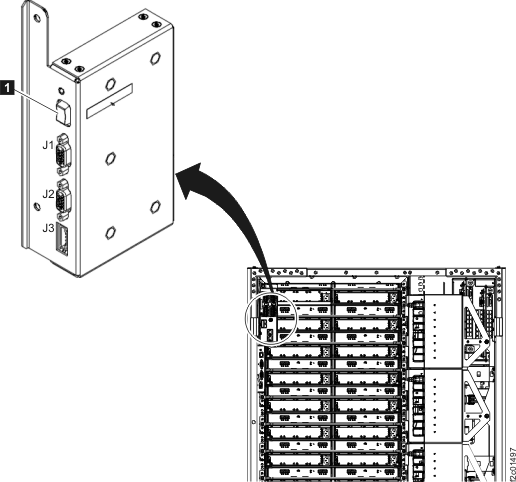
MAP1240 Section-8 (RPC card)
Procedure
At the rear of the rack, find the
RPC card with the blinking identify LED:
- Models 941, 951: or
 (See Figure 15.)
Figure 15. "Identify"
indicator (LED) for an RPC card (Models
941, 951)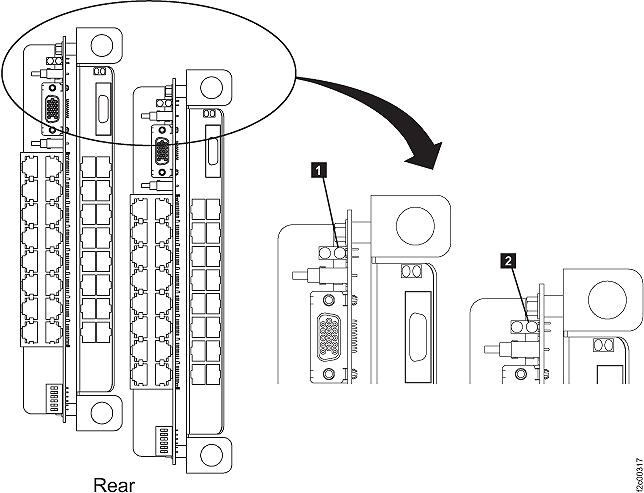
MAP1240 Section-9 (storage enclosure [16 DDM slots] Models 92x, 93x, 92E, 9A2, 9B2, 9AE, 941)
Procedure
- 1. At the front and rear of the rack, find the storage
enclosure with the enclosure identify LED
 blinking on one or both FCIC cards. Figure 16. LEDs on a Fibre Channel interface card (at a storage enclosure)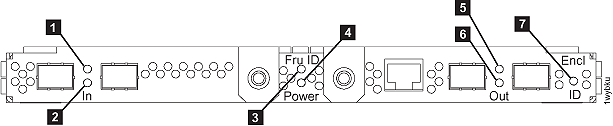
- The FCIC card "identify" indicator (LED) is shown in Figure 16.
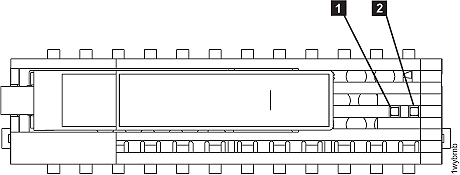
- The DDM "Identify" indicator (LED) is shown in Figure 17. Figure 17. LEDs on a disk drive module (DDM)
MAP1240 Section-10 (CEC Enclosure Models 941, 951)
Procedure
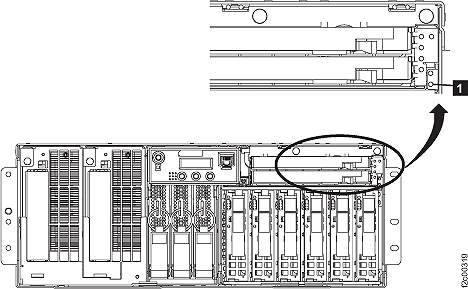
- At the front of the rack, find the CEC enclosure with the
enclosure identify LED blinking. Figure 18. The "Identify" indicator (LED) for a CEC enclosure (front)
- Find the FRU identify LED location that is blinking using Table 3 and Figure 19 through Figure 21.
Table 3. FRU identify LED locations on the CEC enclosure FRU Reference CEC enclosure Figure 19, LED ; Figure 20, LED CEC enclosure control panel No LED, use location code CEC enclosure disk drive Figure 19, LED CEC enclosure disk drive backplane assembly Figure 19, LED 
CEC enclosure fan Figure 19, LED CEC enclosure I/O backplane assembly Figure 20, LED CEC enclosure PCIe four port card Figure 21, LED 
CEC enclosure PCIe single port card Figure 21, LED CEC enclosure PCIe single port card (slot 5) Figure 21, LED CEC enclosure power supply Figure 20, LED 
CEC enclosure RIO card Figure 21, LED CEC enclosure RIO card ports 1 and 2 Figure 21, LED CEC enclosure service processor card Figure 20, LED CEC enclosure system processor backplane assembly Figure 19, LED CEC enclosure system processor card No LED, use location code
(See Exchange the CEC enclosure system processor card for more information.)CEC enclosure system processor dummy card No LED, use location code CEC enclosure system processor voltage card Figure 19, LED CEC enclosure system processor voltage dummy card No LED, use location code CEC enclosure VPD card No LED, use location code CEC enclosure VPD pass-through card Figure 20, LED Figure 19. LEDs on the CEC enclosure (rear)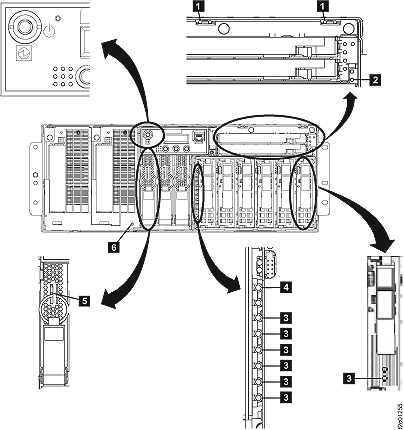 Figure 20. LED CEC enclosure right rear
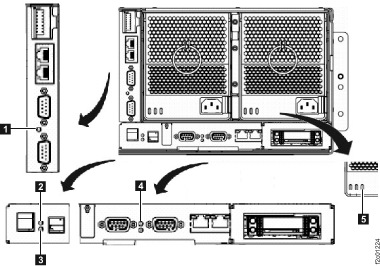 Figure 21. LED CEC enclosure left rear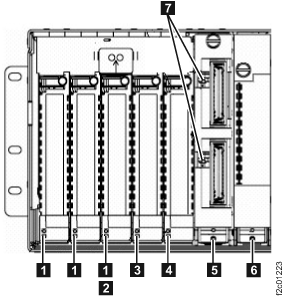
MAP1240 Section-11 (I/O enclosure Models 941, 94E, 951, 95E)
Procedure
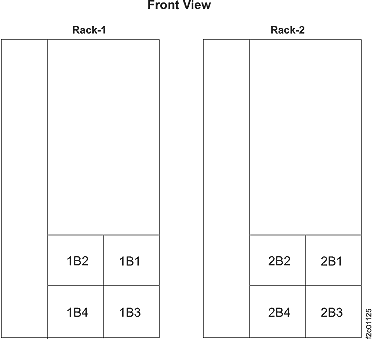
- At front of rack, note the I/O enclosure location codes,
as shown in Figure 22. Figure 22. I/O enclosure locations in front of rack
- Find the I/O enclosure with the I/O enclosure identify
blue LED on solid. See Figure 23 and Figure 24. Figure 23. "Identify" indicator (LED) for an I/O enclosure (front)
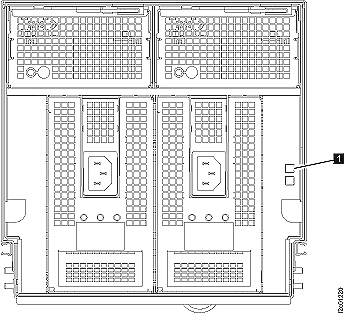 Figure 24. "Identify" indicator (LED) for an I/O enclosure (rear)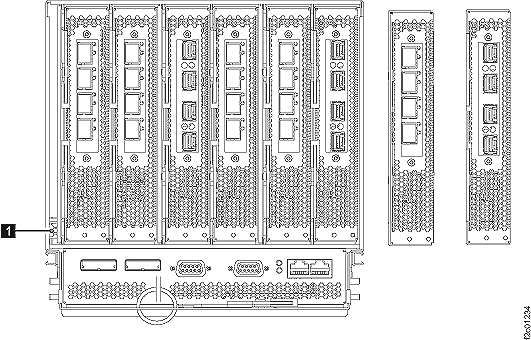
- Find the FRU identify LED location that is blinking using Table 4, Figure 25, and Figure 26.
Table 4. FRU identify LED locations on the I/O enclosure FRU Reference I/O enclosure device adapter card Figure 25, LED I/O enclosure Fibre Channel host card, long wave Figure 25, LED I/O enclosure Fibre Channel host card, short wave Figure 25, LED I/O enclosure fan Figure 26, LED I/O enclosure identify Figure 23, LED
Figure 24, LEDI/O enclosure power supply Figure 26, LED I/O enclosure PCIe and SPCN card Figure 25, LED Figure 25. LEDs on the CEC enclosure (rear)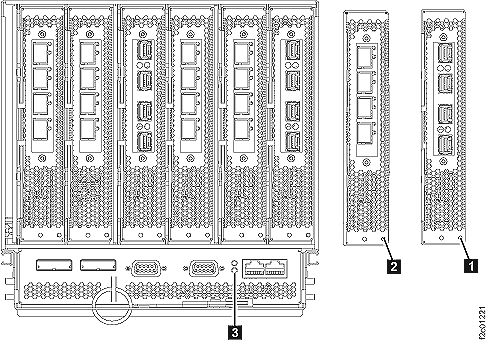 Figure 26. LEDs on the I/O enclosure (front)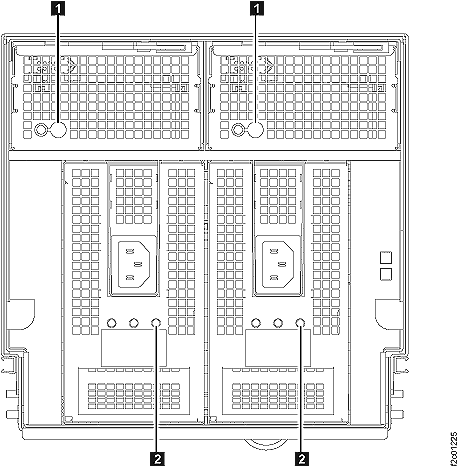
MAP1240 Section-12 (storage enclosure [12 or 24 DDM slots] Model 951, 95E)
Procedure
- At the front of the rack, find the storage enclosure with
the enclosure identify LED lit solid. Figure 27. LEDs on the front of the storage enclosure

- To locate a DDM: at the front of the rack, find the DDM
with the identify LED blinking. Figure 28. Disk drive modules (DDMs) LEDs (24 DDM slot storage enclosure)
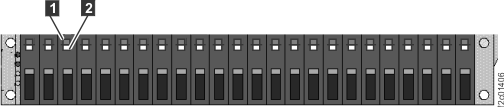 Figure 29. Disk drive modules (DDMs) LEDs (12 DDM slot storage enclosure)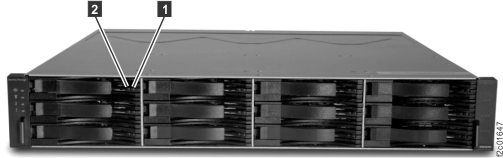
- To locate a Fibre Channel interface card (FCIC): at the
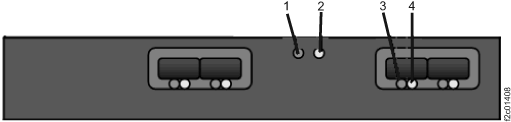
rear of the rack, find the FCIC with the attention/identify LED blinking. Figure 30. LEDs on a Fibre Channel interface card (at a storage enclosure)
- To locate a storage enclosure power supply: at the rear
of the rack, find the storage enclosure power supply with the attention/identify
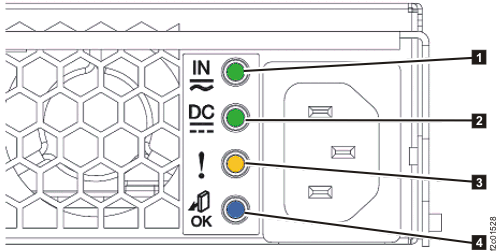
LED blinking. Figure 31. Storage enclosure power supply LEDs