DS8000 Service Documentation Version 6.3.3
Installing battery module sets
Perform this task on any rack from which the battery module sets have been removed.
Procedure
- Remove the Weight Reduction Status chart from the CE
envelope. Additional copies are in the boxes on the pallet. The Weight Reduction
Status chart contains a record of the original installed location of each
battery module. For a sample chart, see Figure 1.
For a description of the columns in the chart, see Table 1. Then go to step 4. Note: If the status chart cannot be found, contact the next level of support. There is a procedure to get a PDF copy sent from San Jose manufacturing.Figure 1. Sample of Models 92x, 93x, 94x, 95x, 9Ax, 9Bx Weight Reduction Status table (Model 922 rack shown)
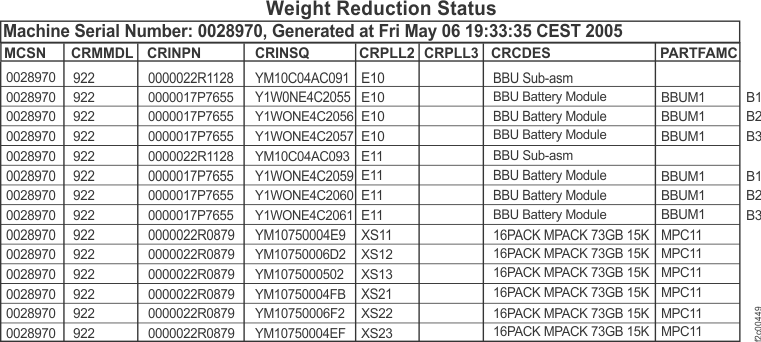
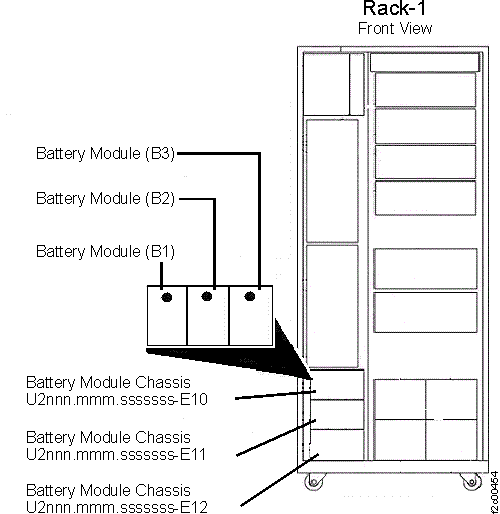
Table 1. Description of columns in a sample Weight Reduction Status chart Column in chart Description of column CRINSQ Battery module serial number CRMMDL Rack model number (mmm in the location code for the battery module chassis: U2nnn.mmm.sssssss-E1x-E2) MCSN Machine serial number CRPLL2 Location of the battery module chassis (xxx in the location code for the battery module chassis: U2nnn.mmm.sssssss-xxx-E2; see Figure 2) (margin to the right of the table) Location of the battery module, handwritten by manufacturing (when the rack is viewed from the front, B1 is on the left; see Figure 2) - Use the information in the status chart to determine
where each battery module must be installed, and then go to step 5. Figure 2. Locations of the battery modules, (Rack models 921, 922, 92E, 931, 932, 941, 94E, 951, 95E, 9A2, 9AE, 9B2 )