DS8000 Service Documentation Version 6.3.3
Installing storage enclosures
Perform this task on any rack from which the storage enclosures have been removed.
Procedure
- Remove the Weight Reduction Status chart from the CE envelope.
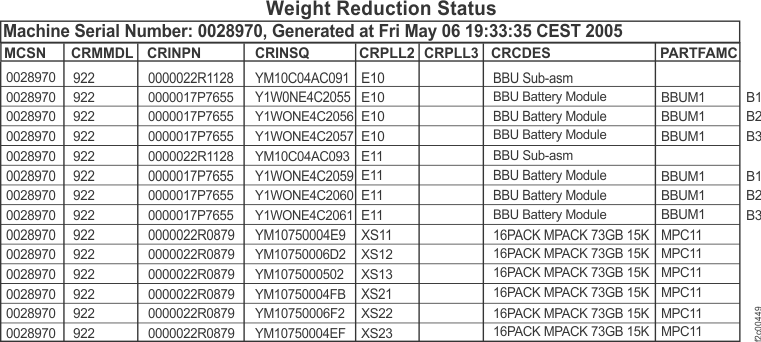
The Weight Reduction Status chart contains a record of the original installed
location of each storage enclosure. For a sample chart, see Figure 1. Figure 1. Sample of Models 92x, 93x, 94x, 95x, 9Ax, 9Bx Weight Reduction Status table (Model 922 rack shown)
- Use the information in the chart to determine where each storage
enclosure must be installed. For a description of the columns in the chart,
see Table 1.
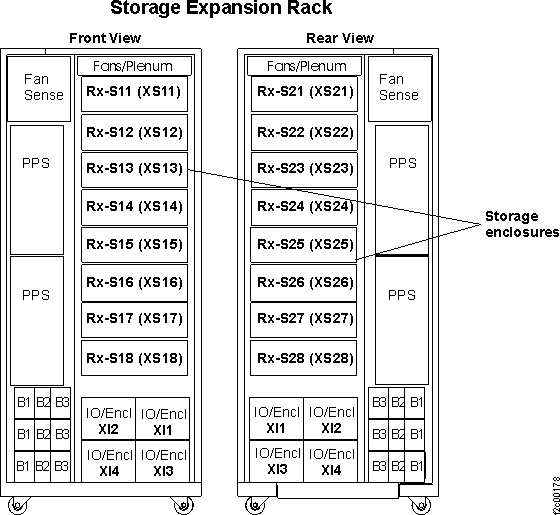
Table 1. Description of columns in a sample Weight Reduction Status chart Column in chart Description of column CRINSQ Storage enclosure serial number (on the front of the storage enclosure, at the far right, between the rack mounting screws; the number is in a vertical orientation) CRMMDL Rack model number MCSN Machine serial number CRPLL2 Location of the storage enclosure (see Figure 2 and Figure 3) Figure 2. Physical location codes (Rack-1, Models 921, 922, 931, 932, 941, 9A2, 9B2)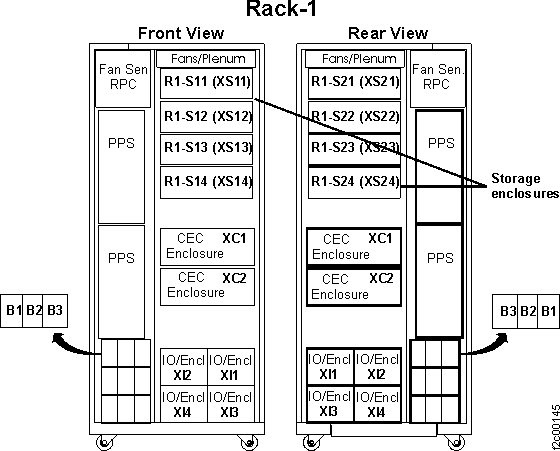 Figure 3. Physical location codes (expansion rack, Models 92E, 94E, 9AE)
 CAUTION:A fully populated storage enclosure weighs 121 kg (55 lb). This weight exceeds the safe lifting limit for a single service representative. Installation of this feature requires two service representatives.Note: DDMs are logically configured to a particular slot and if removed must be put back in the same slot.
 - Using the location information from step 2, install the storage enclosures in their original locations.