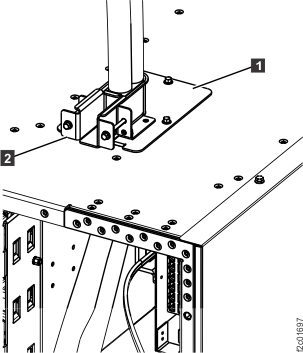
Procedure
- The mainline power cable that connects to PPS-1
(upper)
 is longer than the mainline power
cable that connects to PPS-2 (lower)
is longer than the mainline power
cable that connects to PPS-2 (lower)  . See Figure 1. Use
the cable label and part number (P/N) to identify the longer cable.
. See Figure 1. Use
the cable label and part number (P/N) to identify the longer cable. Table 1. Cable label and part number Feature Code P/N of shorter cable P/N of longer cable 1090 - 3 phase 60A non EMEA 22R1190 22R2222 1091 - 3 phase 60A EMEA 22R3794 22R3795 1092 - 3 phase 60A Japan 22R1191 22R2224 1093 - 3 phase 60A Chicago 22R1188 22R1189 1060 - 1 phase non EMEA 17P9592 17P9593 1065 - 1 phase Chicago 17P9590 17P9591 1067 - 1 phase EMEA 17P9595 17P9596 CAUTION:Do not connect the storage facility mainline power cables to customer power until instructed to do so.Figure 1. Mainline power cables (Model 95x)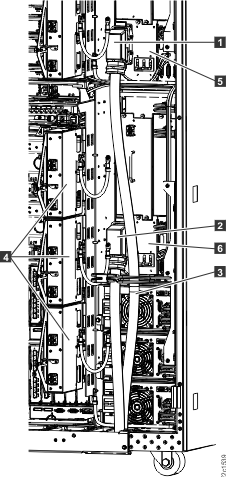
- Route but DO NOT CONNECT the mainline power cables. See Figure 1.
- Route the longer mainline power cable
 up through the tailgate.
 - Route the longer mainline power cable behind the PPS
208V power module cables as shown in Figure 2
 ) and DO NOT CONNECT it to PPS-1 (upper)
 - Use one of the cable ties
 to fasten it to the bracket .
 - Route the shorter mainline power cable
 up through the tailgate as shown and
DO NOT CONNECT it to PPS-2 (lower) .
up through the tailgate as shown and
DO NOT CONNECT it to PPS-2 (lower) .
Notes:- If this is on a raised floor, route the cables down through the floor cutout and near the customer power connectors.
- If this is not on a raised floor, route the cables underneath the frame behind the rear caster so they exit to the side. The cables must not exit the rack in the front or rear service areas.
CAUTION:Do not connect the storage facility mainline power cables to customer power until instructed to do so.Figure 2. Model 951 routing longer mainline power cables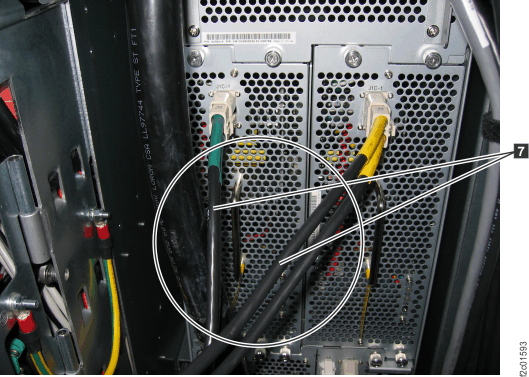
- Route the longer mainline power cable
- For the top
exit line cord features, the mainline power cable that connects to
PPS-2 (lower) is longer than the mainline power
cable that connects to PPS-1 (upper) . See Figure 4. Use
the cable label and part number (P/N) to identify the longer cable.
Table 2. Cable label and part number (top exit line cord) Feature Code P/N of shorter cable P/N of longer cable 1095 - 3-phase 60A Japan/non-EMEA (RS) 99Y1177 99Y1176 1096 - 3-phase 40A EMEA 99Y1174 99Y1173 1097 - 3-phase 30A Japan (IEC 309) 99Y1186 99Y1185 1070 - 1-phase 60A Japan/non-EMEA (IEC 309) 99Y1180 99Y1179 1071 - 1-phase 40A EMEA 99Y1183 99Y1182 CAUTION:Do not connect the storage facility mainline power cables to customer power until instructed to do so.Figure 3. Removing top exit line cord cover plate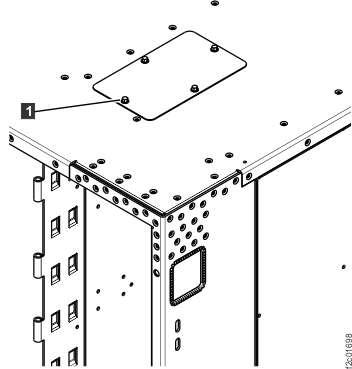 Figure 4. Model 951, 95E power cables (top exit)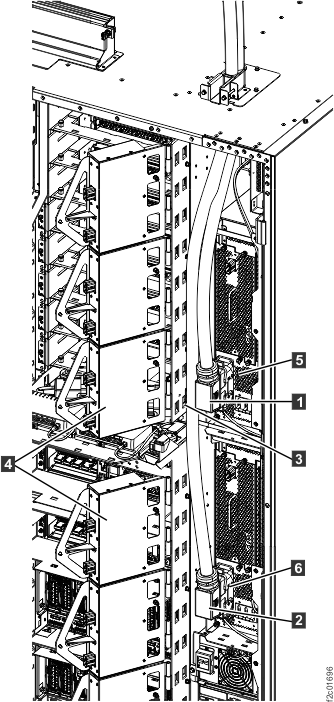
- Ensure the PDUs
 are in the open position. See Figure 4.
 - Remove the top exit cover plate.
- Route but DO NOT CONNECT the
mainline power cables. See Figure 4.
- Route the longer mainline power cable down through the opening.
- Route the longer mainline power cable behind the PPS
208V power module cables as shown in Figure 5 but DO NOT CONNECT IT to PPS-2 (lower) .
- Use one of the cable ties to fasten it to the bracket .
- Route the shorter mainline power cable down through the opening as shown
but DO NOT CONNECT it to PPS-1 (upper) .
CAUTION:Do not connect the storage facility mainline power cables to customer power until instructed to do so.Figure 5. Model 951 routing longer mainline power cables - Route the longer mainline power cable
- Remove the adjustable clamp
bracket from the top exit line cord clamp
housing . Position the housing around the
power cables and secure to the rack using the three screws from step
9b, above. Install the adjustable clamp bracket into the housing,
but do not tighten at this time. See Figure 6. Figure 6. Top exit line cord clamp