Complete the steps in this section for each expansion
rack that you just installed.
Procedure
- Locate the interrack decorative
covers kit. It contains two side interrack covers and one top interrack
cover. There are two versions of the interrack decorative covers kit.
- Early version - the covers are packaged in a long narrow cardboard
box normally taped to the expansion rack. The side interrack covers
are one piece. Go to step 3.
- Later version - the covers are packaged in the large ship
group box. Each side interrack cover is in two pieces that are hinged
together. Go to the next step.
- Assemble each of the side interrack
covers as follows:
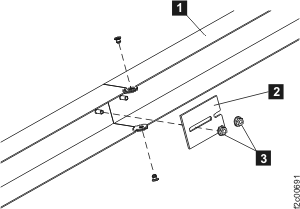
- Open the hinged side interrack cover 1 so
that it is straight. See the following figure.
- Loosen the two nuts 2 on
the threaded studs next to the hinge points.
- Slide the plate 3 so that
it engages both studs.
- Tighten both nuts.
Figure 1. Assembling
the later version of the interrack decorative side covers
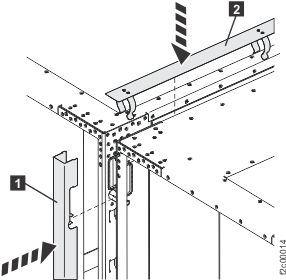
- Install each of the two interrack side covers by pushing the cover
into place over the interrack spacing studs. Take care not to interfere with
any interrack cables. See Figure 2.
- Install the top interrack cover by pressing it down squarely. The
spring clips should hold the cover in place. See Figure 2.
Figure 2. Installing
the interrack decorative covers
- Continue with Finish installation and cleanup.