DS8000 Service Documentation Version 7.5

Checking rack power system ground continuity (wired)

Before you begin

Attention: Use an IBM-approved analog multimeter. Do not use a digital meter.

Procedure

  1. Switch off the customer circuit breaker that supplies the AC voltage to the mainline power cables.
    CAUTION:
    Do not connect the mainline power cables until instructed to do so.
  2. Attention: Use lockout and tagout procedures as defined in the Electrical Safety for IBM® Customer Engineers.
  3. Verify the MAIN LINE circuit breaker  1  (CB00) on the rear of each primary power supply is set to Off (down). Refer to Figure 1.
    Figure 1. Rear view of PPS showing CB00
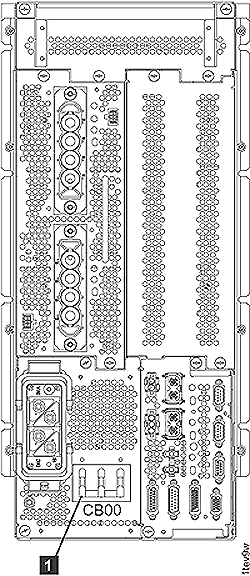
    Rear view of PPS showing CB00
  4. Verify the DS8000® mainline power cables are not connected to the customer power.
  5. Connect the DS8000 mainline power cable to each primary power supply (PPS) input power connector.
    Note: Ensure that you connect the long mainline power cord to the upper primary supply and the short mainline power cord to the lower primary supply.
  6. Prepare the multimeter to measure 0.1 ohm or less resistance. Place one lead of the multimeter on the green and yellow wire at the customer end of each mainline power cable. Place the other lead on the conductive metal of each PPS enclosure. Refer to Figure 2.

    Is there more than 0.1 ohm of resistance?

    Figure 2. Prepare multimeter to measure ohm resistance
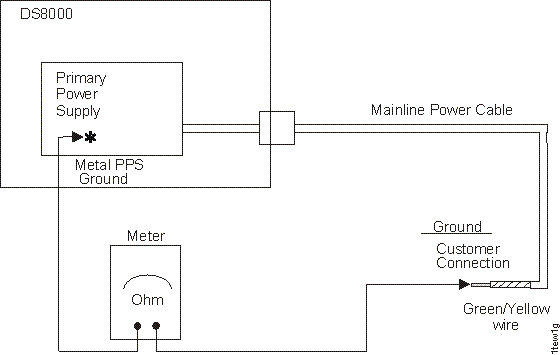
    Preparing multimeter to measure ohm resistance
  7. Disconnect the DS8000 mainline power cables from each PPS input power connector.
  8. Instruct the customer to call a licensed electrician to connect each wired mainline power cable to the customer mainline power source.
    Attention: For EMEA installations, provide the following information to the electrician.
    EMEA Electrician Information

    The mainline power cord of this machine must be connected to the customer's mainline power source by a licensed electrician. The mainline power cable cannot be modified in any way.

    Table 1. Mainline power cord, color reference (Models 941, 94E, 951, 95E)
    3-phase color code - early version 3-phase color code - later version 1-phase color code
    • L1 (phase 1) = black
    • L2 (phase 2) = blue
    • L3 (phase 3) = brown
    • PE (ground) = green/yellow
    Note: The connection to the AC power must be made without neutral, the blue wire must be used as a phase.
    • L1 (phase 1) = brown
    • L2 (phase 2) = black
    • L3 (phase 3) = gray
    • PE (ground) = green/yellow
    • L1 (phase 1) = brown
    • Neutral = blue
    • PE (ground) = green/yellow
    • For 3-phase machines: The machine must be connected to a 3-phase AC power. The mainline power cable is a four-conductor cable.
    • For 1-phase machines: This machine must be connected to a 1-phase AC power. The mainline power cable is a three-conductor cable.
  9. Continue with Checking customer ground continuity with customer CB off (wired).