DS8000 Service Documentation Version 7.5
Unpacking the expansion rack and verifying the ship group is
complete
Procedure
- On each rack being installed, open the front and rear
covers.
- Open the front cover.
- Open the left rear cover (customer access area).
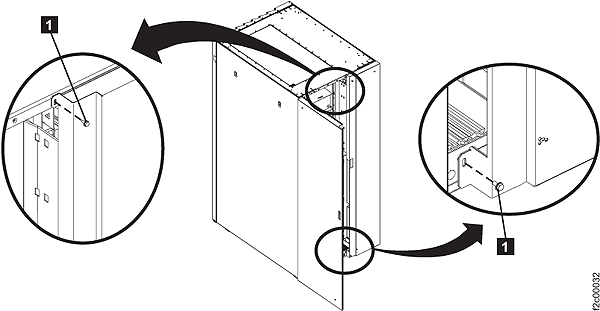
- Open the right rear cover (trained service personnel
access area only). Remove the two screws 1 .
See Figure 1. The
screws must be reinstalled when the cover is closed to prevent customer
access.
Figure 1. Removing retaining
screws on right rear machine cover
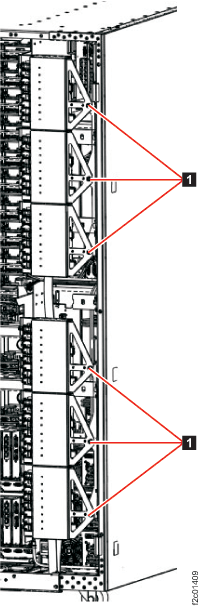
- On each rack being installed, to access the rear of the
DC-UPS, unfasten 1 and then rotate the
upper and lower sets of power distribution units (PDUs) away from
the rear of the DC-UPS, as shown in Figure 2.
Figure 2. Power distribution units in normal position (rack rear view)
- If the expansion rack was shipped directly from
IBM manufacturing, remove the CE Unpacking Instructions from the Customer
Engineer envelope that is taped to the front of the storage facility below
the CEC enclosures. Use the CE Unpacking Instructions to
unpack the storage facility frame(s)
and prepare it for installation.
- Verify that all items in the
ship group were received.
- The ship group comes in one or more large boxes on pallets.
The customer may not allow the pallet and large box in their machine
room. Consequently, you can end up with a pile of parts on the floor.
- The side decorative covers that go between
the racks are packed in the large ship group box. The side covers
fold in half.
- If the expansion rack is from IBM manufacturing,
the hardcopy listing of the ship group contents is shipped loose with
the other parts inside the large boxes. If it is missing, check if
it was accidently discarded along with the pallets and large boxes.
An additional copy of the paperwork may be included in the CE Envelope.
- The official ship group listing of parts is included
in the ship group.
- Place the ship group parts list in the
document enclosure (front upper left of rack 1). This list can be
used for future removal of the storage facility.