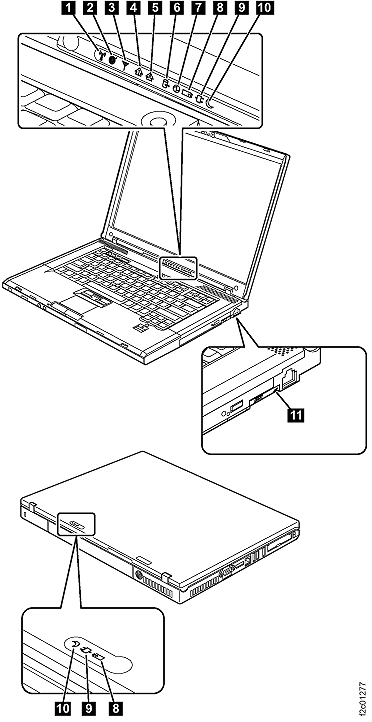
Wireless status |
- Green
- The wireless feature (802.11 standard or 802.11n) is on, and the
radio link is ready for use.
- Blinking green
- Data is being transmitted.
|
Wireless PAN status |
- Green
- Bluetooth wireless is operational. This indicator is on when Bluetooth
wireless is on and not in suspend mode.
|
Wireless WAN status |
- Green
- The wireless WAN is on, and the radio link is ready for use.
- Blinking green
- Data is being transmitted.
|
Num lock |
- Green
- The numeric keypad on the keyboard is enabled. To enable or disable
the keypad, press and hold the Shift key, and press the NumLk (ScrLk)
key.
|
Caps lock |
- Green
- Caps Lock mode is enabled. To enable or disable Caps Lock mode,
press the Caps Lock key.
|
Drive in use |
- Green
- Data is being read from or written to the hard disk drive, the
diskette drive, or the drive in the Serial Ultrabay Slim device. When
this indicator is on, do not put the computer into standby mode or
turn off the computer.
Note: Do not move the system while the green
drive-in-use light is on. Sudden physical shock could cause drive
errors.
|
Power on |
- Green
- The computer is on and ready to use. This indicator stays lit
whenever the computer is on and is not in standby mode.
|
Battery status |
- Green
- The battery is charged between 80% to 100% of the capacity, and
being discharged between 0% to 80% of the capacity.
- Blinking green
- The battery is charged between 20% to 80% of the capacity, and
being charged.
- Orange
- The battery is charged between 5% and 20% of the capacity, and
being discharged.
- Blinking orange (slow)
- The battery is charged between 5% to 20% of the capacity, and
being charged.
- Blinking orange (rapid)
- The battery is charged between 0% to 5% of the capacity.
|
AC power status |
- Green
- The computer is connected to the ac power supply.
|
Standby status |
- Green
- The computer is in standby mode.
- Blinking green
- The computer is entering standby mode or hibernation mode, or
is resuming normal operation.
|
Serial Ultrabay Slim status |
- Green
- A Serial Ultrabay Slim device is installed and in use.
- Blinking green
- A Serial Ultrabay Slim device is in the process of being detached.
Turn off: A Serial Ultrabay Slim device is ready to be attached or
detached.
Note: If you are using Windows 2000, the Serial Ultrabay
Slim status indicator does not blink while a Serial Ultrabay Slim
device is being detached. Instead, a message box pops up when the
process is completed; then the indicator turns off.
|