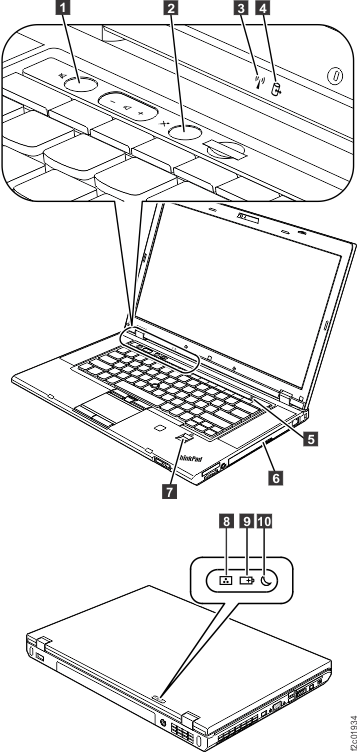
Speaker mute |
- Orange:
- The speaker is on mute. To mute or unmute the speakers, press
the speaker mute button.
|
Microphone mute |
- Orange:
- The microphone is on mute. By default, when the microphone is
on mute, none of the recording devices is available.
|
Wireless LAN, WAN or Bluetooth status |
- Green:
- The wireless LAN feature (the IEEE 802.11 b/g standard, 802.11
a/b/g, or 802.11n), wireless WAN feature, or Bluetooth feature is
on.
- Blinking green:
- Data is being transmitted.
|
Device access |
- Blinking green:
- Data is being read from or written to the hard disk drive, the
solid state drive, or the device in the Serial Ultrabay™ Enhanced
bay.
|
Power on |
- Green:
- The computer is on and ready to use. This indicator stays lit
whenever the computer is on and is not in sleep mode.
- Slow-blinking green:
- The computer is in sleep mode.
- Fast-blinking green:
- The computer is entering sleep mode or hibernation mode, or is
resuming normal operation.
|
Serial Ultrabay Enhanced device status |
- Green:
- A Serial Ultrabay Enhanced device is installed and in use.
- Blinking green:
- A Serial Ultrabay Enhanced device is being detached.
- Off:
- A Serial Ultrabay Enhanced device is ready to be attached or detached.
|
Fingerprint reader status |
- Green:
- The fingerprint reader is ready to take fingerprint.
- Blinking green once:
- The fingerprint is being authenticated or has been authenticated.
- Blinking green:
- The fingerprint reader is ready take fingerprint in power-on authentication
state.
- Blinking amber:
- The fingerprint could not be authenticated.
- Steady amber for 15 seconds:
- The power-on authentication feature is going to be disabled after
three bad fingerprint swipes.
|
Color sensor status |
- Green:
- The display color calibration has completed. When the computer
lid opens, the indicator turns off.
- Blinking green:
- Display colors are being calibrated.
|
Battery status |
- Green:
- The battery charge level is 80% or more.
- Blinking green:
- The battery charge level is between 20% and 80%, and charging
is continuing. When the battery charge level reaches 80%, the battery
status indicator stops blinking, but the charging might continue until
the battery is 100% charged.
- Slow-blinking orange:
- The battery charge level is between 5% and 20%.
- Quick-blinking orange (0.5 second off every 1.5 seconds:
- The battery charge level is 5% or less.
- Fast-blinking orange (0.25 second off every 0.5 second):
- An error has occurred with the battery.
- Off:
- The battery is fully charged or detached, or the computer is powered
off.
Note: If the computer is operating on battery power,
the battery status indicator does not work while the computer is turned
off or is in sleep mode or hibernation mode.
|
Sleep status |
- Green:
- The computer is in sleep mode.
- Blinking green:
- The computer is entering sleep mode or hibernation mode, or is
resuming normal operation.
|