Before you begin
If you have questions about floor loading and
service clearances of the racks, review the installation site requirements
in the
IBM® DS8870 Introduction and Planning Guide which
is available on the
IBM DS8000® series
Service Documents CDROM.
Procedure
- View the rack number label
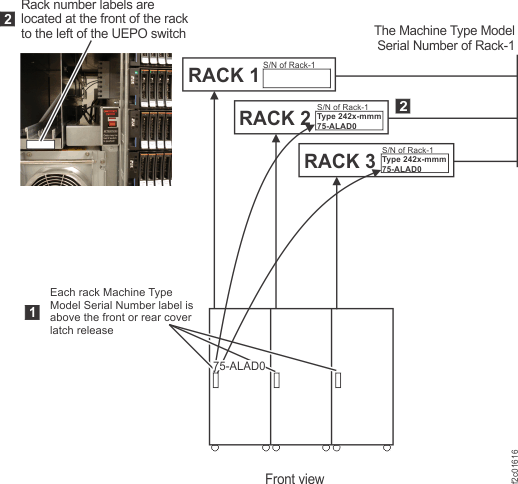
 to determine the rack location. The rack number is located to the left of the
UEPO red switch behind the Rack-1 front cover. See Figure 1.
to determine the rack location. The rack number is located to the left of the
UEPO red switch behind the Rack-1 front cover. See Figure 1. Figure 1. Rack serial number and rack
number labels (Models 951, 95E)
- Facing the front of Rack-1, all additional expansion racks
will be installed to the right. Move the expansion rack into position
approximately 3" (75mm) from the existing rack.
- Locate 4 x spacer studs P/N 22R5046, 7 x spacer mounting
bolts P/N 1621545, and 7 x M8 washers P/N 84X5850 in the ship group.
- Install the bottom spacer stud at the rear of the existing
rack (Rack 1 or the expansion rack that is already installed).
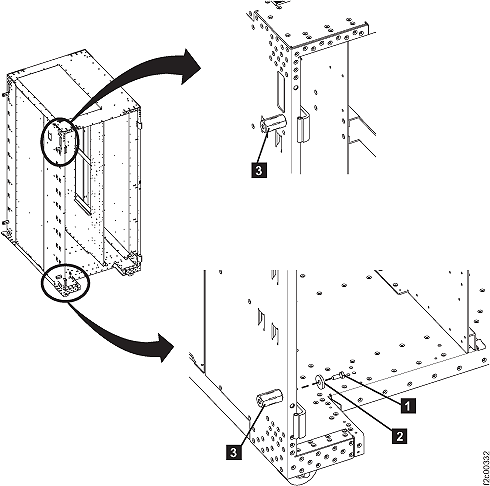
- Refer to Figure 2.
Install a spacer stud 3 in the lower
rear left corner of the rack using a mounting bolt 1 and
a washer 2 . Leave the bolt loose so that
it will be easier to align the spacer stud with the bolt from the
new frame.
Figure 2. Interrack
spacer studs
- Determine the part number (P/N) of the interrack decorative side
covers in your ship group. The P/N is printed near the middle of
each side cover. There are two side covers and one top cover in the
long narrow shipping box.
- P/N 22R0786 (original version has one piece side cover) go to
step 7.
- P/N 22R4964 (new version has a hinged two piece side cover) go
to step 7.
- In the upper rear left corner of the existing rack, next
to the hinge are two holes, one above the other. Use the upper hole
and install a spacer stud 3 using a mounting
bolt 1 and a washer 2 ,
see Figure 2.
Do not tighten the bolt fully as some alignment will be needed. You
can hold the side cover next to the spacer studs to ensure the spring
clips align properly before going to step 8.
Note: On early frames, it may be necessary to
remove the rear left top hinge and spacer plate to allow the mounting
bolt to be inserted. Reinstall the hinge and plate when the bolt has
been tightened.
- In the upper rear left corner of the existing
rack, next to the hinge, there are two holes; one above the other.
Use the lower hole and install a spacer stud 3 using
a mounting bolt 1 and a washer 2 ,
see Figure 2. Do
not tighten the bolt fully as some alignment will be needed. You
can hold the side cover next to the spacer studs to ensure the spring
clips align properly before going to step 8.
- On the rear of the expansion rack being
installed, perform the following steps to remove the right cover.
- Open the rear left machine cover.
Note: On some models, the rack machine type, model,
serial (MTMS) label is located on the left rear cover, just above
the door latch. If the left rear cover is removed from the rack,
ensure it is reinstalled on the correct rack. If this is not done,
the incorrect MTMS will be displayed on the exterior of the rack,
which could result in maintenance errors or other issues. If a reference
is needed, the correct rack MTMS is also shown on the "1S" label,
affixed to the upper left inside wall of both the front and rear of
the rack.
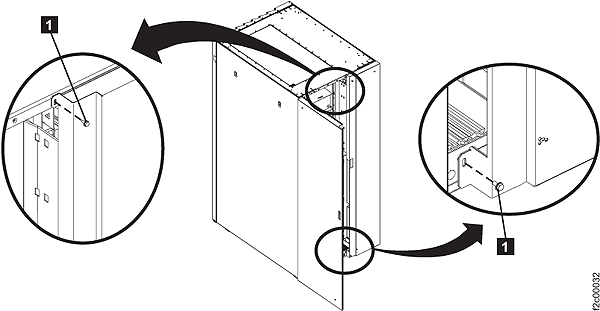
- Remove and retain the two screws 1 and
open the rear right machine cover. Refer to Figure 3.
Note: The
screws must be reinstalled later to prevent non-service personnel
from accessing a hazardous section of the machine.
Figure 3. Removing retaining
screws on right rear machine cover
- On the upper and lower door hinges, loosen the screw 1 and
move the retention plate 2 that prevents
the hinge pin 3 from being removed. Refer
to Figure 4.
- Remove the hinge pins, remove the rear cover and place
it in a safe location.
Figure 4. Removing rear right cover
- Return to the front of the racks. Do not remove any front
covers. Install 2 spacer studs on the front left of the storage expansion
being installed.
- Install a spacer stud in the lower front left corner
of the rack using a mounting bolt and a washer. Do not tighten
the bolt fully as some alignment will be needed.
- Install a spacer stud in the upper front left corner
of the rack using a mounting bolt and a washer. If there are two
frame holes near the hinge, use the same hole (upper or lower) as
you did at the rear of the rack. Do not tighten the bolt fully
as some alignment will be needed.
- Move the expansion rack being installed into its final
position.
- At the rear, secure the expansion rack being installed
to the existing rack using one bolt and washer in the upper position
only. The bolt is screwed into the spacer stud previously installed.
Do not tighten the bolt fully.
Note: It is not possible
to install the bolt at the bottom of the rack because the 208VDC bus
bars block access.
- At the front, insert two bolts and washers from the left
rack and screw into the spacer studs previously installed in the right
rack. When the alignment is correct, tighten all the bolts that have
been installed.
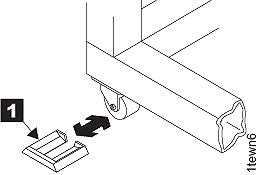
- Install the wheel chocks 1 (located
in the ship group) on all four casters. If caster locks are available,
engage the caster locks on all casters. Refer to Figure 5.
Figure 5. Wheel (wedge) chocks
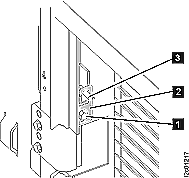
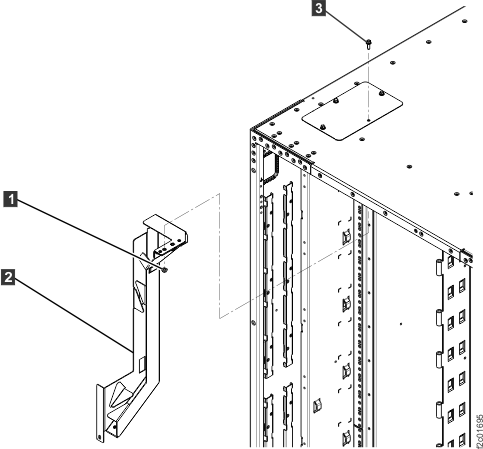
- If you are installing Rack-2, does it have an
upper "funnel" bracket 2 inside
at the rear top left of the rack? See Figure 6.
- Yes, go to the next step.
- No, go to step 18.
Figure 6. Removing top tailgate cover
plate
- Looking down at the top left rear of the rack,
inspect the top tailgate cover plate screw 3 .
See Figure 6.
- If the screw is installed from the top (only screw head is
visible), go to the next step.
- If the screw is installed from inside the rack, (only threaded
end is visible) to go step 17.
- The screw is installed from the top of the rack.
Install the screw from inside the rack and then install the top tailgate.
- Remove and discard the nut 1 securing
the upper "funnel" bracket 2 of
the host cable channel. See Figure 6.
- Remove the long screw 3 from
the top of the rack.
- Install the long screw 3 from
inside the rack. The threaded end of the screw will extend out the
top of the rack.
- At the top of the rack, remove the three screws that
secure the cover plate to the top of the rack. Remove the cover plate.
- Store the cover plate in the document enclosure at the
front top left of the rack.
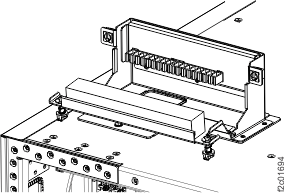
- Position the tailgate assembly over the opening at the
top of the rack. See Figure 7.
Secure the assembly with the three screws that were removed in step
d.
- Go to step 18.
- The
screw is installed from inside the rack. Install the top tailgate.
- Looking down at the top of the rack, remove the three
screws around the opening for the funnel bracket. See Figure 6. The cover plate
already removed and stored in the document enclosure at the front
top left of the rack.
- Position the tailgate assembly over the opening at the
top of the rack. See Figure 7.
Secure with the three screws that were just removed in substep a.
- Go to the next step.
- Go to the next section.