Use this MAP to determine which of the four private network address ranges the customer selected to be used on this storage plex. A default address range and three optional address ranges are available to avoid address range conflicts with the customer network.
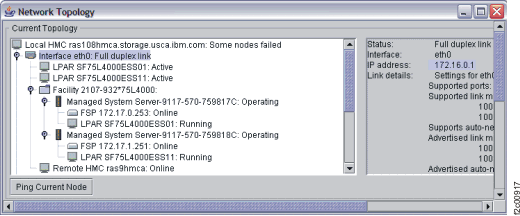
A window appears with the current network topology (port connections) listed at the top and the saved network topology listed at the bottom. See Figure 1.

| Setting | Address range | |
|---|---|---|
| Black network (HMC eth0, LPAR en0) | Gray network (HMC eth3, LPAR en1) | |
| Default | 172.16.0.0 to 172.16.255.255 | 172.17.0.0 to 172.17.255.255 |
| Option 1 | 10.235.158.0 to 10.235.159.255 (10.235.158.0/23) | 10.236.158.0 to 10.236.159.255 (10.236.158.0/23) |
| Option 2 | 192.168.162.0 to 192.168.163.255 (192.168.162.0/23) | 192.168.164.0 to 192.168.165.255 (192.168.164.0/23) |
| Option 3 | 9.15.132.0 to 9.15.133.255 (9.15.132.0/23) | 9.16.132.0 to 9.16.133.255 (9.16.132.0/23) |
| Setting | Address range | |
|---|---|---|
| Black network (HMC eth0, LPAR en0) | Gray network (HMC eth3, LPAR en1) | |
| Default | 172.16.0.0 to 172.16.0.100 172.16.1.101 to 172.16.1.112 172.16.2.101 to 172.16.2.112 |
172.17.0.0 to 172.17.0.100 172.17.1.101 to 172.17.1.112 172.17.2.101 to 172.17.2.112 |
| Option 1 | 10.235.0.0 to 10.235.0.100 10.235.1.101 to 10.235.1.112 10.235.2.101 to 10.235.2.112 |
10.236.0.0 to 10.236.0.100 10.236.1.101 to 10.236.1.112 10.236.2.101 to 10.236.2.112 |
| Option 2 | 192.168.160.0 to 192.168.160.100 192.168.161.101 to 192.168.161.112 192.168.162.101 to 192.168.162.112 |
192.168.240.0 to 192.168.240.100 192.168.241.101 to 192.168.241.112 192.168.242.101 to 192.168.242.112 |
| Option 3 | 9.15.0.0 to 9.15.0.100 9.15.1.101 to 9.15.1.112 9.15.2.101 to 9.15.2.112 |
9.16.0.0 to 9.16.0.100 9.16.1.101 to 9.16.1.112 9.16.2.101 to 9.16.2.112 |