The management
console login
window prompts for the user ID and the password. The management
console is supplied
with a predefined user ID of CE and the default password serv1cece.
Both the user ID and password are case sensitive and must be typed
exactly as shown. After the successful login, the management console
graphical user interface opens.
Are you able to
log in?
Yes, the login is no longer failing, exit this MAP.
No, the user ID or password is corrupt. Contact your next
level of support.
Is the management
console server
and display powered on?
Note: The management
console should
be left powered on all the time. If the management
console is inside
of a DS8000® rack,
it will receive power as long as the line cord input is present and
the UEPO red switch is not tripped. The same is true for the Ethernet
switches in the DS8000 rack.
Yes, power off the management
console server
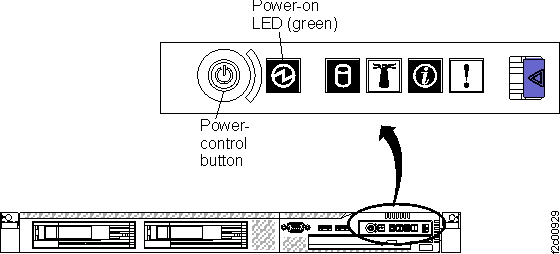
and then power it back on (the power button is on the front of the
server, at the right end). See Figure 1 (X335 server)
or Figure 2 (X336
server) or Figure 3 (X3550 server).
If the management
console login
window prompt is still not displayed, go to MAP6020 Management console problem determination.
No, power on the management
console server
(the power button is on the front of the server, at the right end).
See Figure 1 (X335
server) or Figure 2
(X336 server) or Figure 3 (X3550 server).
Power on the HMC display. If the management
console login
prompt window is not displayed, return to the beginning of this MAP.
Figure 1. X335 management console server (front view)
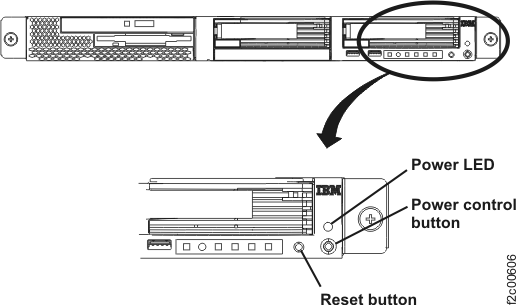
Figure 2. X336 management
console server (front view)
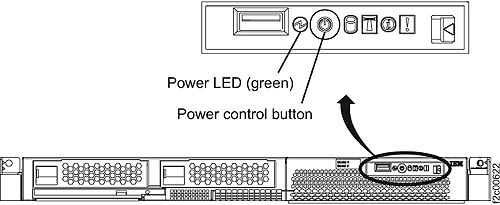
Figure 3. X3550 management console server
- operator control panel (front view)
MAP6060 Section-3, Laptop
Procedure
After power-on, is the management
console login
window prompt displayed?
The management
console login
window prompts for the user ID and the password. The management
console is supplied
with a predefined user ID of CE and the default password serv1cece.
Both the user ID and password are case sensitive and must be typed
exactly as shown. After the successful login, the management console
graphical user interface opens.
Are you able to
log in?
Yes, the login is no longer failing, exit this MAP.
No, the user ID or password is corrupt. Contact your next
level of support.
Is the laptop powered
on?
Note: The management
console should
be left powered on all the time. If the management
console is inside
of a DS8000 rack,
it will receive power as long as the line cord input is present and
the UEPO red switch is not tripped. The same is true for the Ethernet
switches in the DS8000 rack.
Yes, power off the management
consolelaptop and
then power it back on. If the management
console login
window prompt still does not display, go to MAP6020 Management console problem determination.
No, power on the management
consolelaptop. If
the management
console login
prompt window is not displayed, return to the beginning of this MAP.