DS8000 Service Documentation Version 7.5

MAP4980 Disk encryption, encryption key management server SRCs, and repairs

The encryption key management server works with IBM encryption-enabled storage components (DDMs, device adapter, and functional code) in generating, protecting, storing, and maintaining encryption keys that are used to encrypt information being written to and decrypt information being read from storage media. Disk encryption gives the customer an added layer of protection for their data. The combination of data encryption on the DS8000® and the customer data encryption key stored on the customer's encryption key management server external to the DS8000 ensures that if the DS8000 or any DDMs with encrypted data are stolen, data cannot be accessed.

About this task

To enable encryption, you must have encryption-capable DDMs along with supporting encryption software stack installed on the DS8000. The customer must have configured at least two encryption key management servers.

Note: In other IBM publications, the encryption key management server is called:
  • Encryption key server
  • Key server
  • IBM Security Key Lifecycle Manager
  • IBM Tivoli Key Lifecycle Manager key server

MAP4980-Section 1

About this task

Use Table 1 to find the appropriate action for the SRC in the serviceable event that sent you here.
Note: A DDM pseudo repair implies attempting a DDM repair using the Exchange FRU option and continuing through the repair without unseating and reseating the drive.
Table 1. Disk Encryption SRC repair actions
SRC SRC Description Service action/machine state when serviceable event is generated Action
BE14CFE1 DS8000 management console regained access to the customer's encryption key management servers. Automatic dual cluster reboot is initiated. No further action is needed. Dual cluster IML This is an informational serviceable event.
BE14CFE5 Base page mismatch detected and recovered by automatic dual cluster reboot. ESC=0xCFE5 Dual cluster IML This is an informational serviceable event.
BE14CFEB DS8000 microcode detected less than two encryption key management servers can be accessed by the LPARs. DS8000 management console should be configured with at least two encryption key management servers. Periodic key retrieval
  1. Refer to actions for BE14EAF1. The customer must confirm that the DS8000 management console is configured with at least two encryption key management servers.
  2. Log in to DS8000 management console as customer (the default password is cust0mer).
  3. Test the link status between the management console and the encryption key management server, then continue with periodic key retrieval.
    1. From the navigation area, click Storage Facility Management > storage facility.
    2. From the bottom Task area, click Service Utilities -> Key Server Utilities.
    3. In the confirmation window, "Press ’Yes’ to test the link status between HMC and the Key Server," click Yes.

      Test results will display in the next confirmation window.

    4. In the confirmation window, "Do you want to proceed with the testing of encryption key retrieval between SFI and Key Server?", click Yes.

If the periodic key retrieval completes successfully, close the existing BE14CFEB serviceable event. Otherwise, check for any open serviceable events that begin with BE14E0 or BE14EA and repair that serviceable event.

BE14CFF5 An invalid encryption-capable SFI configuration has been detected. A valid certificate is not installed on the SFI or the SFI does not have a homogeneous configuration of self-encrypting drives. Field install when DDM certify is initiated Customer has received a DS8000 with an invalid configuration for encryption-capable SFI. Contact next level of support for problem determination and resolution.
BE14E004 The DS8000 management console cannot retrieve encryption keys from the customer's encryption key management server because the DS8000 management console could not detect any active encryption key management server paths. Suspected configuration error. Dual cluster IML; Periodic key retrieval
  1. The customer must verify whether encryption key management servers are configured and active using one of the methods identified in note 2.
  2. If all encryption key management servers are inactive, the customer has to activate the encryption key management servers using the DS CLI or DS Storage Manager and reverify the encryption key management server path status.
  3. If the DS8000 management console fails to recognize one or more active encryption key management server paths, work with the DS8000 service representative or your next level of support to correct the connectivity.
  4. For cases where there is no access to customer data; that is, IML is "complete" but global data is inaccessible due to lack of encryption key management server access: when the DS8000 management console detects the active encryption key management server paths, a dual cluster IML will occur within 12 minutes on the DS8000 partitions reporting the serviceable event. (See note 5.)
BE14E008 The DS8000 management console cannot retrieve encryption keys from the customer's encryption key management server(s) because of communication errors between the DS8000 Hardware Management Console (HMC) and encryption key management servers. A suspected network error. Dual cluster IML; Periodic key retrieval – ESSNI is running on the HMC but is encountering a socket open error with the encryption key management servers.
  1. The customer must verify network connectivity and path status between the DS8000 HMC and encryption key management servers using one of the methods described in note 2.
    1. If network connectivity does not exist or if the path status is inactive or failed, the customer must verify that the configured encryption key management servers are operational and paths are active.
    2. The customer must reverify network connectivity, path status, or both between the encryption key management servers and the DS8000 management console.
  2. If network connectivity, path status, or both cannot be established, work with the DS8000 service representative or your next level of support to resolve the issue.
  3. For cases where there is no access to customer data; that is, IML is "complete" but global data is inaccessible due to lack of encryption key management server access: when the DS8000 management console regains connectivity to the active encryption key management server(s), dual cluster IML will occur within 12 minutes on the DS8000 partitions reporting the serviceable event. (See note 5.)
BE14E009 The DS8000 management console cannot retrieve encryption keys from the configured encryption key management server because of communication errors between the DS8000 partitions (LPARs) and the Hardware Management Console (HMC). Dual cluster IML; Periodic key retrieval
  1. Display and repair open serviceable events related to “CEC failures and/or internal network failures.”
  2. If connectivity is restored, the customer must verify that their configured encryption key management servers path status is active using one of the methods identified in note 2.
  3. For cases where there is no access to customer data; that is, IML is "complete" but global data is inaccessible due to lack of encryption key management server access: when the DS8000 management console detects the active encryption key management servers, dual cluster IML will occur within 12 minutes on the DS8000 partitions reporting the serviceable event (See note 5.)
BE14E00B The DS8000 management console cannot retrieve encryption keys from the configured encryption key management server. A command timeout has occurred between DS8000 partitions (LPARs) and the hardware management console (HMC). Dual cluster IML; Periodic key retrieval Contact your next level of support for resolution.
BE14E011 Encryption key management server error: All configured encryption key management servers are unable to unwrap keys provided by the DS8000 management console ESC=0XCFE0; Reason Code=0xF1 Dual cluster IML; Periodic key retrieval Contact your next level of support for resolution.
BE14E012 Encryption key management server error: Microcode unable to unwrap keys received from all configured encryption key management servers. Dual cluster IML; Periodic key retrieval
  1. The serviceable event text should indicate the encryption key management server error code that was generated and the encryption key management server that delivered incorrect keys. See notes 4 and 6 for sample serviceable events. Refer to the encryption key management server documentation to obtain information on the encryption key management error code and contact the customer for further resolution.
  2. The customer must verify that encryption key management errors are resolved.
  3. For cases where there is no access to customer data; that is, IML is "complete" but global data is inaccessible due to lack of encryption key management server access: after the customer resolves encryption key management errors, a dual cluster IML will occur within 12 minutes on the DS8000 partitions reporting the serviceable event. (See note 5.)
BE14E0F1 The DS8000 management console cannot access the customer's encryption key management server. Dual cluster IML
  1. The customer must verify network connectivity and path status between the configured encryption key management servers and DS8000 management console using one of the methods identified in note 2.
    • If network connectivity does not exist or path status is inactive or failed, the customer must verify that the configured encryption key management servers are operational and that paths are active.
    • The customer must reverify network connectivity, path status, or both between the encryption key management servers and the DS8000 management console.
  2. If the connectivity fails, work with the DS8000 service representative to correct the connectivity.
  3. For cases where there is no access to customer data; that is, IML is "complete" but global data is inaccessible due to lack of encryption key management server access: when the DS8000 management console detects the active encryption key management server paths, dual cluster IML will occur within 12 minutes on the DS8000 partitions reporting the serviceable event. (See note 5.)
BE14E1F6 DS8000 partitions IMLed with the configured encryption key management servers not available. The encryption key management server is available and DS8000 partitions must be re-IMLed to allow data access. DS8000 partitions regained access to encryption key management servers. However, a dual cluster reboot and IML was not attempted because of a service action in progress. Dual cluster IML could not be attempted on the DS8000 partitions because of the service action in progress. The DS8000 partitions must be re-IMLed (shutdown and rebooted) using the following steps:
  1. From the navigation area, click Storage Facility Management > storage facility > SF image.
  2. From the bottom Task area, select Service Utilities > Change/Show SFI State.

Valid state should be "quiesce." Click Quiesce SFI, then monitor by refreshing the panel.

When valid state is "shutdown," click Shutdown SFI, then monitor by refreshing the panel.

When valid state is "resume," click Resume SFI, then monitor by refreshing the panel.

BE14E3F7 DS8000 data encryption key repository reported a permanent error. Failure to read record or certificate.   Contact your next level of support for resolution.
BE14EA0B Encryption key management server error: The DS8000 management console cannot retrieve encryption keys from some of the configured encryption key management servers. A command timeout has occurred between DS8000 partitions (LPARs) and the hardware management console (HMC). Periodic key retrieval Contact your next level of support for resolution.
BE14EA11 Encryption key management server error: One or more encryption key management servers have an invalid key, or a record is corrupted in the key repository, or a failure to unwrap keys. ESC = 0xCFEA; Reason Code =0XF1 Periodic key retrieval
  1. The serviceable event text should indicate the encryption key management server error code that was generated and the IP address of the encryption key management server that has an invalid key, corrupted record, or failed to unwrap keys. (See notes 4 and 6 for a sample serviceable event).
    Note: An encryption key management server error code will not be shown for a corrupted record.
  2. Ask the customer to contact the encryption key management server support team for problem resolution.
  3. Ask the customer to verify that encryption key management server error(s) are resolved.
  4. Verify the encryption key management server and DS8000 management console connectivity status and initiate periodic key retrieval. From the navigation area, click Storage Facility Management > storage facility. From the Tasks area, click Service Utilities > Key Server Utilities. (See 7 for an example of Key Server Manager Utilities).

    If the periodic key retrieval completes successfully, close the existing BE14EA11 serviceable event. Otherwise, check for any open serviceable events that begin with BE14E0 or BE14EA and repair that serviceable event.

BE14EA12 Encryption key management server error: Microcode cannot unwrap keys received from one or more encryption key management servers. Periodic key retrieval
  1. The serviceable event text should indicate the encryption key management server error code that was generated and the IP address of the encryption key management server that delivered incorrect keys. (See notes 4 and 6 for a sample serviceable event.) Refer to the encryption key management server documentation to obtain information on the encryption key management server error code and contact the customer for further resolution.
  2. Ask the customer to contact the encryption key management server support team and provide the team with the encryption key management server error code for problem resolution.
  3. Ask the customer to verify that encryption key management server errors are resolved.
  4. Verify the encryption key management server and DS8000 management console connectivity status and initiate periodic key retrieval. From the navigation area, click Storage Facility Management > storage facility. From the Tasks area, click Service Utilities > Key Server Utilities. (See 7 for an example of Key Server Manager Utilities).

    If the periodic key retrieval completes successfully, close the existing BE14EA12 serviceable event. Otherwise, check for any open serviceable events that begin with BE14E0 or BE14EA and repair that serviceable event.

BE14EA13 Key retrieved from the encryption key management server failed signature verification. Periodic key retrieval Contact your next level of support for resolution.
BE14EAF1 DS8000 management console has failed to communicate with the encryption key management server. If the communication continues to fail after four hours, a request for service will occur.  
  1. The customer must verify network connectivity and path status between the configured encryption key management servers and the DS8000 management console using one of the methods identified in note 2.
    1. If network connectivity does not exist or path status is inactive or failed, the customer must verify that the configured encryption key management servers are operational and paths are active.
    2. The customer must reverify network connectivity, path status, or both between the encryption key management servers and the DS8000 management console.
  2. If the connectivity fails, work with the DS8000 service representative or your next level of support to correct the connectivity.
    Note: The network connectivity between encryption key management servers and DS8000 management console can also be verified with the Key Manager Utilities (See Note 7 below for a sample screen capture of Key Manager Utilities).
BE14EAF2 DS8000 management console has failed to communicate with the encryption key management server for four hours.   Refer to actions for BE14EAF1.
BE14EAF3 DS8000 management console has failed to communicate with the encryption key management server using an SSL link. If the communication continues to fail after four hours, a request for service will occur.   Refer to actions for BE14EAF1.
If connectivity works with an unencrypted link but fails when using an SSL link, a likely cause is an untrusted certificate. Contact your next level of support.
BE14EAF4 DS8000 management console has failed to communicate with the encryption key management server for four hours, using an SSL link.   Refer to actions for BE14EAF1.
If connectivity works with an unencrypted link but fails when using an SSL link, a likely cause is an untrusted certificate. Contact your next level of support.
BE316023 A severe software error has been discovered.   Contact your next level of support for resolution.
BE31CFE8 A severe software error has been discovered.   Contact your next level of support for resolution.
BE31F004 Failed to initialize the replacement encryption-capable DDM to the existing configured encryption group during its repair. The more likely cause was a DDM hardware problem. Access credential migration failed after DDM repair during the DDM resume operation.
Access credential migration was initiated because of one of the following conditions:
  • The device adapter pair has one or more exposed or degraded RAID arrays.
  • A DDM migration condition was detected and loop balance had to be restored.
Use this procedure to do software checks before replacing the DDM:
  1. Run the Manage SFI Resources utility to verify the state of configured encryption group. See note 3.
    1. If a configured encryption group is accessible, go to step 2.
    2. Otherwise, contact your next level of support.
  2. Display and repair any open serviceable event for this DDM.
  3. If there is not an open serviceable event for this DDM drive, contact your next level of support.
BE34009E An encryption-capable DDM was not cryptographically erased during a DDM repair, DDM install, rank removal, or recovery after a failed rank creation. A DDM repair; storage enclosure/DDM Install MES operation; rank removal appeared successful to the customer. Recovery after a failed rank creation.
  1. If this serviceable event was reported during a DDM repair or install, replace the DDM with a new encryption-capable DDM using the Parts Exchange procedure.
  2. If this serviceable event was reported after a customer's rank removal appeared to be successful, check for and repair any open serviceable events for this DDM.
  3. If this serviceable event was reported during a customer's rank creation process, check for and repair any open serviceable events for this DDM. The customer needs to remove the failing rank. The DDMs will automatically begin to reformat. When complete, the customer must re-create the rank.
BE34009F One or more encryption-capable DDMs were not automatically cryptographically erased after the customer removed one or more ranks. This serviceable event is generated when a SF Discontinue utility queries the cryptographically erase status of all FDE drives and detects that one ore more drives are security degraded. This condition is only detected during a check for a storage facility removal process. If the customer removed all their data and logical configuration including ranks, the encrypted DDMs should have been automatically cryptographically erased. Contact your next level of support for resolution.
BE3400A2 Failed to initialize the replacement encryption-capable DDM to the existing configured encryption group during its repair. The existing encryption group is inaccessible. RAS initiated an issraid exchange Smart rebuild. Perform the following software checks before replacing the DDM:
  1. Run the Manage SFI Resources utility to verify the state of configured encryption group. (See note 3.)
    • If the configured encryption group is inaccessible, go to step 2.
    • Otherwise, contact your next level of support.
  2. Check for any open serviceable events that begin with BE14E0xx or BE14EAxx.
    • If any such serviceable event is found, repair that serviceable event before replacing the DDM again.
    • Otherwise, contact your next level of support.
BE3400A3 Adding or replacing an encryption-capable DDM and the DDM FRU is already in a configured state. A cryptographic erase could not be initiated. This should not occur during any RAS-initiated service action. A probable cause for this serviceable event is a cryptographic erase that was attempted on a drive that stores customer data during manual recovery. Contact your next level of support for resolution.
BE3400B3 Hourly health checks on the partitions detected one or more encryption-capable drives inaccessible (security degraded). This serviceable event is generated during a RAS hourly health check running on the partitions. Perform the following software checks:
  1. Run the Manage SFI Resources utility to verify the state of configured encryption group. (See note 3,
    • If the configured encryption group is inaccessible, go to step 2.
    • Otherwise, contact your next level of support.
  2. Check for any open serviceable events that begin with BE14E0 or BE14EA.
    • If any such serviceable event is found, repair that serviceable event before replacing the DDM again.
    • Otherwise, contact your next level of support.
Other SRCs     Contact your next level of support for resolution.
Notes:
  1. DDM pseudo repair implies attempting a DDM repair using the Exchange FRU option and continuing through the repair without unseating and reseating the drive.
  2. The customer can use either the DS CLI or DS Storage Manager to query the list of configured encryption key management servers and the path status of each configured encryption key management server:
    • DS CLI: The customer can enter the lskeymgr command to obtain the list of configured encryption key management servers and the path status of each configured encryption key management server.
      Sample lskeymgr output:
      dscli> lskeymgr 
      Date/Time: October 28, 2008 
      8:04:45 PM MST IBM DSCLI Version: 5.4.2.221 DS: 
      ID  state   status  addr    port 
      ===============================
      1   active  normal  tens    3801
      2   active  failed  automan 3801
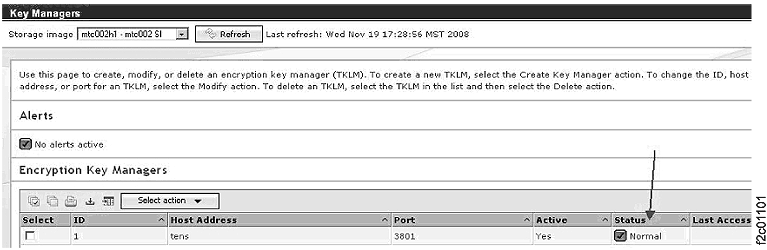
    • DS Storage Manager : The customer can use the key manager option to obtain the list of configured encryption key management servers and the path status of each configured encryption key manager server. Figure 1 shows an example of a key manager window.
      Figure 1. Window: Key Managers
      Window: Key Managers
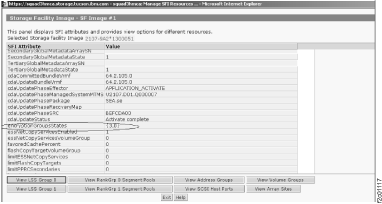
  3. IBM support or service representative can use the Manage Storage Facility Image (SFI) Resources utility to determine the state of the configured encryption group. Figure 2 shows the encryptionGroupsStates value {3,0} indicating that the customer configured encryption group is accessible.
    To display the Manage SFI Resources utility:
    1. From the navigation area, click Storage Facility Management > storage facility > SF image.
    2. From the Task area, select Service Utilities > Manage SFI Resources.
    Figure 2. Window: Manage SFI Resources
    Window: Manage SFI Resources
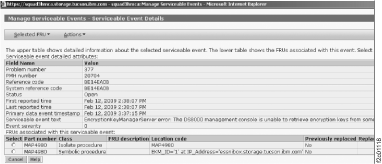
  4. Figure 3 show an example of a serviceable event text with encryption key management server error code detected by the DS8000 management console. Figure 4 is a continuation of Figure 3 intended to show additional serviceable event text that displays by the DS8000 management console.
    Figure 3. Window: Manage Serviceable Events
    Window: Manage serviceable events
    Figure 4. Window: Manage Serviceable Events (continued)
    Window: Manage serviceable events
  5. The DS8000 partitions that reported BE14E004, BE14E008, or BE14E009 will query for encryption key management servers connectivity every 12 minutes. When connectivity is regained, a dual cluster IML (that is, a shutdown; reboot; IML) will be attempted if, and only if, both of the following are true:
    1. There is no service action in progress
    2. There is no access to customer data; that is, IML is "complete" but global data is inaccessible due to lack of encryption key management server access
    IBM service representatives must wait for dual cluster IML completion before attempting any scheduled service actions. A BE14CFE1 serviceable event will be logged after dual cluster IML is completed.
    Note: The BE14CFE1 serviceable event will be auto-closed along with any other BE14E0xx serviceable events reported against the same partitions.
  6. Figure 5 shows a sample serviceable event with an encryption key management server ID and IP address in the location code field of the serviceable event.
    Figure 5. Window: Serviceable Event with an ID and an IP address in the location code field
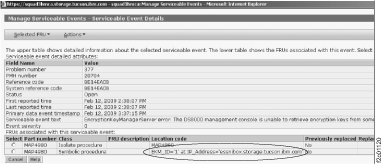
    Window: Serviceable Event with a ID and an IP address in the location code field
  7. Example of the key server utilities and retrieval status.
    Figure 6. Window: Key Server Utilities Test Key Retrieval panel
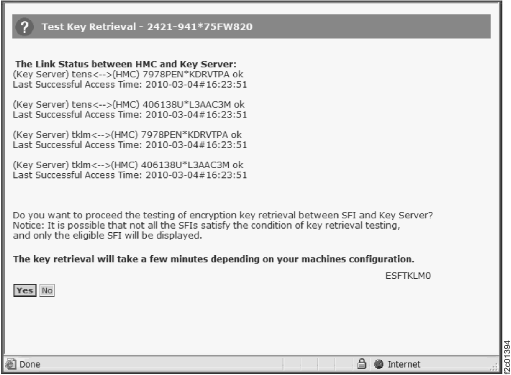
    Window: Key Server Utilities Test Key Retrieval
    Figure 7. Window: Test Key Retrieval status
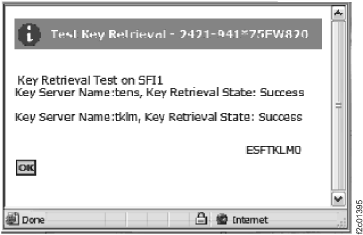
    Window: Test Key Retrieval status
  8. Upon successful resolution of the BE14xxxx serviceable event, the serviceable event has to be closed manually.