MAP4960 Section-1
Procedure
- Does the FRU list, in the serviceable event, that
sent you here contain a symbolic FRU similar to "Invalid-MTMS-cpssebay**"?
- Yes, continue at the next step.
- No, go to MAP4960 Section-2.
- When the FRU list contains a symbolic FRU similar to "Invalid-MTMS-cpssebay**" the location code is invalid and cannot be used to determine the failing I/O enclosure.
- To determine the cpssebay** value from
the symbolic FRU of Invalid-MTMS-cpssebay**, use the first column
of Table 1.
Table 1. Symbolic FRU location to type-location translation Symbolic FRU location code Location Type location I/O enclosure number cpssebay00 1B1 1400-1B1 0 cpssebay01 1B2 1400-1B2 1 cpssebay02 1B3 1400-1B3 2 cpssebay03 1B4 1400-1B4 3 cpssebay04 2B1 1400-2B1 4 cpssebay05 2B2 1400-2B2 5 cpssebay06 2B3 1400-2B3 6 cpssebay07 2B4 1400-2B4 7 - Determine the location code in Table 1, second column for the symbolic FRU location code in the FRU list.
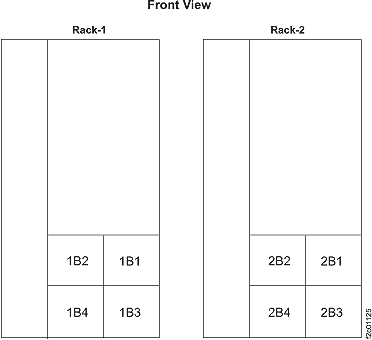
- Translate the three-character location code from the prior
step to a physical location of the I/O enclosure in the rack. See Figure 1. Figure 1. I/O enclosure locations in front of rack
- Determine the serial number of the I/O enclosure by reading the MTMS label.
- Launch the Advanced System Management
(ASM) menu:
- From the navigation area, click Storage Facility Management > Server view.
- Select the server associated with the serviceable event that sent you here.
- From the bottom Task area, click Operations > Launch Advanced System Management (ASM).
- On the launch ASM interface confirmation, click OK.
- The management console Web browser will be launched, and the ASM login panel will appear.
- Log in as admin with a password
of admin2107. Notes:
- If you are logged in and not active for 15 minutes, your session expires.
- If you make five invalid login attempts, your user account is locked out for five minutes and none of the other accounts is affected.
- Reset the I/O enclosure MTMS from the ASM menu:
- Expand System Configuration.
- Select Configure IO Enclosures.
- Observe the Type-Model column in the displayed Enclosure Configuration table.
- Find the row that has the Type-Model determined from step 3.
- Select the radio button for that I/O enclosure.
- Click Change settings.
- Modify the Type-Model field to match and Type-Location field in Table 1 for the I/O enclosure.
- Modify the Serial number field to match the serial number read from the I/O enclosure machine/type/model/serial number label.
- Click on Save Settings.
- Update the HMC microcode objects for the I/O enclosure
machine/type/model/serial number by using a pseudo repair of the PCIe
and SPCN card FRU, which will cause the I/O enclosure to be power
cycled.
- From the navigation area, click Storage Facility Management > storage facility.
- From the Task area, click Exchange Parts > Exchange IO Enclosure and Components.
- Click Show I/O Enclosures and select the enclosure location.
- Click Show FRUS.
- Select I/O Enclosure PCIe/SPCN Card and then click Exchange FRU.
- When prompted to replace the FRU, do not disconnect
the PCIe and
SPCN cables from the card. Do not remove the card. Verify
the card is properly seated.
Continue with the repair.
- If the repair is successful, exit this MAP and ensure that any related serviceable events are closed.
- If the repair fails with the same error, replace the I/O enclosure PCIe / SPCN card.