MAP4830 Section-1
Procedure
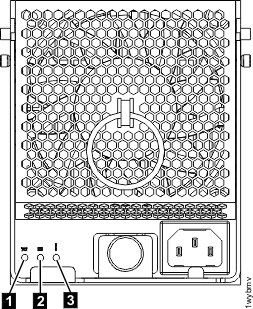
- Verify whether the managed system (CEC enclosure)
is powered off. At the rear of the storage facility, view
the CEC enclosure power
supplies. See Figure 1.
Are the DC GOOD (output) LEDs
 lit?
lit?- Yes, contact your next level of support.
- No, continue with the next step.
Figure 1. CEC enclosure power supply LEDs (Model 951 shown, LEDs similar for other models)