MAP4040 Section-2
About this task
Procedure
- Review the list of devices that are found.
See the example screen shown below. In some cases, you
might need to enter N (Next page of list) to see the entire list of
available boot devices. Also see Figure 1, Figure 2, Table 1, and Table 2 which show the
hard drive location codes for the different DS8000® models.
PowerPC Firmware
 Version AL740_075
 SMS 1.7 (c) Copyright IBM Corp. 2000,2008 All rights reserved.
-------------------------------------------------------------------------------
 Select Device
 Device  Current  Device
 Number  Position  Name
 1.        -      Port 1 - IBM 2 PORT PCIe 10/100/1000 Base-TX Adapter
        ( loc=U78AA.001.WZSGRLF-P1-C2-T1 )
 2.        -      Port 2 - IBM 2 PORT PCIe 10/100/1000 Base-TX Adapter
        ( loc=U78AA.001.WZSGRLF-P1-C2-T2 )
 3.        2      SAS 136 GB Harddisk, part=2 (AIX 7.1.0)
        ( loc=U78AA.001.WZSGRLF-P2-D2 )
 4.        1      SAS 136 GB Harddisk, part=2 (AIX 7.1.0)
        ( loc=U78AA.001.WZSGRLF-P2-D1 )
 5.        -      SAS 136 GB Harddisk, part=4 (AIX 7.1.0)
        ( loc=U78AA.001.WZSGRLF-P2-D2 )


 -------------------------------------------------------------------------------
 Navigation keys:
 M = return to Main Menu
 ESC key = return to previous screen         X = eXit System Management Services
 -------------------------------------------------------------------------------
 Type menu item number and press Enter or select Navigation key:
Figure 1. CEC enclosure location codes (front) (model 961)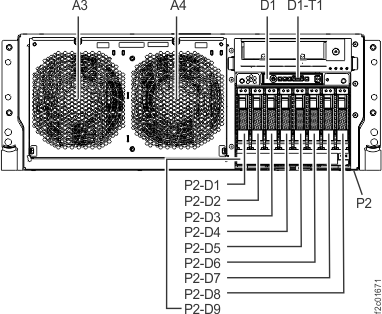
Table 1. Hard drive locations (model 961) Model Storage Facility Image (SFI) Partition name Location code Primary boot drive Secondary boot drive 961 First SFxxxxxxx01 (in upper CEC) U78AA.001.xxxxxxx-P2-D1 U78AA.001.xxxxxxx-P2-D2 SFxxxxxxx11 (in lower CEC) U78AA.001.xxxxxxx-P2-D1 U78AA.001.xxxxxxx-P2-D2 Figure 2. CEC enclosure locations (front) (models 941, 951)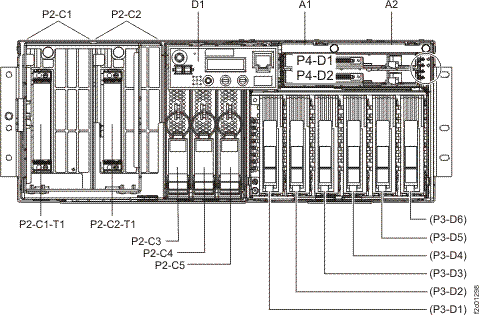
Table 2. Hard drive locations (models 941, 951) Model Storage Facility Image (SFI) Partition name Location code Primary boot drive Secondary boot drive 941, 951 First SFxxxxxxx01 (in upper CEC) U789D.001.xxxxxxx-P3-D1 U789D.001.xxxxxxx-P3-D2 SFxxxxxxx11 (in lower CEC) U789D.001.xxxxxxx-P3-D1 U789D.001.xxxxxxx-P3-D2 Note: The same device might appear multiple times, indicating a multibos installation on that device. For example, the following display shows two partitions on the same hard drive:3. 2 SAS 136 GB Harddisk, part=2 (AIX 7.1.0)
This is not the same as two separate hard drives.
( loc=U78AA.001.WZSGRLF-P2-D2 )
5. - SAS 136 GB Harddisk, part=4 (AIX 7.1.0)
( loc=U78AA.001.WZSGRLF-P2-D2 )