MAP32E0 Section-1
About this task
- MAP32E0
- Location of the storage enclosure you are installing in "MES
format."
For example: R1-B04
For further location information, refer to Location codes > MES and installation instruction > MES and installation instructions location codes (Models 961, 96E)
Procedure
Do the following:
- In the FRU list, note the location of the storage enclosure you are installing.
- Look up the physical location code of the RAID controller cards in the
affected storage enclosure in Table 1 (standard or business class) or Table 2 (DS8870 all flash).. Note the following:
- DA pair (link) associated with the affected RAID controller cards
- PCIe storage interface cards associated with the affected RAID controller cards
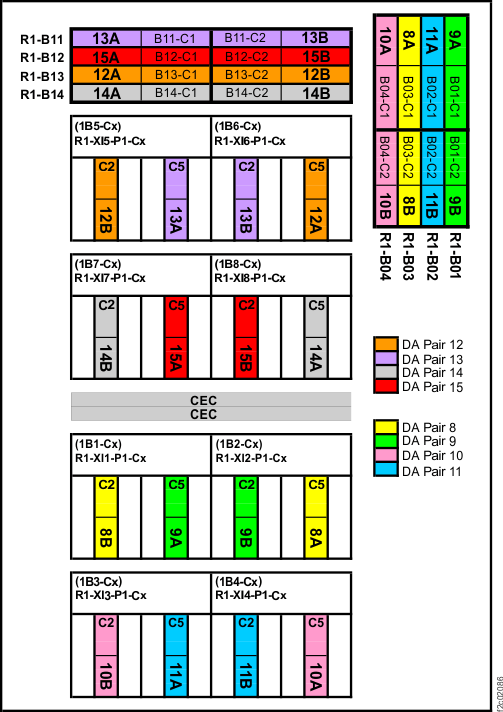
Point-to-point diagrams are provided at the end of this procedure if needed. See Figure 1, Figure 2, and Figure 3.
Example:For FRU location: R1-B04
The associated RAID controller cards, and their associated PCIe storage interface cards, are:
R1-B04-P1-C1-T3 (10A) which is connected to R1-XI3-P1-C2-T1
R1-B04-P1-C2-T3 (10B) which is connected to R1-XI4-P1-C5-T1
(the RAID controller card port will always be T3, and the PCIe storage interface card port will always be T1)Table 1. Storage enclosure PCIe cabling matrix - standard or business class configuration, Rack-1 and Rack-2 (Models 961, 96E) From:
PCIe storage interface cardDA Pair
(link)To:
RAID controller cardR1-XI3-P1-C2-T1 10B R1-B04-P1-C2-T3 R1-XI4-P1-C5-T1 10A R1-B04-P1-C1-T3 R1-XI1-P1-C2-T1 8B R1-B03-P1-C2-T3 R1-XI2-P1-C5-T1 8A R1-B03-P1-C1-T3 R1-XI3-P1-C5-T1 11A R1-B02-P1-C1-T3 R1-XI4-P1-C2-T1 11B R1-B02-P1-C2-T3 R1-XI1-P1-C5-T1 9A R1-B01-P1-C1-T3 R1-XI2-P1-C2-T1 9B R1-B01-P1-C2-T3 R2-XI3-P1-C2-T1 14B R2-B04-P1-C2-T3 R2-XI4-P1-C5-T1 14A R2-B04-P1-C1-T3 R2-XI1-P1-C2-T1 12B R2-B03-P1-C2-T3 R2-XI2-P1-C5-T1 12A R2-B03-P1-C1-T3 R2-XI3-P1-C5-T1 15A R2-B02-P1-C1-T3 R2-XI4-P1-C2-T1 15B R2-B02-P1-C2-T3 R2-XI1-P1-C5-T1 13A R2-B01-P1-C1-T3 R2-XI2-P1-C2-T1 13B R2-B01-P1-C2-T3 Table 2. Storage enclosure PCIe cabling matrix - DS8870 all-flash, Rack 1 (Model 961) From:
PCIe storage interface cardDA Pair
(link)To:
RAID controller cardR1-XI3-P1-C2-T1 10B R1-B04-P1-C2-T3 R1-XI4-P1-C5-T1 10A R1-B04-P1-C1-T3 R1-XI1-P1-C2-T1 8B R1-B03-P1-C2-T3 R1-XI2-P1-C5-T1 8A R1-B03-P1-C1-T3 R1-XI3-P1-C5-T1 11A R1-B02-P1-C1-T3 R1-XI4-P1-C2-T1 11B R1-B02-P1-C2-T3 R1-XI1-P1-C5-T1 9A R1-B01-P1-C1-T3 R1-XI2-P1-C2-T1 9B R1-B01-P1-C2-T3 R1-XI7-P1-C2-T1 14B R1-B14-P1-C2-T3 R1-XI8-P1-C5-T1 14A R1-B14-P1-C1-T3 R1-XI5-P1-C2-T1 12B R1-B13-P1-C2-T3 R1-XI6-P1-C5-T1 12A R1-B13-P1-C1-T3 R1-XI7-P1-C5-T1 15A R1-B12-P1-C1-T3 R1-XI8-P1-C2-T1 15B R1-B12-P1-C2-T3 R1-XI5-P1-C5-T1 13A R1-B11-P1-C1-T3 R1-XI6-P1-C2-T1 13B R1-B11-P1-C2-T3 - Confirm that the PCIe cable is not damaged and is securely
connected to the correct adapter (not "crossed") for each of
the following locations:
- Both storage enclosure RAID controller cards in the affected storage enclosure.
- Both PCIe storage interface cards in the DA pair.
Because you were guided to MAP32E0, the most likely problem is that cables were crossed at the storage enclosure (between the two storage enclosure RAID controller cards) or between the two IO enclosure PCIe storage interface cards.
- Are any cables disconnected, damaged, or connected to the wrong adapter?
- A visual inspection confirmed that the cables
are correctly connected and are not damaged.
Contact your next level of support. A system check detected crossed cabling but a visual inspection confirmed cables are not crossed. - Is a cable damaged?
- A cable is disconnected or is connected to the wrong adapter. Correct the disconnected or incorrectly connected cable(s), then continue to step 8.
- Close the serviceable
event that sent you here, and retry the storage enclosure installation. Figure 1. PCIe cable connections (standard configuration, Rack-1, rear) (Models 961/96E)
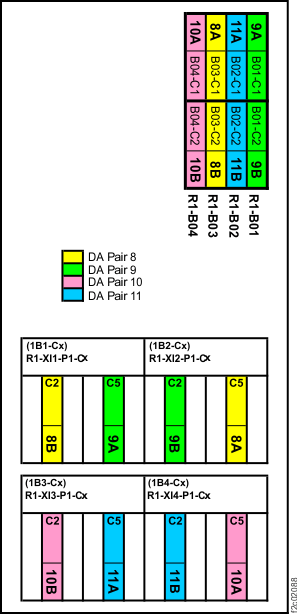 Figure 2. PCIe cable connections (standard configuration, Rack-2, rear) (Models 961/96E)
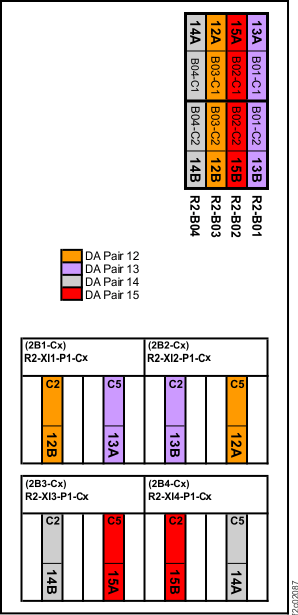 Figure 3. PCIe cable connections (DS8870 all-flash, Rack-1, rear) (Model 961)