Two or more FC-AL cables are reported
as cross-connected at the device adapter card listed in the FRU list.
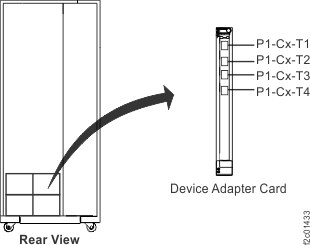
At the device adapter card listed in the FRU list, observe the FC-AL
cable labels. See Figure 1 or Figure 2.
Note: If the FRU list contains FC-AL
cables, they are listed for informational purposes only. Any cables
listed should be in pairs. If an odd number of cables is listed,
look for an FC-AL that is not connected to the DA card and is hanging
free. In all cases, continue with this procedure as if the cables
were not listed.
Are the cables cross-connected?
Yes, go to the next step.
No, stop and contact your next
level of support. This
may be a false error.
Figure 1. Model
941/94E, location codes for the device adapter card
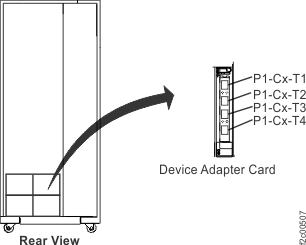
Figure 2. Model 951/95E, 961/96E location codes for the device adapter
card
Use the normal FRU exchange process to do a pseudo
repair of the I/O enclosure device adapter card in the FRU list. Do
not replace the I/O enclosure device adapter card when instructed
by the repair process. Instead, correct the cable or cables that are
not connected correctly and then continue with normal repair process.
Read all of the following substeps before going to substep
b, which will close this service information center window. To view
this MAP in a separate information center window, click Help in
the upper right corner of the main HMC GUI screen and navigate to
the MAP.
Click Close in the current service
information center window.
One or more HMC repair screens might prompt you for
the result of using the service procedure in the MAP. Select Problem
not fixed.
Select No when prompted for whether
you exchanged any parts.
Select Yes when prompted for
whether you isolated the problem.
Select the I/O Enclosure Device Adapter Card from
the FRU list. The HMC begins the FRU exchange process for the selected
FRU.
If the pseudo repair does not fix the problem, contact your next
level of support.