MAP 2460 Section-1 Overview of Power Control Panel
Fields
This section provides an overview of the Power Control Panel and
the various Power Control Modes.
Figure 1. Window:
Power Control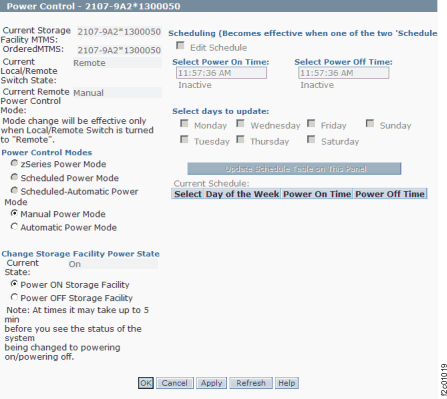
- Current Storage Facility MTMS
- This displays the Machine Type Model and Serial number of the currently targeted Storage Facility.
- Local/Remote Switch
- This displays the current position of the Local/Remote switch. This is
located on the local remote or zSeries local remote switch card. Note: The switch must be in the ’Remote’ state for any features on this panel to work.
- Current Power Control Mode
- This displays the active Power Control mode setting. Changes to the Power Control Mode will not take effect until Apply or OK is clicked.
- Power Control Modes
- Zseries Power Mode
- This mode is only available if the zSeries Power Control Feature is installed. If the feature is installed then a zSeries local remote switch card will be present in the DS8000 Rack-1. The zSeries local remote switch card can be distinguished from the local remote switch card in that it has four large connectors which allow zSeries power control cables to be plugged. If this option is selected, then Power On and Off of the storage facility is controlled by the zSeries host.
- Automatic Power Mode
- Automatic power mode causes the Storage Facility to power up automatically if AC power is restored following an unscheduled AC input loss. This setting can be used in combination with zSeries Power Mode.
- Scheduled Power Mode
- This power mode allows the customer to specify (using the panel on the right) when the storage facility should power on and power off. The Schedule on the right can be edited when this button is selected and Edit schedule is enabled. The schedule does not become active until Apply is clicked. Transitions will not occur until the next scheduled power off on power on time.
- Scheduled Automatic Power Mode
- This power mode provides the same function as Scheduled Power Mode except that additionally it will cause the storage facility to power up automatically if AC power is restored following an unscheduled AC input loss. That will occur if the AC power is restored inside a Power On window.
- Manual Power Mode
- Selecting this option will enable the Change Storage Facility Power State panel.
- Change Storage Facility State Panel
- This panel is enabled when Manual Power Mode is selected.
Clicking Power On or Power Off followed by Apply or OK will cause the storage facility to power on or power off. If either Apply or OK is clicked, a separate window opens and prompts the user to confirm the selection.
- Scheduling panel
- This becomes active if Scheduled or Scheduled Automatic Power Mode is
selected and Edit Schedule is enabled.
The panel allows the Power On and Off Schedule to be updated and shows a summary of the current choices. Multiple days can be updated simultaneously by selecting them. The selections become active when Apply or OK is selected.
Actions
- OK
- Clicking OK will perform the selected tasks and exit the panel as well. A separate window opens and prompts the user to confirm the selection.
- Apply
- Clicking Apply will perform the selected tasks without exiting the panel. A separate window opens and prompts the user to confirm the selection.
- Refresh
- Clicking Refresh will update the information on the panel to reflect changes in the storage facility, but will not change anything on the storage facility. For example, if the Local/Remote switch position is changed, then clicking Refresh will change the State as displayed on the panel.
- Cancel
- Clicking Cancel will exit the panel without committing any changes made since the last Apply.