DS8000 Service Documentation Version 7.5

MAP2260 DC-UPS battery service module (BSM) set isolation

This procedure isolates problems where the DC-UPS DC supply unit (DSU) does not properly detect or manage the DC-UPS battery service module (BSM) set.

MAP2260 Section-1 Entry

Procedure

  1. The serviceable event FRU list that sent you here contains one or more DC-UPS BSM FRUs.
  2. Find the condition that applies to the FRU list:
    • "BSM set" means the DC-UPS BSM set FRU
    • "DSU" means the DSU FRU
    Table 1. Possible FRU lists that contain a DC-UPS BSM
    If the FRU list contains: Go to:
    • MAP2260
    • BSM set
    MAP2260 Section-3 One BSM set
    • MAP2260
    • BSM set
    • BSM set
    MAP2260 Section-2 Two or three BSM sets
    • MAP2260
    • BSM set
    • BSM set
    • BSM set
    • MAP2260
    • BSM set
    • DSU
    MAP2260 Section-4 DSU and one BSM set
    • MAP2260
    • BSM set
    • DSU
    • BSM set
    MAP2260 Section-5 DSU and two or three BSM sets
    • MAP2260
    • BSM set
    Figure 1. Battery service module set location codes, DC-UPS (front)
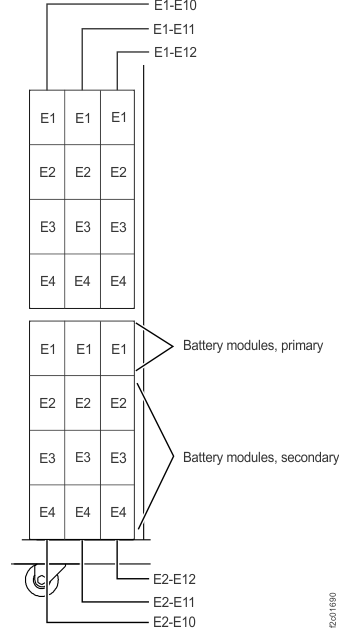
    Battery service module (BSM) set locations (front)

MAP2260 Section-2 Two or three BSM sets

Procedure

  1. The problem has been isolated to one BSM set. The remaining BSM sets for this DC-UPS are also listed in the serviceable event list. This is a special case.
    • All BSM sets for a DC-UPS must have a born-on date not greater than 22 months difference from each other. This ensures that the energy storage and discharge capacity of the BSM sets is compatible.
    • When a FRU list contains all the BSM sets for that DC-UPS, it means that one BSM is suspect, and if it is replaced then the remaining BSM sets must also be replaced.
    • The suspect BSM set is listed first in the FRU list. The remaining BSM sets listed in the FRU list have a born-on date greater than 22 months from today's date.
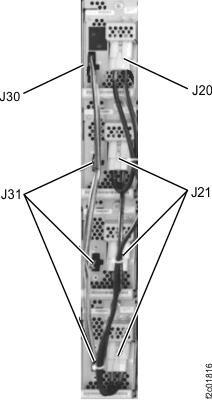
  2. Check whether each power cable (J20, J21) and signal cable (J30, J31) is properly connected to each of the four BSM modules in all listed BSM sets (Figure 2).

    Are the cables properly connected?

    • Yes, go to the next step.
    • No, select the BSM in the serviceable event FRU list and do a pseudo repair. When directed to replace the BSM set, you must follow the steps in the order listed to disconnect and then reconnect all the cables connected to the secondary BSMs. Do not physically replace the BSM set. (If you just reconnect the disconnected cable, the repair will fail). Exit this procedure.
  3. Before proceeding, select the first BSM in the FRU list. When you are directed to replace that BSM set, replace all the listed BSM sets at that time.

MAP2260 Section-3 One BSM set

Procedure

  1. The problem has been isolated to one BSM set.
  2. Check whether each power cable (J20, J21) and signal cable (J30, J31) is properly connected to each of the four BSM modules in this BSM set (Figure 2).

    Are the cables properly connected?

    • Yes, go to the next step.
    • No, select the BSM in the serviceable event FRU list and do a pseudo repair. When directed to replace the BSM set, you must follow the steps in the order listed to disconnect and then reconnect all the cables connected to the secondary BSMs. Do not physically replace the BSM set. (If you just reconnect the disconnected cable, the repair will fail). Exit this procedure.
    Figure 2. Battery service module set cables, J30 and J31 signal, J20 and J21 power
    Battery service module set cables, J30 and J31 signal, J20 and J21 power
  3. Select the BSM in the serviceable event FRU list and do a normal repair. Exit this procedure.

MAP2260 Section-4 DSU and one BSM set

Procedure

  1. The problem has been isolated to one DSU and one BSM set.
  2. Check whether each power cable (J20, J21) and signal cable (J30, J31) is properly connected to each of the four BSM modules in this BSM set (Figure 2).

    Is the cable properly connected?

    • Yes, go to the next step. Select the BSM in the serviceable event FRU list and do a normal repair. Exit this procedure.
    • No, select the BSM in the serviceable event FRU list and do a pseudo repair. When directed to replace the BSM set, you must follow the steps in the order listed to disconnect and then reconnect all the cables connected to the secondary BSMs. Do not physically replace the BSM set. (If you just reconnect the disconnected cable, the repair will fail). Exit this procedure.
  3. Replace each FRU in the order listed in the serviceable event FRU list until the problem is fixed.

MAP2260 Section-5 DSU and two or three BSM sets

Procedure

  1. The problem has been isolated to one DSU and one BSM set. The remaining BSM sets for this DC-UPS are also listed in the serviceable event list. This is a special case.
    • All BSM sets for a DC-UPS must have a born-on date not greater than 22 months difference from each other. This ensures that the energy storage and discharge capacity of the BSM sets is compatible.
    • When a FRU list contains all the BSM sets for that DC-UPS, it means that one BSM is suspect, and if it is replaced then the remaining BSM sets must also be replaced.
    • The suspect BSM set is listed first in the FRU list. The remaining BSM sets listed in the FRU list have a born-on date greater than 22 months from today's date.
  2. Check whether each power cable (J20, J21) and signal cable (J30, J31) is properly connected to each of the four BSM modules in all listed BSM sets (Figure 2).

    Are the cables properly connected?

    • Yes, go to the next step.
    • No, select the BSM in the serviceable event FRU list and do a pseudo repair. When directed to replace the BSM set, you must follow the steps in the order that is listed to disconnect and then reconnect all the cables connected to the secondary BSMs. Do not physically replace the BSM set. (If you just reconnect the disconnected cable, the repair will fail). Exit this procedure.
  3. Read the following points before proceeding.
    • Replace each FRU in the order that is listed in the serviceable event FRU list until the problem is fixed.
    • If and when you replace the first BSM listed in the FRU list, when directed to replace that BSM set, replace all the listed BSM sets at that time.