MAP2242 Section-1
Procedure
- One or more of the battery service module (BSM) set secondary modules is reporting a serial number that does not match the primary module. The serial number must match to ensure all the modules in the set have the same age and charging history.
- The next FRU in the serviceable event FRU list is the location code of the BSM set with the
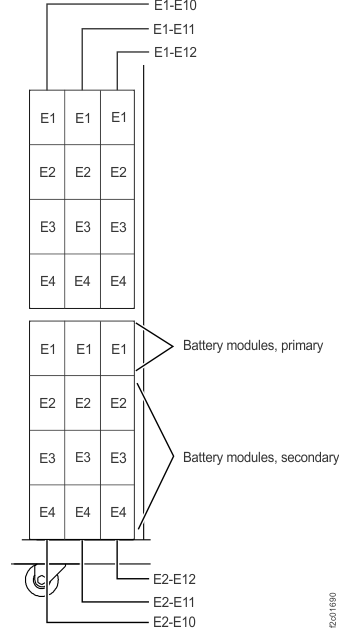
serial number mismatch. To convert the location code to a physical location, see Figure 1.
Figure 1. Battery service module (BSM) set locations (front)
- Remove the BSM set cover (if present) from the
BSM set enclosure.
- At the bottom of the cover, pull the knob out on both fasteners.
- Pull the bottom of the cover away from the BSM set.
- Lift the cover up until the two top sheet metal tabs release from the BSM set enclosure.
- Observe the serial number label on the primary (E1x-E1) BSM module.
- Observe the serial number label on the secondary (E1x-E2/E3/E4) BSM modules.
- Did you find a serial number mismatch between one or more secondary modules and the primary module?
- One or more secondary BSM modules serial
numbers do not match the primary BSM module serial number in the same
BSM set. Read all the following information before you decide on an
action.
Table 1. Replacing a BSM module set when the serial numbers do not match the primary BSM module Condition Action If you are replacing just one BSM set, you may have accidentally swapped one or more old and new BSM modules. It is also possible, although not likely, that the new BSM set came from IBM with a serial number mismatch. It must be replaced with a BSM set that has matching serial numbers.
If you only need to correct one BSM module set: - Select the next FRU in the serviceable event FRU list to repair.
- When you are directed to replace all the BSM modules, disconnect and undock all the modules as directed; but only replace the incorrect module.
If you are replacing more than one BSM set, you may have accidentally swapped BSM modules between some combination of the new set, or old set, or both. If you need to correct more than one BSM module set on the same DC-UPS: - Do a pseudo repair of the DC-UPS DSU. Refer to MAP1230 Replace a FRU without using a serviceable event. The upper DC-UPS DSU is E1, the lower is E2. See Figure 1.
- When you are directed to replace the DC-UPS DSU, disconnect all the cables as directed, except for the ground cable.
- At the front of the rack, undock each primary BSM as directed by the DSU repair procedure. The DSU modules can be left installed in the DC-UPS chassis.
- At the front of the rack, move the BSM modules to the correct locations. Insert the primary BSM(s) and install the retaining screw(s). Reinstall the BSM set cover (if removed).
- Return to the rear of the rack and complete the pseudo repair of the DC-UPS DSU, connecting the cables when directed.
- The code is reporting a serial number
mismatch, and your visual inspection did not find a serial number
mismatch.
- Go to the next FRU in the serviceable event FRU list and do a pseudo repair of the BSM set listed. A pseudo repair of the BSM set means that when you are directed to replace the BSM set, you will disconnect the cables and undock the modules from the enclosure, but you will not replace the modules with new ones.
- If the pseudo repair is successful, reinstall the BSM set cover (if removed) and then exit this MAP, the service action is complete.
- If the pseudo repair fails, order a new BSM set and repeat the repair. This time you will replace the old modules with the new modules.