DS8000 Service Documentation Version 7.5

MAP2221 CEC enclosure to RPC card serial path failure (Model 961)

One or more serial interfaces between the CEC enclosure RS-485 serial interface card and RPC cards is failing.

MAP2221 Section-1

Procedure

  1. There are four serial cables between the CEC enclosures and RPC cards as shown in Figure 1. Each is a separate communication path.
    Figure 1. Serial cables, CEC enclosure RS-485 card to RPC cards
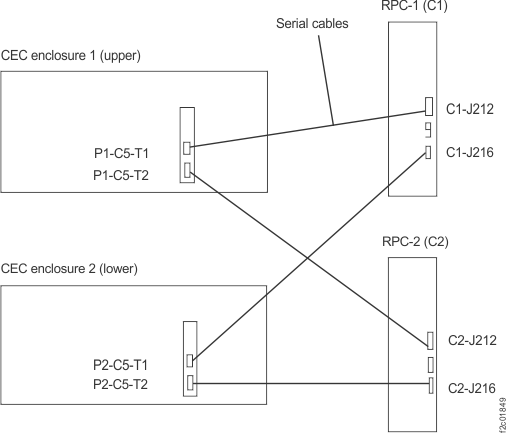
    Serial cables, CEC enclosure RS-485 card to RPC cards
  2. Display open serviceable events. Find those with the SRCs listed in Table 1. Use Table 1 to prioritize the order of repair.
    Table 1. SRC and associated actions
    SRC repair order SRC definition Go to
    BE190050 CEC enclosure 1 failed to communicate with RPC-1 and RPC-2 through serial paths. MAP2221 Section-2 (One CEC enclosure RS-485 serial interface failed to both RPC cards)
    BE190051 CEC enclosure 2 failed to communicate with RPC-1 and RPC-2 through serial paths.
    BE190052 CEC enclosure 1 and 2 failed to communicate with RPC-1 through serial paths. MAP2221 Section-3 (Both CEC enclosure RS-485 serial interfaces failed to one RPC card)
    BE190053 CEC enclosure 1 and 2 failed to communicate with RPC-2 through serial paths.
    BE190054
    BE190058
    CEC enclosure 1 failed to communicate with RPC-1 through serial path. MAP2221 Section-4 (One CEC enclosure RS-485 serial interface failed to one RPC card)
    BE190055
    BE190059
    CEC enclosure 2 failed to communicate with RPC-1 through serial path.
    BE190056
    BE19005A
    CEC enclosure 1 failed to communicate with RPC-2 through serial path.
    BE190057
    BE19005B
    CEC enclosure 2 failed to communicate with RPC-2 through serial path.

MAP2221 Section-2 (One CEC enclosure RS-485 serial interface failed to both RPC cards)

Procedure

  1. Use the SRC in the serviceable event that sent you here and refer to Table 2 for an overall description of your failure.
    Table 2. SRC communication failure resources
    SRC Communication failure resources
    BE190050 CEC enclosure 1 (upper) failure to communicate with RPC-1 card (upper) and RPC-2 card (lower) through serial interface paths.
    BE190051 CEC enclosure 2 (lower) failure to communicate with RPC-1 card (upper) and RPC-2 card (lower) through serial interface paths.
  2. Display open serviceable events. Look for FRU lists containing:
    • CEC enclosure RS-485 serial interface card
    • CEC enclosure system backplane
    • Serial interface cable

    Other than the serviceable event FRU list that sent you here, is there any other serviceable event with one of the above FRUs listed?

    • Yes, exit this MAP and attempt to repair that serviceable event first. If that repair does not correct this problem, return here and continue with the next step. If that repair does correct this problem, remember to also close this serviceable event.
    • No, go to the next step.
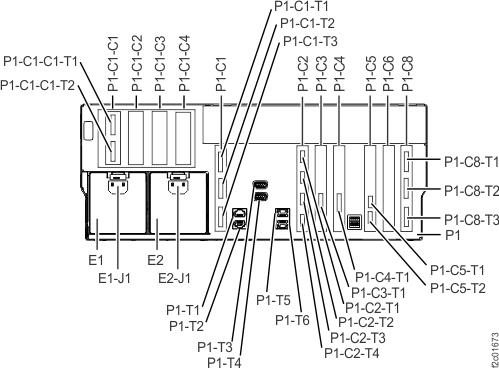
  3. Ensure that both serial interface cables are properly connected to the CEC enclosure RS-485 serial interface card connectors (Figure 2). P1-C5-T1 is upper cable with gray label, P1-C5-T2 is lower cable with yellow label.
    • The location code of the CEC enclosure RS-485 serial interface card appears in the serviceable event FRU list that sent you here.
    • If a cable is unplugged, do a pseudo repair of the CEC enclosure RS-485 serial interface card and instead of replacing the card, properly connect the cable.
    Figure 2. Location codes for the CEC enclosure (rear view) (Model 961)
    Location codes for the CEC enclosure (rear view) (Models 961)
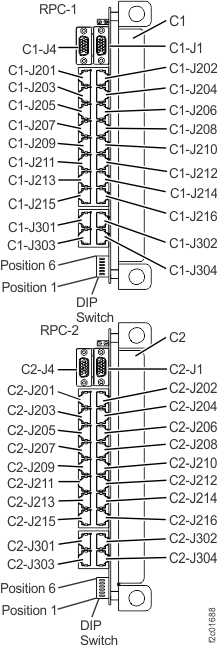
  4. Ensure the serial interface cables are properly connected to both RPC cards (Figure 3).
    • The serial interface cables from CEC enclosure 1 (upper) connects to both RPC cards J212. See Figure 3.
    • The serial interface cables from CEC enclosure 2 (lower) connects to both RPC cards J216. See Figure 3.
    • If a cable is unplugged, do a pseudo repair of the CEC enclosure RS-485 serial interface card and instead of replacing the card, properly connect the cable.
    Figure 3. Location codes for the RPC cards (Model 961)
    Location codes for the RPC cards (Model 961)
  5. If no problem was found with the serial interface cables, the possible failing FRUs are:
    • CEC enclosure RS-485 serial interface card
    • CEC enclosure system backplane
    • Serial interface cable

    These FRUs are listed in the serviceable event FRU list that sent you here. Use normal guided maintenance to replace the FRU(s).

MAP2221 Section-3 (Both CEC enclosure RS-485 serial interfaces failed to one RPC card)

About this task

Note: The RPC card is fenced. The following procedure resets the fence by either replacing the card or doing a pseudo repair of the card.

Procedure

  1. Use the SRC in the serviceable event that sent you here to determine which RPC card the CEC failed to communicate with. Refer to Table 3. The location code of the suspect RPC card is the first FRU following MAP2221 in the FRU list (Figure 3).
    Table 3. SRC communication interface failure resources
    SRC Communication failure resources
    BE190052 Both CEC enclosure serial adapter cards failed to communicate with RPC-1 card (upper)
    BE190053 Both CEC enclosure serial adapter cards failed to communicate with RPC-2 card (lower)
  2. Display serviceable events that need repair.

    Is there any other serviceable event listing the RPC card determined in step 1 or CEC enclosure-to-RPC card cable that connects to it?

    • Yes, exit this MAP and attempt to repair that serviceable event first. If that repair does not correct this problem also, return here and continue at the next step. If that repair does not correct this problem, remember to also close this serviceable event.
    • No, go to the next step.
  3. Ensure both serial interface cables are properly connected to the CEC enclosure RS-485 serial interface card connectors (P1-C5-T1, P1-C5-T2, Figure 2).
    • The location code of the CEC enclosure RS-485 serial interface card assembly appears in the serviceable event FRU list that sent you here.
    • If a cable is unplugged, do a pseudo repair of the RPC card listed in the FRU list. Instead of replacing the card, properly connect the cable. This also resets the RPC card fence.
  4. Ensure the following cables are properly connected to each RPC card (Figure 3).
    • The Y-cable from both DC-UPSs in Rack-1 are connected to RPC card J201.
      Note: This cable provides power to the RPC card. It is not part of the serial interface. If the RPC card has no power, both serial interfaces will fail.
    • The serial interface cables from CEC enclosure 1 (upper) connect to J212 on both RPC cards. See Figure 1.
    • The serial interface cables from CEC enclosure 2 (lower) connect to J216 on both RPC cards. See Figure 1.
    • If a cable is unplugged, do a pseudo repair of the RPC card listed in the FRU list. Instead of replacing the card, properly connect the cable. This also resets the RPC card fence.
  5. If no problem was found with the serial interface cables, the possible failing FRUs are:
    • RPC card
    • Serial interface cable

    The FRU is listed in the serviceable event FRU list that sent you here. Use normal guided maintenance to replace the FRU.

MAP2221 Section-4 (One CEC enclosure RS-485 serial interface failed to one RPC card)

About this task

Note: The RPC card is fenced. The following procedure resets the fence by either replacing the card or doing a pseudo repair of the card.

Procedure

  1. Use the SRC in the serviceable event that sent you here to determine the failing communication interface using Table 4. The FRUs at each end of the serial interface cable are listed following MAP2221 in the FRU list.
    Table 4. SRC communication interface failure resources
    SRC Communication failure resources
    BE190054
    BE190058
    CEC enclosure 1 (upper), failure to communicate with RPC-1 card through serial cable
    BE190055
    BE190059
    CEC enclosure 2 (lower), failure to communicate with RPC-1 card through serial cable
    BE190056
    BE19005A
    CEC enclosure 1 (upper), failure to communicate with RPC-2 card through serial cable
    BE190057
    BE19005B
    CEC enclosure 2 (lower), failure to communicate with RPC-2 card through serial cable
  2. Display serviceable events that need repair.

    Is there any other serviceable event listing the RPC card determined in step 1 or CEC enclosure-to-RPC card cable that connects to it?

    • Yes, exit this MAP and attempt to repair that serviceable event first. If that repair does not correct this problem also, return here and continue at the next step. If that repair does not correct this problem, remember to also close this serviceable event.
    • No, go to the next step.
  3. Ensure both serial interface cables are properly connected to the CEC enclosure RS-485 serial interface card connectors (P1-C5-T1, P1-C5-T2, Figure 2.
    • The location code of the CEC enclosure RS-485 serial interface card assembly appears in the serviceable event FRU list that sent you here.
    • If a cable is unplugged, do a pseudo repair of the RPC card listed in the FRU list. Instead of replacing the card, properly connect the cable. This also resets the RPC card fence.
  4. Ensure the serial interface cables are properly connected to each RPC card (Figure 3).
    • The serial interface cables from CEC enclosure 1 (upper) connect to J212 on both RPC cards. See Figure 1.
    • The serial interface cables from CEC enclosure 2 (lower) connect to J216 on both RPC cards. See Figure 1.
    • If a cable is unplugged, do a pseudo repair of the RPC card listed in the FRU list. Instead of replacing the card, properly connect the cable. This also resets the RPC card fence.
  5. If no problem was found with the serial interface cables, the possible failing FRUs are:
    • RPC card
    • CEC enclosure serial adapter card
    • CEC enclosure system backplane
    • Serial interface cable

    The FRU is listed in the serviceable event FRU list that sent you here. Use normal guided maintenance to replace the FRU.