MAP2180 Section-2
Before you begin
About this task
Procedure
- Use a volt/ohm meter to check the continuity of the new FRU between the two pins on the cable connector that would plug to the PPS J4 connector. With the switch in the closed position, the continuity should be less than 0.1 ohm. With the switch in the open position, the continuity should be infinite. Ensure both cables connectors checkout correctly before you continue.
- The next steps show and describe the Model 94x. The 95x is similar.
- At the front of the rack, remove the two rack
operator panel screws 1 . See Figure 1. Figure 1. Rack operator panel LED assembly
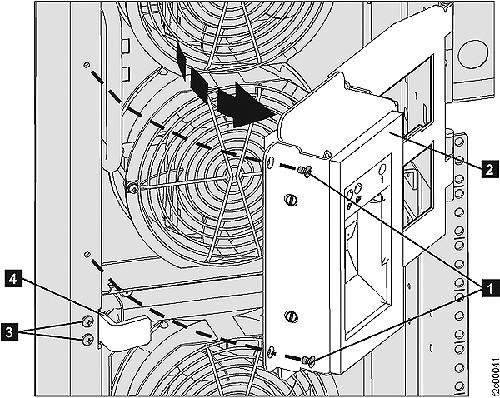
- WARNING: Open the rack operator panel gently.
Do not force it! Note: A few racks built before September 2007 may have the cable to the UEPO switch installed without enough free play. Forcing the panel open could cause the cable to break the UEPO switch.
- At the rear of the operator panel, remove the four screws (two in front and two on the left side) that hold the rear sheet metal cover that blocks access to the rear of the UEPO switch.
- Remove the two screws fastening the UEPO switch to the operator panel and remove the UEPO switch. Temporarily leave the switch assembly hanging by its wires. Ensure it does not contact any exposed circuits. The old UEPO switch assembly and its associated cables will be removed later in the procedure.
- Observe the "top" label on the UEPO switch and ensure it is facing up. (There are two versions of the switch, one that has the wires connected to the bottom four pins, the other connecting to the top four pins. The "top" label ensures it is installed in the correct orientation.) Mount the new UEPO switch assembly on the front cover with the "top" label facing up.
- Mount the new UEPO switch assembly to the operator panel.
- Ensure the new UEPO switch setting is ON (up). Note: To set the UEPO switch up, some service representatives use a key to push up through the front to set the UEPO switch to on.
- Route but do not connect the UEPO switch assembly cables to the appropriate primary power supply.
- Observe the UEPO LOOP GOOD LED indicator on the front of both PPSs. Find the condition that applies:
- Make a connection to PPS-1 by performing
the following steps.
- Use the utilities at the management console to select System Level Deactivate for PPS-1.
- Switch off the PPS-1 power input circuit breaker.
- Unplug the UEPO cable connected to the PPS-1 connector J4.
- Connect the cable from the new UEPO switch assembly.
- Switch on the PPS-1 power input circuit breaker.
- Ensure the "UEPO LOOP GOOD" LED indicator is now on.
- Use the utilities at the management console to select System Level Activate for PPS-1.
- Go to step 14.
- Make a connection to PPS-2 by performing
the following steps.
- Use the utilities at the management console to select System Level Deactivate for PPS-2.
- Switch off the PPS-2 power input circuit breaker.
- Unplug the UEPO cable connected to the PPS-2 connector J4.
- Connect the cable from the new UEPO switch assembly.
- Switch on the PPS-2 power input circuit breaker.
- Ensure the "UEPO LOOP GOOD" LED indicator is now on.
- Use the utilities at the management console to select System Level Activate for PPS-2.
- Find the condition that applies:
- Remove the old UEPO switch assembly.
- Complete the routing for the new cables. Ensure the cable at the operator panel has enough free play before installing the cable retention hardware.