Use this procedure when the primary power supply (PPS) reports an overcurrent in the 208 VDC power boundary.

.
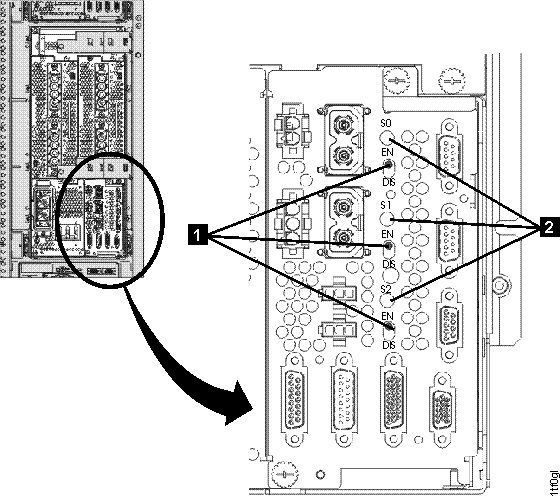
shows the disable/enable switch. 
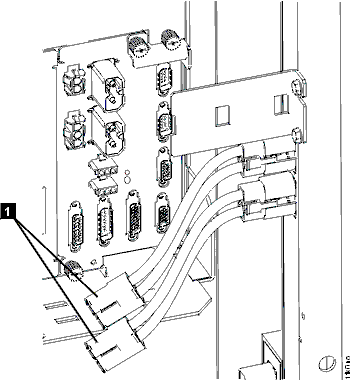
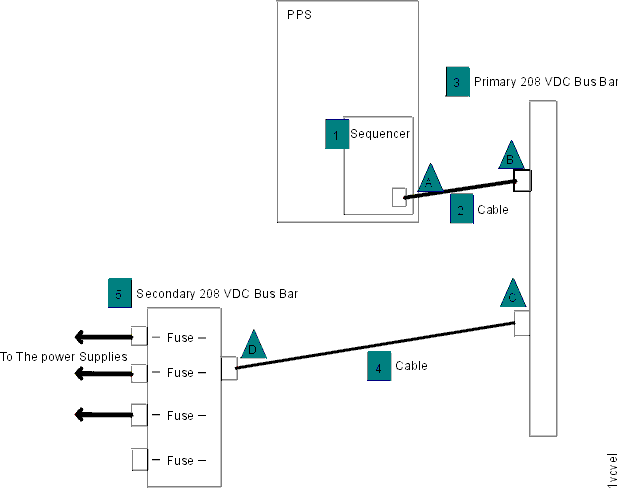
from the PPS sequencer module to the 208 VDC
bus bar. Reset the "S0" output by setting the enable/disable
switch below the LED to disable (down) and then enable (up). 


from connector C. Reset the "S0" output by setting the enable/disable
switch below the LED to disable (down) and then enable (up).
or bus bar
. Go to the next step.
or bus bar
. Go to step 7.
at connector B. Reset the "S0" output by setting the enable/disable
switch below the LED to disable (down) and then enable (up). Observe
the LED on the PPS sequencer module labeled "S0". Find the condition
that applies:
to connector C.
from connector D. Reset the "S0" output by setting the enable/disable
switch below the LED to disable (down) and then enable (up). Observe
the LED on the PPS sequencer module labeled "S0". Find the condition
that applies:| FRU to replace | Action |
|---|---|
PPS to primary 208 VDC bus bar cable ![]() |
Go to Cables to replace the FRU and then go to the next step. |
Primary 208 VDC bus bar cable ![]() |
Go Cables to replace the FRU then return to the next step. |
Primary 208 VDC bus bar to secondary 208 VDC bus bar cable ![]() |
Replace the FRU and then go to the next step. |
Secondary 208 VDC bus bar ![]() |
Go to Exchange the bus bar, 208VDC secondary to replace the FRU and then return to the next step. |