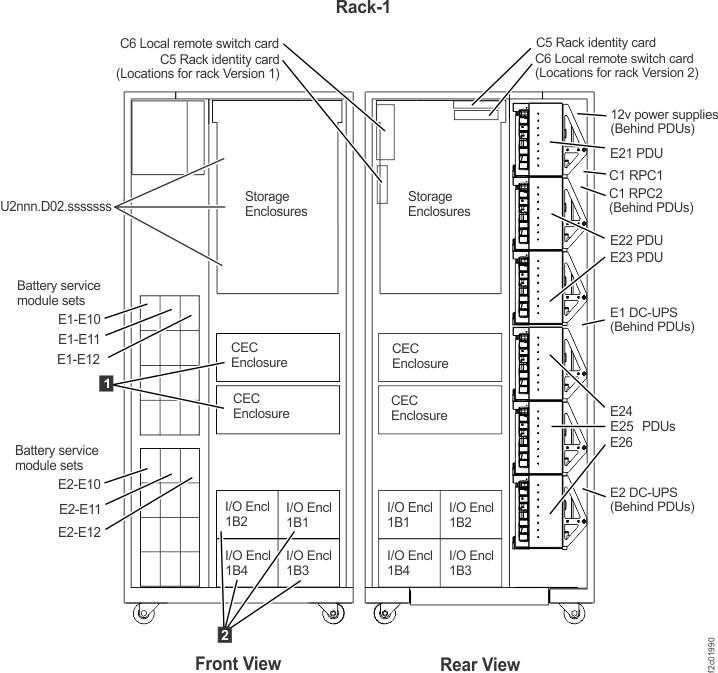
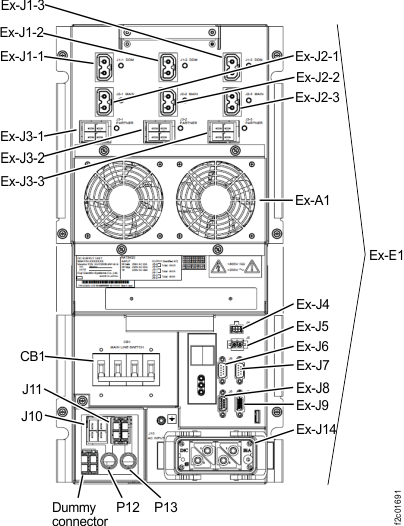
Figure 2. Location codes for the DC-UPS (Models 961, 96E) (rear)
The input circuit breaker is in the center position because it is tripped as a result of an
over-current condition inside the DSU. Do
not reset the circuit breaker. Return to the screen that sent you here to continue the repair
process and replace the DSU FRU.
The input circuit breaker is in the completely
up position, which is the normal position. The DSU has previously
reported that the breaker was manually tripped and then manually closed.
Either someone manually tripped/closed the breaker or the DSU is incorrectly
reporting that it detected a manual trip/close. Attempt to determine
from the customer whether there has been any manual intervention on
the machine. If this is the first occurrence, close the serviceable event and exit
this MAP. If this is the second (or more) occurrence of such event
and there was no known source of manual intervention (including the
customer), then return to the screen that sent you here to continue
the repair process and replace the DSU FRU.
The input circuit breaker is in the completely
down position, which is the normal position when it has been manually
switched off. Determine who switched it off and why.
If it was switched off as part of a repair procedure, return to
that procedure and continue.
If you cannot determine why it was switched off, go to the next
step.
Observe the two character LED status display
to the right of the input circuit breaker.
Is an error
code displayed?
No, go to the next step.
Yes, display and repair any related serviceable events.
If the error indicates that the circuit breaker is off (display
= I4), then go to the next step.
If the error is internal to the DSU, replace
the DSU.
If the error is not internal, contact your next
level of support.
The functional code may have fenced the DSU (removed
it from active use) as part of the error recovery. Determine if the DSU has been
fenced.
From the navigation area, click Storage Facility Management > storage
facility.
From the bottom Task area, click Service Utilities > View Storage Facility
State.
A window displays the status (passed/failed) of 25 or
more system checks.
At the bottom of the System Check Type column, observe
the status of the Fenced Resources.
What is the status of the Fenced Resources?
PASSED, no resources are fenced. If the error code from step 5 above indicated that the breaker
was off (I4), then flip the breaker to the up (On) position. Go to step 8.
FAILED, go to the next step.
Display details about the Fenced Resources.
Select Fenced Resources in the list.
Click Details. The Details window
is displayed.
Is the DSU listed
as a fenced resource in the Details window?
Yes, go to the next step.
No, the DSU is
not fenced. Close the serviceable event and exit
this MAP. There should be serviceable events for
resources that are fenced. These should be repaired.
Reset the DSU fence or related power errors by doing a pseudo repair of the DSU FRU.
Return to the repair screen that sent you here.
Do a pseudo repair of the FRU. A pseudo repair
of the DSU means
that you use the normal FRU replacement procedure. Disconnect and
reconnect the cables in order, when directed. The ground cable can
be left connected. Do not physically remove and reinstall the FRU.