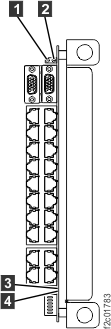
The failing RPC card has
an internal problem that is causing it to fence the working RPC card when
it should not.
About this task
The false fence must be reset before the failing RPC card can
be replaced. The RPC to RPC communication cable will be unplugged so the working RPC card will not continue
to be fenced by the failing RPC card.
Verify that one of the two s is fenced. Observe the green LED on each
RPC card. Is the green LED indicator off on one of the
cards?
Yes, continue at the next step.
No, neither RPC is fenced. The original failing condition is no longer present. Contact your next level
of support before cancelling this problem.
Unplug the RPC to RPC communication cable from the J2-08 connector on the failing RPC card (green LED is lit).
Observe the green LED on the working RPC card (green
LED was off). Is the green LED indicator lit?
Yes, continue at the next step.
No, the working RPC card did
not unfence when the RPC to RPC communication cable carrying the fence signal
was unplugged. Both RPC cards
may be failing. Contact your next level
of support.
Return to the SAEL problem screen and continue.
Note: Both RPC cards are not available
and normal guided FRU replace procedures will be used.