This section contains information about LEDs that are on the x3550 management console server. Although the condition of LEDs might indicate a failure, the LEDs should not be used as a starting point for a repair.
LEDs on the front of the x3550 server
Figure 1. X3550 management console server
DVD drive activity LED (front view)
- DVD-RAM drive activity LED
- When this LED is lit, it indicates that the DVD-RAM drive is in use.
LEDs on the x3550 operator information panel
Figure 2. x3550 operator
panel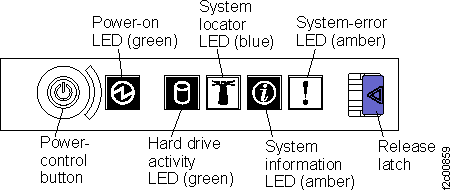
- Power-on LED
- When this green LED is lit and not flashing, it indicates that
the server is turned on.
When this LED is flashing, indicates that the server is turned off and is still connected to an ac power source.
When this LED is off, it indicates power is not present, or the power supply or the LED itself has failed. A power LED is also on the rear of the server.Note: If this LED is off, it does not mean that there is no electrical power in the server. The LED might be burned out. To remove all electrical power from the server, you must disconnect the power cord from the electrical outlet. - System-locator LED
- Use this blue LED to visually locate the server among other servers. You can use IBM Director to light this LED remotely. This LED is controlled by the BMC.
- System-error LED
- When this amber LED is lit, it indicates that a system error has occurred. A system-error LED is also on the rear of the server. An LED on the light path diagnostics panel on the system board is also lit to help isolate the error. This LED is controlled by the BMC.
- System-information LED
- When this amber LED is lit, it indicates that a noncritical event has occurred. Check the error log for additional information. See the information about light path diagnostics in the Problem Determination and Service Guide for more information about error logs.
- Hard drive activity LED
- When this green LED is lit, it indicates that one of the hard disk drives is in use.
- DVD-RAM drive activity LED
- When the LED is lit, it indicates that the DVD-RAM drive is in use.
LEDs on the rear of the x3550 server
Figure 3. x3550 management
console server (rear view with LED information only)
- Power connector
- Connect the power cord to this connector.
- AC power LED
- Each hot-swap power supply has an ac power LED and a dc power LED. When the ac power LED is lit, it indicates that sufficient power is coming into the power supply through the power cord. During typical operation, both the ac and dc power LEDs are lit. For any other combination of LEDs, see the Problem Determination and Service Guide.
- DC power LED
- Each hot-swap power supply has a dc power LED and an ac power LED. When the dc power LED is lit, it indicates that the power supply is supplying adequate dc power to the system. During typical operation, both the ac and dc power LEDs are lit. For any other combination of LEDs, see the Problem Determination and Service Guide.
- System-error LED
- When this LED is lit, it indicates that a system error has occurred. An LED on the light path diagnostics panel is also lit to help isolate the error.
- Power-on LED
- When this LED is lit and not flashing, it indicates that the server is turned on. When this LED is flashing, it indicates that the server is turned off and still connected to a power source. When this LED is off, it indicates that ac power is not present, or the power supply or the LED itself has failed.
- System-locater LED
- Not used.
Figure 4. X3550 Ethernet
LEDs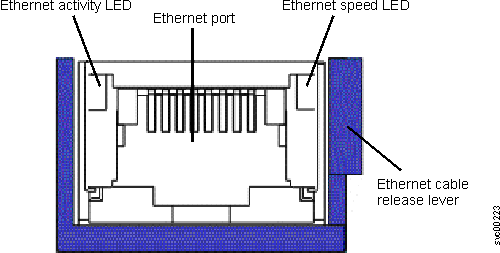
- Ethernet activity LEDs
- When these LEDs are lit, they indicate that the server is transmitting to or receiving signals from the Ethernet LAN that is connected to the Ethernet port.
- Ethernet speed LED
- When these LEDs are lit, they indicate that there is an active link connection on the 10BASE-T, 100BASE-TX, or 1000BASE-TX interface for the Ethernet port.