This section contains information about LEDs that are on the X335 management console server. Although the condition of LEDs might indicate a failure, the LEDs should not be used as a starting point for a repair.
LEDs on the front of the X335 server
Figure 1. LEDs on the
front of the X335 management console server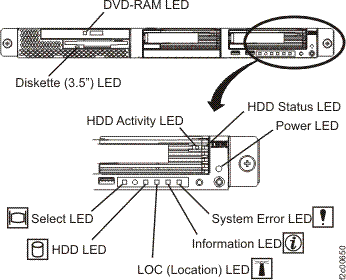
- Diskette (3.5") LED: On = The diskette drive is in use.
- DVD-RAM LED: On = The DVD-RAM drive is in use.
- HDD Activity LED: On = The hard disk drive is in use.
- HDD Status LED: On = The hard disk drive has failed. If an optional RAID adapter is installed in the server and the LED flashes slowly (one flash per second), the drive is being rebuilt. If the LED flashes rapidly (three flashes per second), the controller is identifying the drive.
- HDD LED (Panel): On = Either of the hard disk drives is in use.
- Information LED: On = A non-critical event has occurred and is identified in the error log.
- LOC (Location) LED: Use this blue LED to visually locate the server if it is in a location with numerous other servers. You can use IBM Director to light this LED remotely. (Not used on the DS8000®.)
- Power LED: On = Input power (ac) and output power (dc)
are present in the server. Flashing = The server is in power
off state. Off = Input power is not present, the power supply
has failed, or the LED itself has failed. A power LED is also on the
rear of the server.Note: To remove all electrical power from the server, you must disconnect the power cord from the electrical outlet.
- Select LED: The C2T chain uses special cables to allow two or more X335 servers to share one keyboard/display. The DS8000 does not use this feature, so this LED should always be lit. A select LED is also on the rear of the server.
- System Error LED: On = A system error has occurred. An LED on the Light Path Diagnostics panel on the system board is also lit to help isolate the error. A system error LED is also on the front of the server.
LEDs on the rear of the X335 server
Figure 2. LEDs on the
rear of the X335 management console server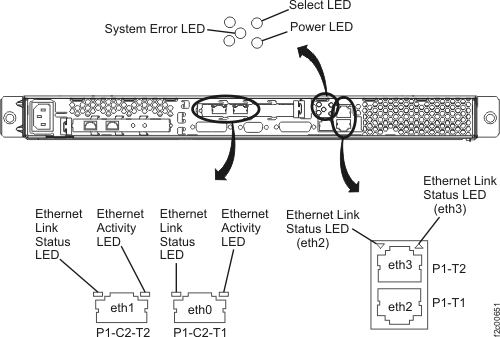
- Ethernet Activity LED: On = The Ethernet link is bad. Off = Ethernet activity is not occurring. Flashing = Ethernet activity is occurring.
- Ethernet Link Status LED: On = The Ethernet link is okay. Off = The Ethernet link is bad.
- Power LED: On = Input power (ac) and output power (dc)
are present in the server. Flashing = The server is in power
off state. Off = Input power is not present, the power supply
has failed, or the LED itself has failed. A power LED is also on the
front of the server.Note: To remove all electrical power from the server, you must disconnect the power cord from the electrical outlet.
- Select LED: The C2T chain uses special cables to allow two or more X335 servers to share one keyboard/display. The DS8000 does not use this feature, so this LED should always be lit. A select LED is also on the front of the server.
- System Error LED: On = A system error has occurred. An LED on the Light Path Diagnostics panel on the system board is also lit to help isolate the error. A system error LED is also on the front of the server.