This section contains storage enclosure FRUs that have LED indicators. Each listed assembly is shown with a description of its LEDs. While LED indicators might indicate a failure, they should not be used as a starting point for a repair.
Storage enclosure FRUs with LEDs
| Part name | Reference |
|---|---|
| Storage enclosure | Figure 1 |
| Disk drive module (DDM) - (24 DDM slot storage enclosure) | Figure 2 |
| Disk drive module (DDM) - (12 DDM slot storage enclosure) | Figure 3 |
| Fibre channel interface card (FCIC) | Figure 4 |
| Storage enclosure power supply | Figure 5 |
Storage enclosure LEDs
Figure 1. Storage enclosure LEDs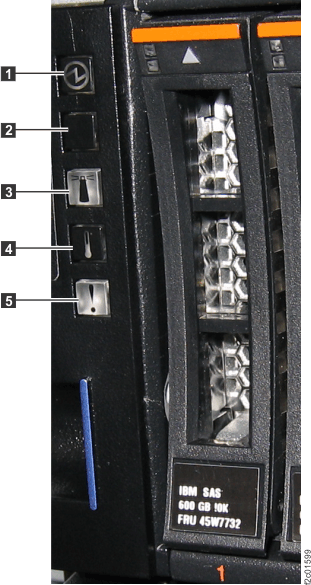
| Index | LED name | LED color | Controlled by | LED state | Description |
|---|---|---|---|---|---|
| 1 | Power | Green | Hardware | Solid on | Storage enclosure is powered on |
| Off | Storage enclosure is powered off | ||||
| 2 | Unused | ||||
| 3 | Group identify | Blue | Microcode | Solid on | A FRU in this storage enclosure is being identified |
| Off | Default state, unused | ||||
| 4 | Over Temperature | Amber | Unused | ||
| 5 | Identify / Attention | Amber | Microcode | Solid on | Storage enclosure fault |
| Off | Default state | ||||
Disk drive modules (DDMs) LEDs
Figure 2. Disk drive modules (DDMs) LEDs
(24 DDM slot storage enclosure)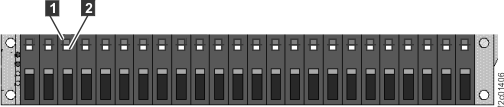
Figure 3. Disk drive modules (DDMs) LEDs
(12 DDM slot storage enclosure)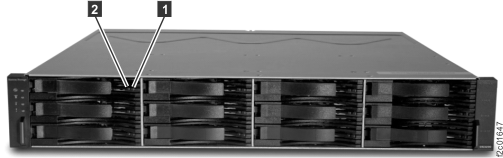
| Index | LED name | LED color | Controlled by | LED state | Description |
|---|---|---|---|---|---|
| 1 | Power / Activity | Green | Hardware | Solid on | Drive spinning, no data transfer |
| Fast blink | Data transferring | ||||
| Medium blink | Drive spinning up; 2 sec blink, 50% on 50% off | ||||
| Slow blink | Drive not spinning up; 2 sec blink, 20% on 80% off | ||||
| Off | Drive not receiving power | ||||
| 2 | Identify / Attention | Amber | Microcode | Solid on | Storage enclosure fault |
| Off | Default statue |
Fibre channel interface card (FCIC) LEDs
Figure 4. Fibre channel interface
card (FCIC) LEDs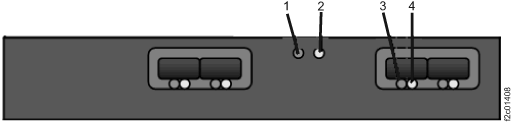
| Index | LED name | LED color | Controlled by | LED state | Description |
|---|---|---|---|---|---|
| 1 | Card power | Green | Hardware | Solid on | Power good |
| Off | Power fault or input power missing | ||||
| 2 | Identify / Attention | Amber | Microcode | Solid on | Fault |
| Blinking | FRU being identified | ||||
| Off | Default state | ||||
| 3 | SFP Status | Green | Firmware | Solid on | FC link active, no data transfer |
| Blinking | FC link active, data transfer | ||||
| Off |
|
||||
| 4 | SFP Identify / Attention | Amber | Microcode | Solid on | Reserved to indicate a fault |
| Blinking | This FRU being identified | ||||
| Off | Default state |
Storage enclosure power supply LEDs
Figure 5. Storage enclosure power supply
LEDs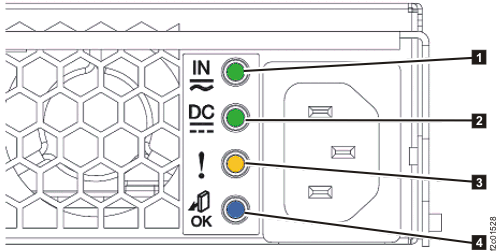
| Index | LED name | LED color | Controlled by | LED state | Description |
|---|---|---|---|---|---|
| 1 | DC Input Good | Green | Hardware | Solid on | DC input good |
| Off | DC input not within limits | ||||
| 2 | DC Output Good | Green | Hardware | Solid on | DC output good |
| Off | DC output is off | ||||
| 3 | Identify / Attention | Amber | Microcode | Solid on | Fault |
| Blinking | This FRU being identified | ||||
| Off | Default state | ||||
| 4 | Not used | Blue | Microcode | Off | Default state, unused |