This section contains FRUs that have LED indicators. Each listed assembly is shown with a description of its LEDs. While CEC enclosure LED indicators might indicate a failure, they should not be used as a starting point for a repair.
| Assembly | Reference |
|---|---|
| CEC enclosure, front view | Figure 1 |
| CEC enclosure, top view | Figure 2 |
| CEC enclosure, rear view | Figure 3 |
| Control panel assembly | Figure 4 |
| Disk drive | Figure 5 |
| Fans, front and middle | Figure 6 |
| Memory modules | Figure 7 |
| Power supply | Figure 8 |
CEC enclosure front LED indicators
Figure 1. CEC enclosure front LED
indicators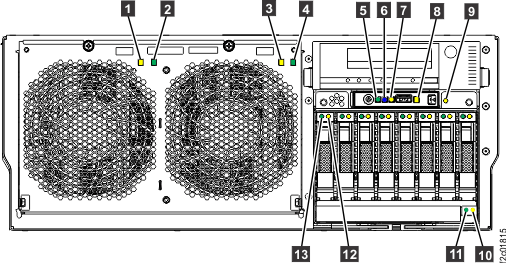
| Index | LED Function | Color | LED Off | LED On | LED Flash |
|---|---|---|---|---|---|
| 1 | Fan fault | Amber | Normal | Fault | Identify |
| 2 | Fan power | Green | Standby | Normal | N/A |
| 3 | Fan fault | Amber | Normal | Fault | Identify |
| 4 | Fan power | Green | Standby | Normal | N/A |
| 5 | CEC enclosure power | Green | No input | Normal | Standby |
| 6 | CEC enclosure ID | Blue | Normal | N/A | Identify |
| 7 | System information / Attention | Amber | Normal | Attention | N/A |
| 8 | CEC enclosure fault | Amber | Normal | Fault | Identify |
| 9 | Disk drive backplane fault | Amber | Normal | Fault | Identify |
| 10 | DVD drive fault | Amber | Normal | Fault | Identify |
| 11 | DVD drive activity | Green | Normal | Activity | Activity |
| 12 | Disk drive fault | Amber | Normal | Fault | Identify |
| 13 | Disk drive activity | Green | Not active | Active | Active |
CEC enclosure top LED indicators
Figure 2. CEC enclosure top LED indicators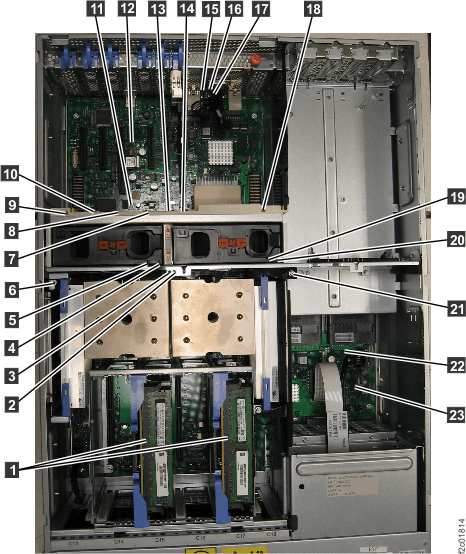
| Index | LED Function | Color | LED Off | LED On | LED Flash |
|---|---|---|---|---|---|
| 1 | Memory card | Amber | Normal | Fault | Identify |
| 2 | Processor module (P1-C11 right) | Amber | Normal | Fault | Identify |
| 3 | Processor module (P1-C10 left) | Amber | Normal | Fault | Identify |
| 4 | Fan power (A1) | Green | Standby | Normal | N/A |
| 5 | Fan fault (A1) | Amber | Normal | Fault | Identify |
| 6 | Voltage regulator module (P1-C9) | Amber | Normal | Fault | Identify |
| 7 | PCIe single-port card (P1-C4) | Amber | Normal | Fault | Identify |
| 8 | RS-485 serial interface card (P1-C5) | Amber | Normal | Fault | Identify |
| 9 | PCIe three-port card (P1-C8) | Amber | Normal | Fault | Identify |
| 10 | Not used. (P1-C6) | Amber | Normal | Fault | Identify |
| 11 | System backplane (P1) | Amber | Normal | Fault | Identify |
| 12 | Network reset | Amber | Normal | TBD | TBD |
| 13 | PCIe single-port card (P1-C3) | Amber | Normal | Fault | Identify |
| 14 | Ethernet two-port card (P1-C2) | Amber | Normal | Fault | Identify |
| 15 | CEC enclosure fault | Amber | Normal | Fault | N/A |
| 16 | System information / Attention | Amber | Normal | Attention | N/A |
| 17 | CEC enclosure ID | Blue | Normal | N/A | Identify |
| 18 | PCIe three-port card (P1-C8) | Amber | Normal | Fault | Identify |
| 19 | Fan (A2) | Amber | Normal | Fault | Identify |
| 20 | Fan (A2) | Green | Standby | Normal | N/A |
| 21 | Voltage regulator module (P1-C12) | Amber | Normal | Fault | Identify |
| 22 | VPD card | Amber | Normal | N/A | Identify |
| 23 | TOD battery | Amber | Normal | N/A | Identify |
CEC enclosure rear LED indicators
Figure 3. CEC enclosure rear LED
indicators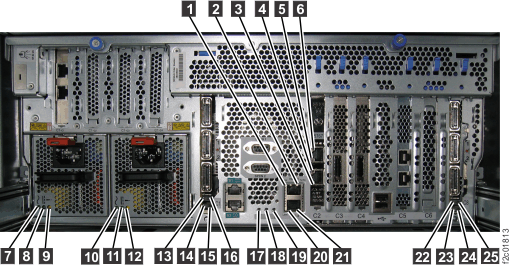
| Index | LED Function | Color | LED Off | LED On | LED Flash |
|---|---|---|---|---|---|
| 1 | Ethernet Link | Green | Not connected | Connected | N/A |
| 2 | Ethernet Tx/Rx | Green | Not active | Active | Active |
| 3 | Ethernet Link | Green | Not connected | Connected | N/A |
| 4 | Ethernet Tx/Rx | Green | Not active | Active | Active |
| 5 | Ethernet Link | Green | Not connected | Connected | N/A |
| 6 | Ethernet Tx/Rx | Green | Not active | Active | Active |
| 7 | Power supply input Good | Green | No input | Input good | N/A |
| 8 | Power supply DC Good | Green | Standby off | On | Standby |
| 9 | Power supply fault | Amber | Normal | Fault | N/A |
| 10 | Power supply input Good | Green | No input | Input good | N/A |
| 11 | Power supply DC Good | Green | Standby off | On | Standby |
| 12 | Power supply fault | Amber | Normal | Fault | N/A |
| 13 | If LED present, not used for field service. | N/A | N/A | N/A | N/A |
| 14 | If LED present, not used for field service. | N/A | N/A | N/A | N/A |
| 15 | If LED present, not used for field service. | N/A | N/A | N/A | N/A |
| 16 | If LED present, not used for field service. | N/A | N/A | N/A | N/A |
| 17 | CEC enclosure ID | Blue | Normal | N/A | Identify |
| 18 | System information / Attention | Amber | Normal | Attention | N/A |
| 19 | CEC enclosure fault | Amber | Normal | Fault | N/A |
| 20 | Ethernet Link | Green | Not connected | Connected | N/A |
| 21 | Ethernet Tx/Rx | Green | Not active | Active | Active |
| 22 | If LED present, not used for field service. | N/A | N/A | N/A | N/A |
| 23 | If LED present, not used for field service. | N/A | N/A | N/A | N/A |
| 24 | If LED present, not used for field service. | N/A | N/A | N/A | N/A |
| 25 | If LED present, not used for field service. | N/A | N/A | N/A | N/A |
CEC enclosure control panel assembly LED indicators
Figure 4. CEC enclosure control panel assembly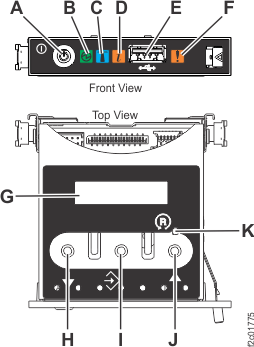
| Index | LED Function | Color | LED Off | LED On | LED Flash |
|---|---|---|---|---|---|
| B | Power | Green | No power | Full power | Standby power1 |
| C | Identifier | Blue | Normal | Identify | N/A |
| D | System information | Amber | Normal | Requires attention | N/A |
| F | Enclosure fault roll-up light | Amber | Normal | Fault | N/A |
| G | Function/Data display | ||||
Notes:
|
|||||
Disk Drive LED indicators
Figure 5. CEC enclosure disk
drive LED indicators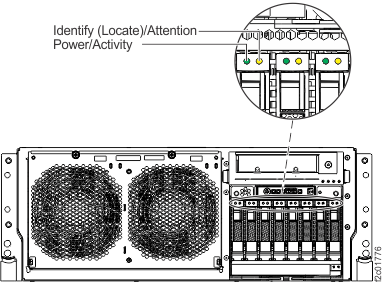
Fan, front and middle, LED indicators
Figure 6. CEC enclosure fan
LED indicators 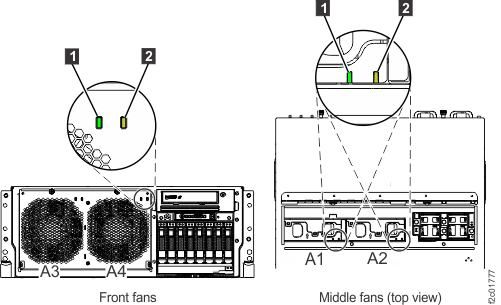
| Index | LED Function | Color | LED Off | LED On | LED Flash |
|---|---|---|---|---|---|
| 1 | Power input | Green | No power | Normal | N/A |
| 2 | Fault | Amber | Normal | Fault | N/A |
Memory card and memory module LED indicators
Figure 7. Memory card and memory
module LED indicators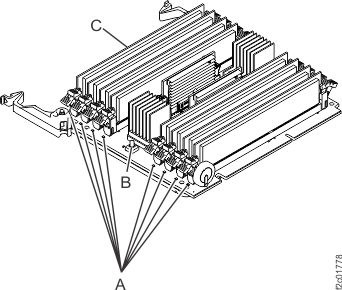
| Index | LED Function | Color | LED Off | LED On | LED Flash |
|---|---|---|---|---|---|
| A | Identify/Fault1 (memory module) |
Amber | Normal | Identify/Fault | N/A |
| C | Identify/Fault (memory card) |
Amber | Normal | Fault | Identify |
Notes:
|
|||||
 identifies the failing memory modules.
 Power supply LED indicators
Figure 8. Power supply LED
indicators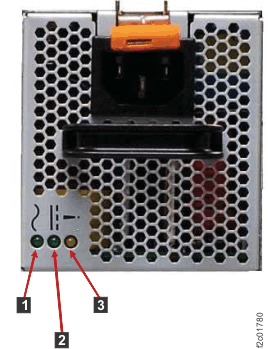
| Index | LED Function | Color | LED Off | LED On | LED Flash |
|---|---|---|---|---|---|
| 1 | AC power, input | Green | Input off | Normal | N/A |
| 2 | DC power, output | Green | CEC off | Normal | |
| 3 | Error and identify | Amber | Normal | Error | Identify |