DS8000 Service Documentation Version 7.5
Disconnecting the internal Ethernet cables to the management
console in the storage facility being installed
Procedure
- Locate the Ethernet switches in the rear of the Rack-1
that is being installed.
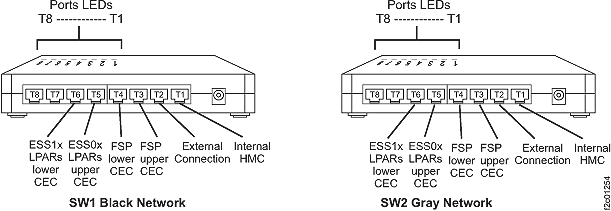
Figure 1. 8-port Ethernet switch port
designations (SW1, SW2-Tx) Model 941, Model 951, and Model 961
- Disconnect the management console Ethernet cable
(black end) that plugs into the Ethernet switch (SW1) connector T1.
Note: This cable will be reconnected in a later step.
- Disconnect the management console Ethernet cable
(gray end) that plugs into the Ethernet switch (SW2) connector T1.
Note: This cable will be reconnected in a later step.
- Does the storage facility to be installed have one or more
storage expansion racks?